SpiderFoot: The Open Source OSINT Automation Tool
What Is SpiderFoot
SpiderFoot is the world’s most popular open source intelligence (OSINT) automation platform. It automates the process of gathering intelligence about a given target by integrating with over 200 data sources and applying a range of analysis methods to make the resulting data easy to navigate and act upon. Whether you are conducting a penetration test, performing a red team exercise, or monitoring your own organization’s attack surface, SpiderFoot provides a single tool that replaces dozens of manual lookups across disparate services.
The project is hosted on GitHub at github.com/smicallef/spiderfoot and has accumulated over 19,000 stars, 3,200 forks, and thousands of commits since its inception. It is written in Python 3, MIT-licensed, and runs cross-platform on Linux, Windows, and macOS. The official project website is spiderfoot.xyz.
SpiderFoot provides two interfaces for interacting with its capabilities: an embedded web server that serves a clean browser-based UI, and a full command-line interface for automation pipelines and headless deployments. Both interfaces communicate with the same core engine, ensuring feature parity regardless of how you choose to use the tool. SpiderFoot has been actively developed since 2012 – over a decade of continuous improvement and community contribution.
Why OSINT Automation Matters
Security professionals face a fundamental challenge when gathering intelligence: the data they need is scattered across hundreds of sources, each with its own query interface, rate limits, and output format. Manually querying SHODAN for open ports, HaveIBeenPwned for breach data, WHOIS for registration details, DNS for subdomain records, and social media platforms for account enumeration is a multi-hour process that is both tedious and error-prone. The manual approach also makes it difficult to correlate findings across sources, which is where the real intelligence value lies.
On the offensive side, reconnaissance is the foundation of any penetration test or red team exercise. The more an attacker knows about a target – its subdomains, exposed services, leaked credentials, and infrastructure relationships – the more effective their subsequent attacks will be. SpiderFoot automates this reconnaissance phase, turning what would be hours of manual work into a scan that completes in seconds to minutes.
On the defensive side, organizations need to understand what information they are exposing to potential attackers. SpiderFoot enables security teams to see their attack surface through the same lens an attacker would use, identifying exposed subdomains, leaked credentials, misconfigured cloud buckets, and other vulnerabilities before they can be exploited. SpiderFoot’s parallelized queries and smart caching deliver results efficiently, bridging the gap between raw data collection and actionable intelligence.
Architecture Overview
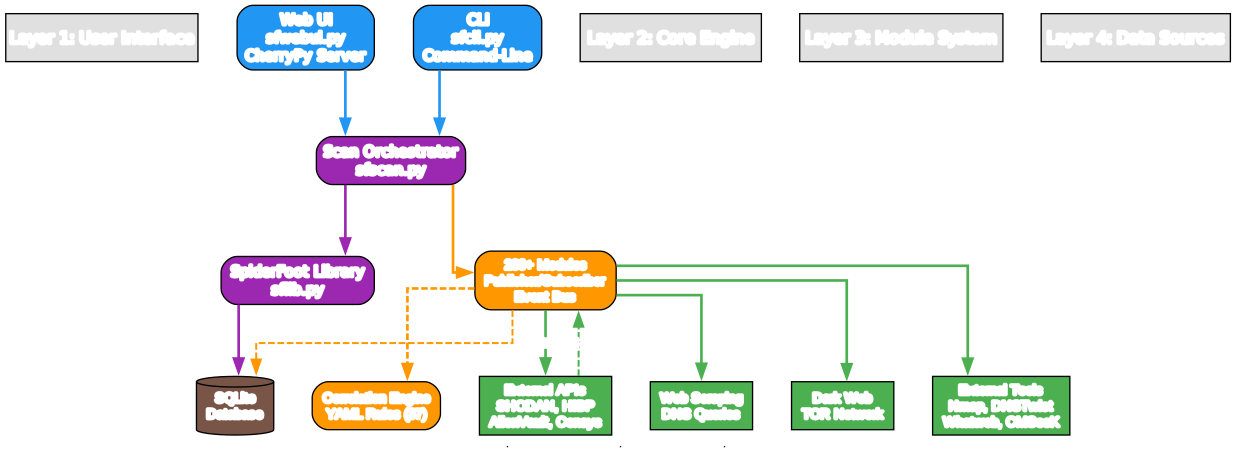
Understanding the SpiderFoot Architecture
The architecture diagram above illustrates SpiderFoot’s four-layer design, which separates user interaction, core orchestration, module execution, and data source access into distinct layers. This separation of concerns is what makes SpiderFoot both extensible and maintainable over its decade-long development history. Let us examine each layer in detail.
Layer 1: User Interface
The top layer provides two interfaces for interacting with SpiderFoot. The web UI, implemented in sfwebui.py, runs an embedded CherryPy web server that serves a browser-based interface for configuring scans, selecting modules, and viewing results with visualizations. The CLI, implemented in sfcli.py, provides full programmatic control for automation pipelines and headless server deployments. Both interfaces communicate with the core engine through the same API, ensuring feature parity regardless of the access method chosen by the operator.
Layer 2: Core Engine
The core engine is the heart of SpiderFoot, consisting of the scan orchestrator (sfscan.py) and the SpiderFoot library (sflib.py). The scan orchestrator manages the complete scan lifecycle: target validation, module selection, parallel execution, event propagation, and result storage. The library provides shared utilities for configuration management, logging, database access, and event handling that all modules rely upon.
All scan results are persisted in a SQLite database backend, enabling custom querying, historical analysis, and result export in multiple formats including CSV, JSON, and GEXF. The database schema is fully documented, allowing organizations to build custom dashboards and reporting on top of SpiderFoot data.
Layer 3: Module System
The module system implements a publisher/subscriber event bus where 200+ modules communicate by emitting and consuming events. When a module discovers new data – for example, a subdomain from a DNS query – it publishes an event that other modules can consume, such as a WHOIS module that then queries the subdomain for registration data. This cascading model ensures maximum data extraction from each initial target.
The correlation engine sits alongside the module system, applying YAML-configurable rules to identify relationships between discovered data points. SpiderFoot ships with 37 pre-defined correlation rules that can detect patterns such as subdomain hijacking risk, credential exposure, and infrastructure relationships.
Layer 4: Data Sources
The bottom layer represents the external data sources that modules interact with. These include commercial and free APIs (SHODAN, HaveIBeenPwned, AlienVault, Censys, BinaryEdge), web scraping targets, DNS infrastructure, dark web resources accessed via TOR, and external security tools (Nmap, DNSTwist, Whatweb, CMSeeK) that SpiderFoot can invoke as subprocesses.
Key Insight
This layered architecture is what makes SpiderFoot extensible. New data sources can be added by writing a single Python module file – no changes to the core engine or user interface are needed. The module auto-discovery mechanism means new modules are immediately available in both the web UI and CLI upon startup.
Modules and Scanning Flow
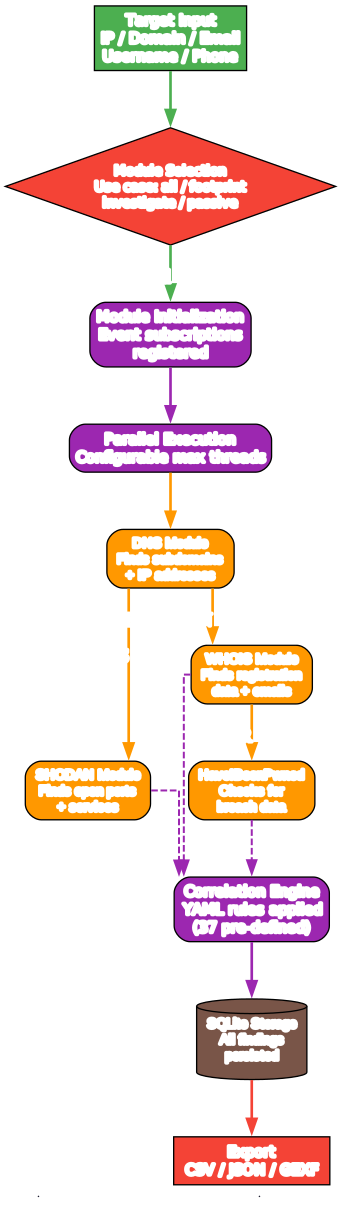
Understanding the Modules and Scanning Flow
The scanning flow diagram demonstrates how SpiderFoot’s publisher/subscriber model creates a cascading intelligence gathering process. Unlike traditional tools that run a fixed set of queries, SpiderFoot modules feed each other, maximizing data extraction from each initial target.
Scan Lifecycle
The scan begins when a user provides a target – an IP address, domain, email, phone number, username, or other supported identifier. SpiderFoot validates the target and determines which modules can directly consume it. Modules are then selected either manually via the -m flag or automatically based on a use case preset.
The four use case presets control how aggressively the scan operates:
- passive: Only queries data sources without directly interacting with the target
- footprint: Gathers basic footprint information with minimal interaction
- investigate: Deeper investigation including active queries to the target
- all: Enables all modules for maximum data extraction
Publisher/Subscriber Event Bus
Once modules are initialized, they register the event types they produce (published events) and the event types they consume (watched events). The scan orchestrator starts modules in parallel, respecting the configured maximum thread count.
When a module discovers new data, it emits an event. For example, the DNS Raw Records module might find MX records containing a hostname. This event is published to the event bus, and any module subscribed to hostname events – such as a WHOIS module or a web scraping module – receives the event and processes the new data. Those modules may in turn discover more data, emitting further events that cascade through the system.
Example Cascade
Consider a scan of a domain target:
- The DNS module resolves the domain and finds subdomains and IP addresses
- The IP addresses trigger the SHODAN module, which finds open ports and services
- The subdomains trigger the WHOIS module, which finds registration data and email addresses
- The email addresses trigger the HaveIBeenPwned module, which checks for breach data
- The breach data triggers the breach correlation rule, which correlates emails with compromised credentials
This cascading flow means a single domain target can yield hundreds of related data points across dozens of data sources, all discovered automatically without manual intervention.
Correlation and Export
After all modules complete, the correlation engine applies its YAML rules to identify relationships between the discovered data. Results are stored in the SQLite backend and can be exported as CSV for tabular analysis, JSON for programmatic processing, or GEXF for graph visualization in tools like Gephi.
Key Features

Understanding SpiderFoot’s Key Features
The features diagram highlights the ten capabilities that make SpiderFoot the most popular OSINT automation tool. Each feature addresses a specific need in the intelligence gathering workflow.
200+ OSINT Modules
SpiderFoot’s module library is its core differentiator. With over 200 modules covering threat intelligence feeds, social media enumeration, cloud bucket discovery, DNS analysis, breach databases, and more, SpiderFoot integrates with virtually every OSINT data source available. Most modules do not require API keys, and many that do offer free tiers, making the tool accessible without commercial subscriptions.
Dual Interface: Web UI and CLI
SpiderFoot provides both a browser-based web interface powered by an embedded CherryPy server and a full-featured command-line interface. The web UI is ideal for interactive investigations with visualizations and real-time scan monitoring. The CLI enables integration into automation pipelines, CI/CD workflows, and headless server deployments.
YAML Correlation Engine
Introduced in SpiderFoot 4.0, the correlation engine applies YAML-configurable rules to identify relationships between discovered data points. The 37 pre-defined rules can detect patterns such as subdomain hijacking risk, credential exposure, and infrastructure relationships. Users can write custom rules using the template provided in the repository.
Multi-Format Export
Scan results can be exported as CSV for spreadsheet analysis, JSON for programmatic processing, or GEXF (Graph Exchange Format) for visualization in graph analysis tools like Gephi. This flexibility ensures results integrate with existing security workflows and reporting pipelines.
SQLite Backend
All scan results are persisted in a SQLite database, enabling custom SQL queries, historical trend analysis, and integration with external data processing tools. The database schema is fully documented, allowing organizations to build custom dashboards and reporting on top of SpiderFoot data.
TOR and Dark Web Integration
SpiderFoot includes built-in TOR integration for anonymous searching and dark web reconnaissance. This enables modules to query onion services and perform searches through Tor-hidden search engines like Ahmia without requiring a separate Tor proxy configuration.
Docker Deployment
The included Dockerfile and docker-compose files enable containerized deployment for production environments. This simplifies scaling, isolation, and integration with container orchestration platforms.
External Tool Integration
SpiderFoot can invoke external security tools as subprocesses, including Nmap for port scanning, DNSTwist for domain permutation detection, Whatweb for technology fingerprinting, and CMSeeK for CMS detection. This extends SpiderFoot’s capabilities beyond its native module library.
API Key Management
SpiderFoot supports importing and exporting API keys, making it easy to share configurations across team members or move between environments. This is particularly useful for organizations that maintain multiple SpiderFoot deployments.
Visualizations
SpiderFoot generates graph-based visualizations of intelligence relationships, helping analysts understand how discovered entities connect to each other. These visualizations can be exported in GEXF format for further analysis in specialized graph tools.
Correlation Engine
The correlation engine is one of SpiderFoot 4.0’s most powerful features. It allows users to define rules in YAML that identify relationships between different data types discovered during a scan. Rather than requiring custom code, correlations are declarative – you describe what to match and what to output, and the engine handles the rest.
SpiderFoot ships with 37 pre-defined correlation rules that cover common intelligence patterns. These include detecting subdomain hijacking risk by correlating dangling DNS records with subdomain status, identifying credential exposure by correlating email addresses with breach data, and mapping infrastructure relationships by correlating IP addresses with hosting providers and ASNs.
A correlation rule defines match conditions, related data types, and output risk assessments. Here is an example of the YAML structure:
# Example correlation rule structure
name: "Subdomain Hijacking Risk"
description: "Correlates dangling DNS records with subdomain takeover risk"
rules:
  - match:
      type: "DNS_RECORD"
      value: "CNAME"
    related:
      type: "SUBDOMAIN"
      status: "dangling"
    output:
      type: "HIJACKING_RISK"
      risk: "high"
Users can write custom correlation rules using the template provided in the repository at correlations/template.yaml. The correlation engine documentation is available at correlations/README.md. This extensibility means organizations can tailor SpiderFoot’s intelligence output to their specific threat model and reporting requirements.
Technology Stack
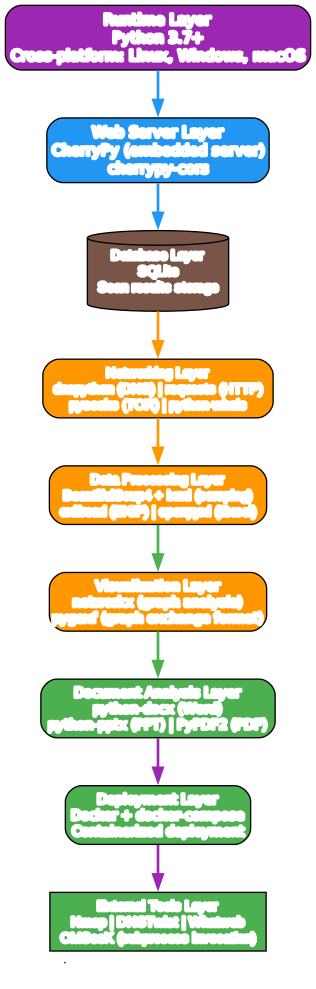
Understanding the SpiderFoot Technology Stack
The technology stack diagram presents SpiderFoot’s components from the foundational runtime at the bottom to the external tool integrations at the top. Each layer builds on the one below it, and the entire stack is designed for cross-platform portability and extensibility.
Runtime Layer
SpiderFoot is built on Python 3.7+, running on Linux, Windows, and macOS. The choice of Python ensures accessibility for security professionals who are already familiar with the language, and the cross-platform support means SpiderFoot can run on any operating system without modification.
Web Server Layer
The embedded web server uses CherryPy, a lightweight Python web framework that requires no external server installation. CherryPy handles HTTP requests, serves the web UI, and provides the REST API for the CLI client. CORS support is included via the cherrypy-cors package for browser-based integrations.
Database Layer
SQLite serves as the persistent storage backend for all scan results. SQLite was chosen for its zero-configuration deployment, single-file storage, and full SQL query support. This enables users to perform custom queries against scan data without setting up a separate database server.
Networking Layer
The networking layer handles all external communication. dnspython provides DNS query capabilities for record enumeration and zone transfers. The requests library handles HTTP/HTTPS communication with web services and APIs. pysocks enables TOR proxy integration for anonymous searching, and python-whois provides WHOIS protocol support.
Data Processing Layer
Web scraping is handled by BeautifulSoup4 with lxml as the XML/HTML parser. Exifread extracts EXIF metadata from images, and openpyxl enables Excel spreadsheet export. These libraries allow SpiderFoot to extract structured data from unstructured web content and binary files.
Visualization and Document Analysis
networkx provides graph analysis capabilities for understanding relationships between discovered entities, while pygexf enables export to graph visualization tools. Document analysis libraries (python-docx, python-pptx, PyPDF2) allow SpiderFoot to extract metadata from Word documents, PowerPoint presentations, and PDF files discovered during scans.
Deployment and External Tools
Docker and docker-compose enable containerized deployment for production environments. SpiderFoot can also invoke external security tools – Nmap for port scanning, DNSTwist for domain permutation analysis, Whatweb for technology fingerprinting, and CMSeeK for CMS detection – extending its capabilities beyond the native Python module library.
Target Types and Use Cases
SpiderFoot supports a wide range of target types, making it versatile across different intelligence gathering scenarios:
| Target Type | Example |
|---|---|
| IP Address | 192.168.1.1 |
| Domain/Sub-domain | example.com |
| Hostname | server.example.com |
| Network Subnet (CIDR) | 192.168.0.0/24 |
| ASN | AS15169 |
| Email Address | user@example.com |
| Phone Number | +1-555-123-4567 |
| Username | johndoe |
| Person’s Name | John Doe |
| Bitcoin Address | 1A1zP1eP5QGefi2DMPTfTL5SLmv7DivfNa |
Offensive Use Cases
During penetration testing and red team exercises, SpiderFoot serves as the primary reconnaissance tool. It performs subdomain enumeration to expand the attack surface, email and phone number extraction for social engineering preparation, Bitcoin and Ethereum address extraction for financial intelligence, subdomain hijacking susceptibility checking, DNS zone transfers, threat intelligence and blacklist queries, social media account enumeration, cloud bucket discovery (S3, Azure, DigitalOcean), IP geolocation, web scraping and content analysis, image and document metadata analysis, dark web searches, port scanning and banner grabbing, and data breach searches.
Defensive Use Cases
For defensive security teams, SpiderFoot provides visibility into what information an organization is exposing to potential attackers. By running SpiderFoot against their own domains, IP ranges, and employee email addresses, security teams can identify exposed subdomains, leaked credentials in breach databases, misconfigured cloud storage, and other vulnerabilities before attackers find them. This proactive approach to attack surface monitoring is essential for maintaining a strong security posture.
SpiderFoot HX: The Commercial Edition
For professionals who need more than the open source version offers, SpiderFoot HX provides a managed cloud platform with additional capabilities. SpiderFoot HX is the commercial edition, and the following table summarizes its additional features:
| HX Feature | Description |
|---|---|
| 100% Cloud-based | Fully managed, no local installation needed |
| Attack Surface Monitoring | Change notifications by email, REST, and Slack |
| Multiple Targets per Scan | Scan multiple targets simultaneously |
| Multi-user Collaboration | Team-based investigation workflows |
| Authenticated and 2FA | Secure access with two-factor authentication |
| RESTful API | Full programmatic control of scans and results |
| Third-party Tools Pre-installed | Nmap and other tools pre-configured |
| TOR Integration Built-in | Dark web searching without local Tor setup |
| Screenshotting | Automatic visual capture of discovered web resources |
| Custom Python Modules | Bring your own SpiderFoot modules |
| Data Export to SIEM | Feed scan data to Splunk, ElasticSearch, and REST endpoints |
More information about SpiderFoot HX is available at spiderfoot.net/hx, and a detailed comparison between the open source version and HX is at spiderfoot.net/open-source-vs-hx. Note that the spiderfoot.net domain is now managed by Intel471, so some content may have moved. The open source project itself remains at github.com/smicallef/spiderfoot with the project website at spiderfoot.xyz.
Getting Started
SpiderFoot can be installed in several ways depending on your environment and needs.
Stable Build (Packaged Release)
# Download the stable release
wget https://github.com/smicallef/spiderfoot/archive/v4.0.tar.gz
tar zxvf v4.0.tar.gz
cd spiderfoot-4.0
pip3 install -r requirements.txt
python3 ./sf.py -l 127.0.0.1:5001
Development Build (from Git)
# Clone the development build
git clone https://github.com/smicallef/spiderfoot.git
cd spiderfoot
pip3 install -r requirements.txt
python3 ./sf.py -l 127.0.0.1:5001
CLI Usage Examples
# Scan a target from the command line
python3 ./sf.py -s example.com

# List all available modules
python3 ./sf.py -M

# Scan with specific modules only
python3 ./sf.py -s example.com -m sfp_dnsraw,sfp_whois

# Scan with a use case preset
python3 ./sf.py -s example.com -u investigate

# Output results as JSON
python3 ./sf.py -s example.com -o json

# Run in strict mode (only modules that directly consume the target)
python3 ./sf.py -s example.com -x
Docker Deployment
# Run SpiderFoot in Docker
docker-compose up -d
Kali Linux
Kali Linux users can install SpiderFoot directly from the package repository:
sudo apt install spiderfoot
The Kali Linux tool page at kali.org/tools/spiderfoot provides additional installation details and package information. Documentation for SpiderFoot is available at spiderfoot.net/documentation.
Community and Ecosystem
SpiderFoot has been actively developed since 2012, making it one of the longest-running open source security tools in continuous development. The project’s author, Steve Micallef, wrote about the experience of maintaining an open source project for a decade in a blog post at medium.com/@micallst.
The SpiderFoot community is active on Discord at discord.gg/vyvztrG, where users can ask questions, share custom modules, and discuss OSINT techniques. The project also maintains a presence on Twitter/X at twitter.com/spiderfoot.
SpiderFoot’s inclusion in Kali Linux as a default tool speaks to its adoption by the broader security community. Kali Linux is the most widely used penetration testing distribution, and having SpiderFoot available out of the box means security professionals can start gathering intelligence immediately after installation.
For those who prefer visual tutorials, SpiderFoot has published a series of asciinema recordings demonstrating various capabilities, available at asciinema.org/~spiderfoot. These recordings show real-time scans and are an excellent way to understand SpiderFoot’s capabilities before installing it.
Writing Custom Modules
One of SpiderFoot’s greatest strengths is its modular architecture, which allows users to write custom modules for data sources or analysis methods not covered by the built-in library. Each module is a Python file placed in the modules/ directory and is automatically discovered by SpiderFoot at startup.
A custom module inherits from SpiderFootPlugin and implements several key methods:
setup(): Configures the module with user-provided optionswatchedEvents(): Declares which event types the module listens forhandleEvent(): Processes incoming events and emits new findings
Here is a simplified module skeleton:
from spiderfoot import SpiderFootPlugin

class sfp_mycustommodule(SpiderFootPlugin):
    """My Custom Module: Description of what it does"""

    meta = {
        'name': "My Custom Module",
        'summary': "Description of the module's purpose",
        'flags': [""],
        'useCases': ["footprint", "investigate", "passive"],
        'categories': ["Reconnaissance"],
        'dataSource': {
            'website': "https://example.com",
            'model': "FREE_AUTH_UNLIMITED",
        }
    }

    def setup(self, sf, userOpts=dict()):
        self.sf = sf
        for opt in list(userOpts.keys()):
            self.opts[opt] = userOpts[opt]

    def watchedEvents(self):
        return ["DOMAIN", "INTERNET_NAME"]

    def handleEvent(self, sfEvent):
        eventName = sfEvent.eventType
        eventData = sfEvent.data
        # Process the event and emit findings
        self.sf.info(f"Received {eventName}: {eventData}")
        # Emit a new event for downstream modules
        sfEventNew = self.sf.newEvent("MY_CUSTOM_RESULT", eventData, self.__name__)
        self.notifyListeners(sfEventNew)
The meta dictionary defines the module’s metadata, including its name, summary, applicable use cases, categories, and data source information. This metadata is used by the web UI and CLI to display module information and group modules logically. The full modules directory is available at github.com/smicallef/spiderfoot/tree/master/modules, where you can examine the 200+ existing modules for reference when writing your own.
Conclusion
SpiderFoot stands as the de facto standard for OSINT automation in the security community. Its 200+ modules, publisher/subscriber event bus architecture, YAML-configurable correlation engine, dual CLI and web UI interface, and decade of active development make it an indispensable tool for both offensive and defensive security professionals. The cascading intelligence model – where one finding triggers multiple downstream modules – ensures maximum data extraction from every target, transforming what would be hours of manual work into an automated scan that completes in minutes.
Whether you are a penetration tester mapping an attack surface, a security analyst monitoring for exposed credentials, or a researcher investigating threat infrastructure, SpiderFoot provides the automation and extensibility needed to gather comprehensive intelligence efficiently. Its open source MIT license, cross-platform support, and active community make it accessible to everyone from individual researchers to enterprise security teams.
To get started with SpiderFoot, visit the GitHub repository at github.com/smicallef/spiderfoot or the project website at spiderfoot.xyz. Documentation is available at spiderfoot.net/documentation, and the community can be reached on Discord at discord.gg/vyvztrG.
Related Posts
- Maigret: OSINT Username Search Engine Across 3,000+ Sites
- GhostTrack: Open Source OSINT Tool for Location and Identity Tracking
- HackingTool-Plugin: Penetration Testing Plugin for AI-Powered Security Auditing

Enjoyed this post? Never miss out on future posts by following us


