pdf-inspector: Fast Rust PDF Classification and Text Extraction
PDFs are the lingua franca of business documents - invoices, research papers, legal contracts, financial reports - yet extracting structured text from them remains surprisingly painful. The hard problem is not parsing the PDF format itself; it is deciding whether a given PDF even has a text layer, or whether it is a bag of scanned images that require OCR. Sending every document through an OCR service wastes 2-10 seconds per file and adds infrastructure cost for the roughly 54% of PDFs that already have perfectly good embedded text.
pdf-inspector, an open-source Rust library from Firecrawl, solves this routing problem head-on. It classifies a PDF as text-based, scanned, image-based, or mixed in about 20 milliseconds, then either extracts text locally in roughly 150 milliseconds or routes only the pages that need OCR to a local PP-OCRv6 Small model. The result is clean Markdown with headings, lists, tables, code blocks, and hyperlinks - delivered through Python, Node.js, browser WebAssembly, and CLI bindings from a single Rust core.
Project Overview
pdf-inspector is released under the MIT license and the current version is 1.17.0. It is built and maintained by the Firecrawl team to handle native-text PDFs locally without the latency or cost of an OCR round-trip.
| Property | Value |
|---|---|
| Repository | firecrawl/pdf-inspector |
| License | MIT |
| Language | Rust (core) + Python / Node / WASM bindings |
| Version | 1.17.0 |
| Rust edition | 2021 (MSRV 1.88) |
| Core dependency | lopdf (rayon-parallel parser) |
| OCR backend (optional) | PP-OCRv6 Small via ONNX Runtime |
| Page renderer (optional) | PDFium (loaded at runtime) |
| Benchmark overall | 0.875 on opendataloader-bench (200 PDFs) |
| Classification speed | ~10-50ms |
| Extraction speed | ~150ms (text-based PDF) |
The Overall Pipeline
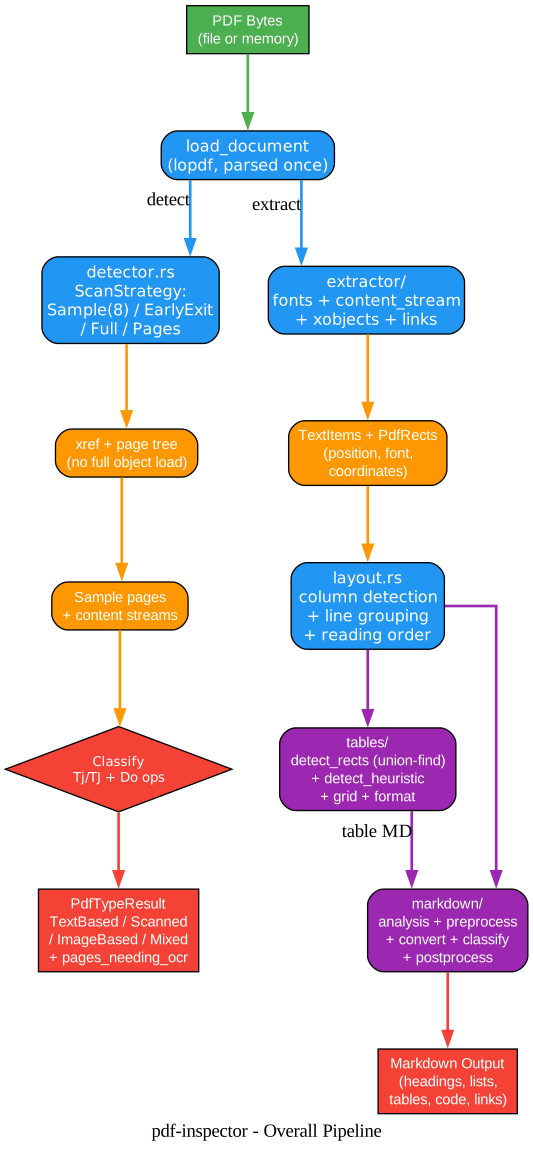
The library is organized around two cooperating stages: a detector that classifies the PDF and identifies pages needing OCR, and an extractor that walks the PDF content streams to produce positioned text items which are then grouped into lines, tables, and Markdown. The document is loaded once via load_document_from_path / load_document_from_mem and shared between the two stages, avoiding redundant I/O.
Understanding the Pipeline
The diagram shows the two parallel branches that originate from a single document load. Each component below plays a specific role.
Single Document Load The PDF bytes enter through load_document_from_path or load_document_from_mem, both of which call into lopdf to parse the xref table and page tree. Critically, this happens once and the resulting lopdf::Document is shared between the detector and extractor branches. In a naive implementation, detection and extraction would each parse the file independently, doubling I/O and parsing cost; pdf-inspector avoids this by structuring the API around a single load.
Detector Branch (detector.rs) The detector never loads every PDF object. Instead, it parses the cross-reference (xref) table and page tree, selects pages according to a ScanStrategy, and then walks only the content streams of those pages looking for text operators (Tj, TJ) and image operators (Do). The default strategy is Sample(8), which samples eight evenly distributed pages (first, last, middle) - a deliberate choice that handles the common case of an image-only cover page followed by text-heavy body pages better than EarlyExit. The detector outputs a PdfTypeResult containing the PdfType enum (TextBased, Scanned, ImageBased, Mixed), a confidence score from 0.0 to 1.0, and a pages_needing_ocr vector with per-page reason codes.
Extractor Branch (extractor/) The extractor walks content streams using a content-stream parser that interprets the full PDF operator set (text-showing, text-positioning, graphics state, and path operators). It produces a list of TextItem structs, each carrying text content, X/Y coordinates, font size, font name, width, and an ItemType tag. Sub-modules handle fonts (with FontStyleCache for bold/italic detection), XObjects (form XObject text and image placeholders), and links (hyperlinks and AcroForm fields). The layout.rs module then groups items into PdfLines, detects newspaper-style multi-column layouts, and computes reading order - including RTL text support for Hebrew and Arabic.
Tables Sub-module (tables/) Table detection runs in three parallel modes: rectangle-based (clusters PDF drawing-ops rectangles via union-find), heuristic (detects columns from text alignment), and structural (uses the PDF structure tree). A grid.rs module assigns items to column/row cells, a financial.rs module handles token splitting for consolidated numeric values, and format.rs renders the final Markdown table. The dual-mode design means pdf-inspector catches both tables drawn with explicit PDF rectangle operators and tables implied only by text alignment.
Markdown Sub-module (markdown/) The Markdown pipeline runs five stages: analysis (compute font statistics and heading tiers), preprocess (merge headings, drop caps, hyphenation rejoining), convert (line loop with table and image insertion), classify (captions, lists, code blocks via monospace font detection), and postprocess (final cleanup). Headings H1-H4 are detected by font-size tiers relative to body text with 0.5pt clustering, bullet/numbered/letter lists by prefix patterns, code blocks by font names (Courier, Consolas, Monaco, Menlo, Fira Code, JetBrains Mono), and URLs are converted to Markdown links.
Key Insights The architecture is deliberately asymmetric: the detector is fast and cheap because it skips most PDF objects, while the extractor is thorough because it needs every text operator and drawing op. Routing PDFs based on the detector’s output means the expensive extractor (and the even more expensive OCR pipeline) only runs when it will produce useful output. This is the same pattern used by production document pipelines at scale - the innovation here is doing it in pure Rust with sub-50ms classification.
Classification and Selective OCR Routing
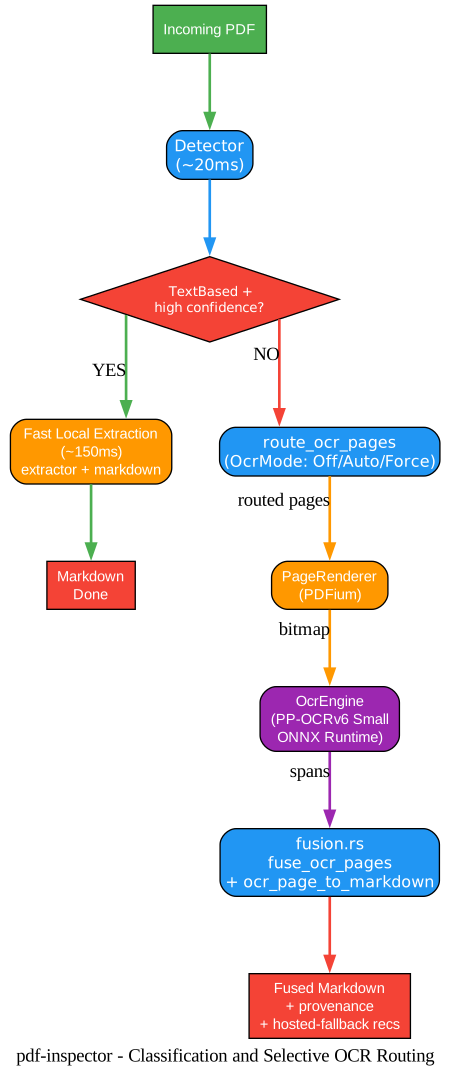
The headline feature of pdf-inspector is its smart routing: classify first, then decide whether to OCR. This is where the 20ms-vs-2-second cost gap between local extraction and OCR is captured.
Understanding the Classification Flow
Detector (~20ms) The detector samples pages (default: 8 evenly distributed) and inspects content streams for Tj/TJ text-showing operators and Do image operators. The ratio of text pages to total pages, combined with a configurable threshold (default 0.6), determines the PdfType. Per-page reason codes (scanned, no_text, vector_text, suspected_garbled_text) are emitted for each page that needs OCR, so callers can route individual pages rather than treating the document as all-or-nothing.
Decision: TextBased + High Confidence? This is the critical branch. If yes, the fast local extractor runs (~150ms) and produces Markdown directly - no model loading, no PDFium, no ONNX Runtime. If no, the document (or specific pages) goes to the OCR pipeline.
Selective OCR Routing (route_ocr_pages) The OcrMode enum controls behavior: Off disables OCR entirely, Auto uses the detector’s recommended_pages (optionally intersected with a user-provided page filter), and Force OCRs every page (or a user-selected subset). The routing function validates, deduplicates, and returns pages in document order. This is where pdf-inspector’s per-page granularity pays off: a 300-page annual report with 5 scanned appendix pages only pays OCR cost on those 5 pages.
Render and Recognize Routed pages are rendered to bitmaps by a PageRenderer (the default implementation uses PDFium, loaded dynamically at runtime). The bitmaps are passed to an OcrEngine - the default CPU implementation is OarOcrEngine, which wraps PP-OCRv6 Small via the oar-ocr crate and ONNX Runtime (loaded from ORT_DYLIB_PATH). The output is positioned OCR spans in the same bitmap coordinate space as the rendered page.
Fusion (fusion.rs) The fuse_ocr_pages function merges OCR output for routed pages with locally-extracted text for non-routed pages, producing a single Markdown document with per-page provenance (PageProvenance records whether each page came from TextLayer or Ocr). The result also includes warnings and recommendations for pages that should be sent to a hosted document pipeline - a pragmatic fallback for cases where local OCR quality is insufficient.
Key Insights The selective OCR design respects a key constraint: model files and ONNX Runtime are never embedded in pdf-inspector artifacts. The default Rust and WASM builds remain pure extraction; native Python and Node packages include the OCR integration code, but PDFium, ONNX Runtime, and the PP-OCRv6 model files remain external and are only loaded when a page is actually routed to OCR. This means a text-only consumer pays zero model-management overhead.
Table Detection Modes
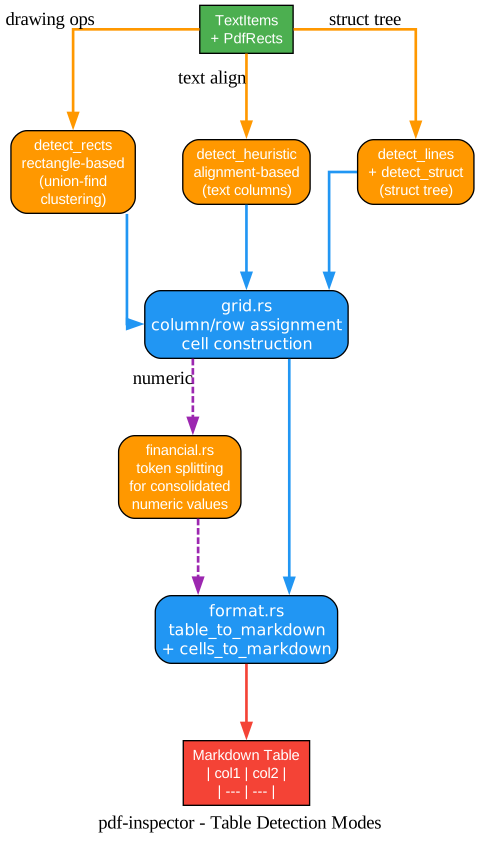
Tables are one of the hardest elements to extract from PDFs because they can be drawn with explicit rectangle operators, implied only by text alignment, or specified in the PDF structure tree. pdf-inspector runs three detection modes in parallel and merges their results.
Understanding Table Detection
detect_rects (Rectangle-based) This mode clusters PDF drawing-ops rectangles using union-find. When a PDF author draws a grid of rectangles, those rectangles become the cell boundaries of a table. The cluster_rects function groups nearby rectangles, detect_tables_from_rects identifies table regions, and try_build_rect_guided_table uses the rect X positions as column boundaries to directly construct a Table struct - bypassing heuristic detection entirely. This is the most reliable mode when it applies, because the PDF author has explicitly encoded the table geometry.
detect_heuristic (Alignment-based) Many PDF tables are drawn without any rectangle operators - the author simply aligned text in columns. detect_heuristic analyzes the X positions of text items to infer column boundaries. When five or more items share approximately the same X coordinate (within 2pt tolerance), a column is detected. This mode catches tables that detect_rects misses entirely.
detect_lines and detect_struct detect_lines detects tables from line drawing operators (horizontal and vertical rules), while detect_struct reads the PDF structure tree - a tagged-PDF feature where the author has explicitly marked content as table rows and cells. The detect_struct_tree function produces StructuredCells that can be directly converted to Markdown via cells_to_markdown. Struct-tree detection is the gold standard when available, because it reflects author intent rather than visual inference.
grid.rs and financial.rs Once a table is detected by any mode, grid.rs assigns text items to column/row cells using the detected boundaries. financial.rs handles a special case: financial PDFs often concatenate multiple numeric values into a single text item (e.g., “1,234,567.89”) that needs to be split across columns. The financial token splitter recognizes consolidated numeric patterns and breaks them apart.
format.rs The final table_to_markdown function renders a Table struct as a Markdown table with header separators (| --- |) and proper cell alignment. The output uses standard Markdown table syntax that renders correctly in GitHub, GitLab, Notion, and most static site generators.
Key Insights The three-mode design reflects a real-world observation: no single table detection algorithm catches every PDF table. Rectangle-based detection works for explicitly drawn tables, heuristic detection works for aligned-text tables, and struct-tree detection works for tagged PDFs. Running all three and merging results gives pdf-inspector its 0.814 TEDS (Table Edit Distance Score) on the opendataloader-bench corpus - substantially higher than PyMuPDF4LLM (0.401) or MarkItDown (0.273).
Multi-Language Bindings
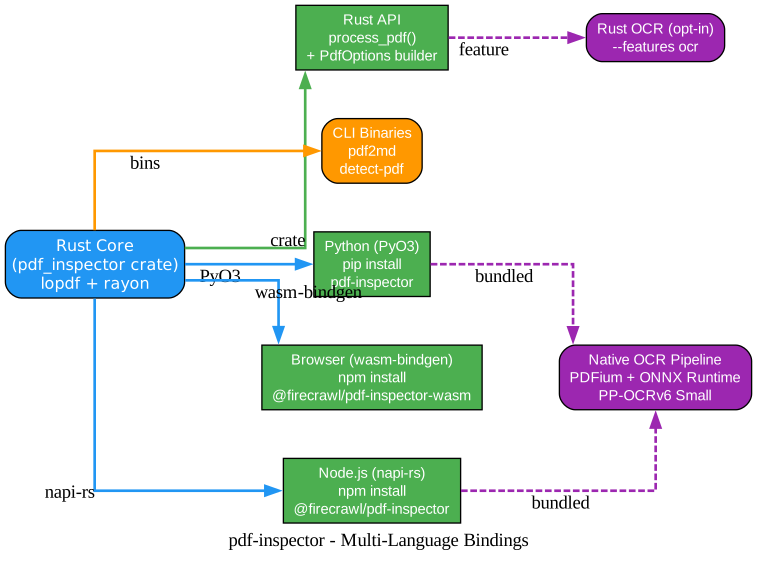
One of pdf-inspector’s distinguishing features is that the same Rust core powers four different consumer surfaces: Rust, CLI, Python, and browser WebAssembly. This is not a thin wrapper - each binding exposes the full pipeline including selective OCR.
Understanding the Binding Architecture
Rust Core The pdf_inspector crate is the single source of truth. It is built as both a lib (for Rust consumers and bindings) and a cdylib (for Python via PyO3 and Node via napi-rs). The core depends on lopdf with the rayon feature for parallel parsing on native targets, and uses wasm_js feature of lopdf for single-threaded browser builds.
Rust API and CLI Binaries Rust consumers use cargo add pdf-inspector and call process_pdf("document.pdf") directly. The same crate ships two CLI binaries: pdf2md (PDF to Markdown conversion with flags like --json, --items-json, --raw, --compact, --pages, --select-pages) and detect-pdf (detection-only with --analyze for layout analysis). Rust and CLI consumers opt into OCR at build time with --features ocr.
Python (PyO3) The Python binding uses PyO3 with abi3-py38 for forward compatibility across Python 3.8+. The pip install pdf-inspector package includes the OCR integration code, so process_pdf_with_ocr works out of the box once PDFium and ONNX Runtime libraries are installed. The package ships with a pdf_inspector.pyi type stub for IDE autocompletion.
Node.js (napi-rs) The Node binding uses napi-rs to produce a native addon installable via npm install @firecrawl/pdf-inspector. The OCR pipeline runs off the Node event loop to avoid blocking, and processPdfWithOcr returns a Promise. Like the Python package, the native Node package includes OCR integration.
Browser WebAssembly The browser binding uses wasm-bindgen and ships as @firecrawl/pdf-inspector-wasm. Browser builds use the wasm_js feature of lopdf (single-threaded, no cross-origin isolation required) and embed the CMaps from external/bcmaps via include_dir because there is no filesystem at runtime. OCR is intentionally not available in the WASM build - browsers should send pages to a server-side OCR service if needed.
Key Insights The binding architecture demonstrates a major advantage of Rust for systems libraries: write the core once, then expose it to every popular language with near-native performance. Python users get a pip-installable package that runs at Rust speed (not CPython speed), Node users get an npm package that does not shell out to a Rust binary, and browser users get the same parser running locally in a Web Worker without a server round trip. The trade-off is build complexity - the project has separate Cargo.toml files for the napi and WASM targets, plus a pyproject.toml for maturin-based Python wheel building.
Installation and Quick Start
pdf-inspector is published to three package registries, so installation depends on your language.
Python
pip install pdf-inspector
import pdf_inspector

# Basic: detect + extract + markdown
result = pdf_inspector.process_pdf("document.pdf")
print(result.pdf_type)    # "text_based", "scanned", "image_based", "mixed"
print(result.markdown)    # Markdown string or None

# Selective OCR: only routes pages that need it
ocr = pdf_inspector.process_pdf_with_ocr("document.pdf")
print(ocr.pages_routed_to_ocr)  # list of 1-indexed page numbers
For OCR, install PDFium and ONNX Runtime separately - see the OCR runtime setup guide in docs/ocr-runtime.md.
Node.js
npm install @firecrawl/pdf-inspector
import { readFileSync } from 'fs';
import { processPdf, processPdfWithOcr } from '@firecrawl/pdf-inspector';

const pdf = readFileSync('document.pdf');
const result = processPdf(pdf);
console.log(result.pdfType);    // "TextBased", "Scanned", "ImageBased", "Mixed"
console.log(result.markdown);   // Markdown string or null

const ocr = await processPdfWithOcr(pdf);
console.log(ocr.pagesRoutedToOcr);
Browser WebAssembly
npm install @firecrawl/pdf-inspector-wasm
import init, { processPdf } from '@firecrawl/pdf-inspector-wasm';

await init();
const response = await fetch('/document.pdf');
const pdf = new Uint8Array(await response.arrayBuffer());
const result = processPdf(pdf);
console.log(result.pdfType);
console.log(result.markdown);
Rust
cargo add pdf-inspector
use pdf_inspector::process_pdf;

let result = process_pdf("document.pdf")?;
println!("Type: {:?}", result.pdf_type);
if let Some(markdown) = &result.markdown {
    println!("{}", markdown);
}
CLI
# Install CLI tools
cargo install pdf-inspector

# Convert PDF to Markdown
pdf2md document.pdf

# JSON output (for piping)
pdf2md document.pdf --json

# Detection only
detect-pdf document.pdf

# Detection + layout analysis
detect-pdf document.pdf --analyze --json

# Selective pages
pdf2md document.pdf --select-pages 1,3,5-10

# With OCR (requires --features ocr at install time)
cargo install pdf-inspector --features ocr --bin pdf2md
PDFIUM_LIB_PATH=/path/to/libpdfium ORT_DYLIB_PATH=/path/to/libonnxruntime \
  pdf2md scan.pdf --ocr auto --json
Scan Strategies
The ScanStrategy enum controls which pages the detector samples. The choice matters for both speed and accuracy.
| Strategy | Behavior | Best for |
|---|---|---|
EarlyExit | Scan all pages, stop on first non-text page | Pipelines routing TextBased PDFs to fast extraction |
Full | Scan all pages, no early exit | Accurate Mixed vs Scanned classification |
Sample(n) | Sample n evenly distributed pages | Very large PDFs where speed matters more than precision |
Pages(vec) | Only scan specific 1-indexed page numbers | When the caller knows which pages to check |
The default is Sample(8), chosen because EarlyExit was too aggressive for PDFs with image-only cover pages followed by text-heavy body pages (e.g., annual reports).
Benchmark Performance
pdf-inspector is evaluated on the opendataloader-bench corpus of 200 PDFs. The results below compare local engines without model-based PDF parsing; OCR was disabled.
| Engine | Overall | Reading Order (NID) | Tables (TEDS) | Headings (MHS) | Speed (200 docs) |
|---|---|---|---|---|---|
| pdf-inspector | 0.875 | 0.915 | 0.814 | 0.788 | 0.470s |
| liteparse | 0.873 | 0.913 | 0.693 | 0.811 | 0.750s |
| opendataloader | 0.831 | 0.902 | 0.489 | 0.739 | 2.569s |
| pymupdf4llm | 0.735 | 0.886 | 0.401 | 0.424 | 17.117s |
| markitdown | 0.589 | 0.844 | 0.273 | 0.000 | 16.165s |
pdf-inspector delivered the highest overall, reading-order, and table scores, along with the fastest complete run. The speed gap is substantial: pdf-inspector processed 200 documents in 0.470 seconds, while markitdown took 16.165 seconds.
Troubleshooting
Detection returns Mixed for a text-only PDF Switch to ScanStrategy::Full instead of the default Sample(8). Sampling can miss text-heavy pages in very large documents, causing a Mixed misclassification.
Garbled text from CID-encoded fonts pdf-inspector includes ToUnicode CMap parsing for Type0/Identity-H fonts, but some PDFs have broken font encodings. The detector emits suspected_garbled_text as an OCR reason for affected pages, so routing those pages through OCR usually fixes the output.
OCR not running despite --ocr auto Verify that PDFIUM_LIB_PATH and ORT_DYLIB_PATH environment variables point to the correct native libraries. The OCR pipeline loads these dynamically at runtime - if either is missing, the pipeline will error rather than silently skip OCR.
WASM build fails on include_dir The browser build embeds CMaps from external/bcmaps. Ensure the external/bcmaps/ directory is present in the crate root. If building from a crates.io download, the include list in Cargo.toml ships these files with the crate.
Tables detected as plain text Check whether the PDF has drawing-ops rectangles around the table. If not, the heuristic detector should still catch it from text alignment - but very sparse tables (fewer than 5 columns) may fall below the detection threshold. The --analyze flag on detect-pdf will show what was detected.
Slow extraction on very large PDFs Use ScanStrategy::Pages with a subset of pages, or switch to Sample(n) for detection. The extractor itself is parallelized via rayon, so ensure the rayon feature is enabled (it is by default on native targets).
Conclusion
pdf-inspector is a textbook example of solving the right problem: not “how do we parse PDFs faster” but “how do we avoid OCR for the majority of PDFs that do not need it.” The 20ms classifier followed by a 150ms local extractor delivers a 10-50x speedup over all-OCR pipelines for text-based documents, while the selective OCR routing ensures scanned or mixed documents still get accurate extraction. The Rust core with Python, Node, and WASM bindings means the same fast path is available regardless of your stack.
The architecture also demonstrates several patterns worth studying: single-document-load API design, per-page OCR routing with provenance tracking, multi-mode table detection with result merging, and feature-gated optional dependencies that keep the default build lightweight. Whether you are building a document pipeline, a RAG ingestion system, or a browser-based PDF viewer, pdf-inspector is a strong default that will handle most PDFs correctly without any model infrastructure.
Related Posts
- MiniMind: Train a 64M-Parameter LLM From Scratch in 2 Hours
- Catch2: A Natural C++ Testing Framework
- yaml-cpp: A YAML Parser and Emitter in C++
Links
- GitHub Repository: firecrawl/pdf-inspector
- Crates.io: pdf-inspector
- PyPI: pdf-inspector
- npm: @firecrawl/pdf-inspector
- Firecrawl
- opendataloader-bench Corpus

Enjoyed this post? Never miss out on future posts by following us


