yaml-cpp: A Complete YAML 1.2 Parser and Emitter in C++
YAML is the configuration format of choice for countless projects, from Kubernetes manifests to CI/CD pipelines, CLAUDE.md agent instructions, and application configs. Behind many C++ projects that read or write YAML sits yaml-cpp, a library by Jesse Beder that implements the full YAML 1.2 specification as a scanner, parser, node graph, and emitter. This post walks through the architecture that makes yaml-cpp a battle-tested choice for YAML processing in C++, covering the tokenization pipeline, the event-driven parser, the in-memory node model, and the state-machine emitter.
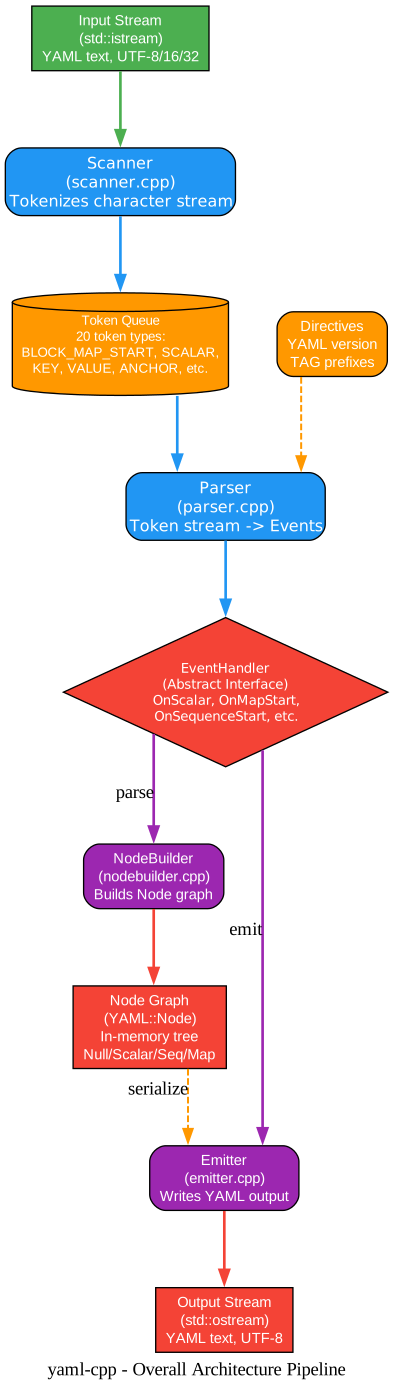
Understanding the Overall Architecture
The architecture diagram above illustrates the end-to-end pipeline that transforms raw YAML text into an in-memory node graph or back to serialized output. Let’s break down each stage:
Input Stream The entry point is a standard std::istream. yaml-cpp accepts any C++ input stream, whether it comes from a file (std::ifstream), a string (std::stringstream), or a network source. The library handles UTF-8, UTF-16, and UTF-32 input encodings transparently, normalizing everything to UTF-8 internally. This encoding-agnostic design means callers never need to worry about byte-order marks or encoding conversion before parsing.
Scanner (scanner.cpp) The scanner is the tokenizer. It transforms the character stream into a queue of tokens, the fundamental lexical units of YAML. The scanner maintains three critical pieces of state: an indentation stack that tracks block context nesting, a flow context stack that tracks whether the parser is inside [...] or {...} flow collections, and a simple-key stack that handles YAML’s implicit key detection. These state machines allow the scanner to correctly tokenize YAML’s context-sensitive grammar, where the same character can mean different things depending on position.
Token Queue The scanner produces 20 distinct token types defined in token.h: directives (%YAML, %TAG), document markers (---, ...), block structure tokens (BLOCK_SEQ_START, BLOCK_MAP_START, BLOCK_ENTRY), flow collection tokens (FLOW_SEQ_START, FLOW_MAP_START, FLOW_ENTRY), mapping tokens (KEY, VALUE), reference tokens (ANCHOR, ALIAS, TAG), and scalar tokens (PLAIN_SCALAR, NON_PLAIN_SCALAR). Tokens carry their source position (Mark) for error reporting, plus a value string and optional parameters.
Parser (parser.cpp) The parser consumes the token queue and produces a stream of events. It handles YAML directives (version specification and tag prefix definitions) before processing document content. The parser delegates the actual token-to-event translation to SingleDocParser, which understands the YAML production rules and calls methods on an EventHandler interface for each structural element it encounters.
EventHandler (Abstract Interface) The EventHandler class is the central abstraction that decouples parsing from consumption. It defines pure virtual callbacks: OnDocumentStart, OnDocumentEnd, OnNull, OnScalar, OnAlias, OnSequenceStart, OnSequenceEnd, OnMapStart, and OnMapEnd. This design allows the same parser to feed multiple consumers. Two built-in implementations are NodeBuilder (constructs the in-memory YAML::Node graph) and Emitter (writes YAML text to an output stream). Third-party code can implement EventHandler to build custom representations directly from the event stream, skipping the intermediate node graph entirely.
NodeBuilder and Node Graph When the goal is to load YAML into memory for random access, NodeBuilder implements EventHandler to construct a tree of YAML::Node objects. The resulting node graph supports type queries (IsSequence(), IsMap(), IsScalar()), indexing by integer or string, iteration, and type-safe conversion via as<T>(). Nodes are reference-counted via shared_ptr internally, so copying a YAML::Node is cheap and aliases (YAML anchors) share the same underlying data.
Emitter and Output Stream When the goal is to produce YAML output, the Emitter class acts as an ostream manipulator. It implements a state machine driven by manipulators like BeginSeq, EndSeq, BeginMap, EndMap, Key, and Value. The emitter tracks its own state (current node type, indentation level, flow vs block style, column position) through EmitterState and dispatches formatting to PrepareNode, which handles both block-style (indent-based, multi-line) and flow-style (JSON-like, single-line) output.
Round-Trip Serialization A key design feature is the round-trip path: an existing YAML::Node graph can be serialized back to text by feeding it through NodeEvents (which translates the node tree back into EventHandler callbacks) into an Emitter. This enables loading, modifying, and saving YAML while preserving structure. The node graph is the canonical in-memory representation, and both parsing and emitting are event-driven processes around it.
How to Build
yaml-cpp uses CMake for cross-platform building. The current version is 0.9.0.
# Clone the repository
git clone https://github.com/jbeder/yaml-cpp.git
cd yaml-cpp

# Create build directory
mkdir build
cd build

# Configure - static library by default
cmake ..

# Build
cmake --build .

# Optional: build shared library instead
# cmake -DYAML_BUILD_SHARED_LIBS=ON ..
On Windows with MSVC, static builds default to the static CRT (/MT). Use -DYAML_MSVC_SHARED_RT=ON if you need the dynamic CRT (/MD).
Integrating with CMake (FetchContent)
The recommended way to add yaml-cpp to your project is via CMake’s FetchContent:
include(FetchContent)

FetchContent_Declare(
  yaml-cpp
  GIT_REPOSITORY https://github.com/jbeder/yaml-cpp.git
  GIT_TAG yaml-cpp-0.9.0
)
FetchContent_MakeAvailable(yaml-cpp)

target_link_libraries(YOUR_LIBRARY PUBLIC yaml-cpp::yaml-cpp)
Basic Usage
Loading and Querying YAML
#include <yaml-cpp/yaml.h>
#include <iostream>
#include <fstream>

int main() {
    // Load from file
    YAML::Node config = YAML::LoadFile("config.yaml");

    // Safe access - does NOT create keys that don't exist
    if (config["lastLogin"]) {
        std::cout << "Last logged in: "
                  << config["lastLogin"].as<std::string>() << "\n";
    }

    // Type-safe conversion
    std::string username = config["username"].as<std::string>();
    int port = config["port"].as<int>(8080);  // default if missing

    // Iterate a sequence
    YAML::Node servers = config["servers"];
    for (std::size_t i = 0; i < servers.size(); i++) {
        std::cout << "Server: " << servers[i].as<std::string>() << "\n";
    }

    // Iterate a map
    for (YAML::const_iterator it = config.begin(); it != config.end(); ++it) {
        std::cout << it->first.as<std::string>() << ": "
                  << it->second.as<std::string>() << "\n";
    }

    return 0;
}
Building and Modifying Nodes
YAML::Node node;
node["name"] = "production";
node["port"] = 5432;
node["features"].push_back("ssl");
node["features"].push_back("replication");

// Sequences auto-convert to maps when indexed by string
// node["features"]["extra"] = true;  // would convert to map

// Write to file
std::ofstream fout("output.yaml");
fout << node;
Custom Type Conversion
yaml-cpp uses template specialization for type conversion. Define a convert<T> specialization to serialize your own types:
struct ServerConfig {
    std::string host;
    int port;
    bool ssl;
};

namespace YAML {
template<>
struct convert<ServerConfig> {
    static Node encode(const ServerConfig& rhs) {
        Node node;
        node["host"] = rhs.host;
        node["port"] = rhs.port;
        node["ssl"] = rhs.ssl;
        return node;
    }

    static bool decode(const Node& node, ServerConfig& rhs) {
        if (!node.IsMap()) return false;
        rhs.host = node["host"].as<std::string>();
        rhs.port = node["port"].as<int>();
        rhs.ssl = node["ssl"].as<bool>();
        return true;
    }
};
}

// Now you can use it directly:
YAML::Node config = YAML::LoadFile("server.yaml");
ServerConfig server = config.as<ServerConfig>();
The Scanner: Tokenizing YAML
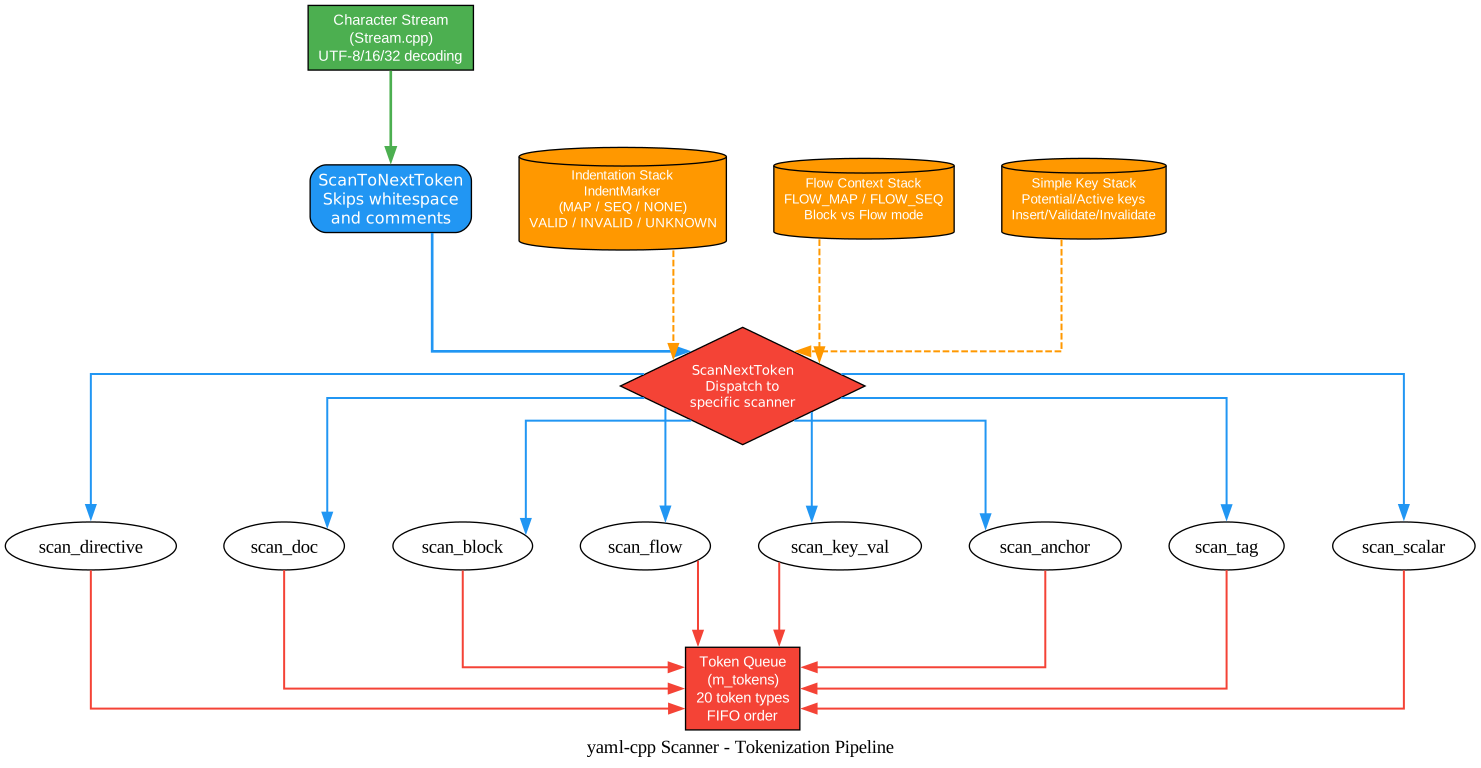
Understanding the Scanner
The scanner diagram shows how yaml-cpp transforms a character stream into a token queue. The scanner is the most complex component because YAML’s grammar is highly context-sensitive.
Character Stream and Encoding The Stream class (stream.cpp) wraps the input std::istream and handles character encoding detection. It reads the byte-order mark (BOM) if present and decodes UTF-16 and UTF-32 input into UTF-8 internally. All subsequent processing operates on UTF-8 strings, which simplifies the rest of the pipeline and ensures consistent string handling regardless of input encoding.
ScanToNextToken Before each token is scanned, ScanToNextToken skips whitespace and comments. In YAML, comments start with # and run to end of line. Whitespace handling is context-dependent: in block context, leading whitespace determines indentation level, while in flow context, whitespace is insignificant. This function also processes line folding (continuation) for multi-line scalars.
Indentation Stack YAML’s block structure is defined by indentation rather than delimiters. The scanner maintains a stack of IndentMarker objects, each tracking a column position and type (MAP, SEQ, or NONE). When indentation increases, a new marker is pushed, generating a BLOCK_MAP_START or BLOCK_SEQ_START token. When indentation decreases, markers are popped, generating corresponding end tokens. The STATUS field (VALID, INVALID, UNKNOWN) handles YAML’s forward-referencing simple key mechanism, where a potential key might be validated or invalidated later as more input is consumed.
Flow Context Stack Inside flow collections ([...] and {...}), the rules change: indentation is insignificant, entries are separated by commas, and keys and values can appear on the same line. The m_flows stack tracks the current nesting of flow maps and flow sequences. InFlowContext() returns true when inside any flow collection, and the scanner uses this to apply different tokenization rules. This dual-context design is what makes YAML both human-friendly (block style) and compact (flow style).
Simple Key Stack YAML allows implicit keys: key: value without explicit markers. The scanner uses a SimpleKey stack to track potential keys. When the scanner encounters a : followed by whitespace, it checks whether a potential simple key exists at the current indentation level. If so, the key is validated and KEY and VALUE tokens are emitted. If not, the : might be part of a scalar value. This mechanism is what makes YAML’s syntax flexible but also what makes the scanner complex.
Token Dispatch ScanNextToken examines the current character and dispatches to the appropriate scanner function. Each scanner function (ScanDirective, ScanDocStart, ScanBlockSeqStart, ScanFlowStart, ScanKey, ScanAnchorOrAlias, ScanTag, ScanPlainScalar, ScanQuotedScalar, ScanBlockScalar) consumes the relevant input and pushes tokens onto the queue. Scalar scanning is particularly complex because YAML has three scalar styles (plain, single-quoted, double-quoted) plus two block scalar styles (literal | and folded >), each with different escaping and line-handling rules.
Token Queue All scanned tokens are placed in a FIFO queue (m_tokens). The parser calls peek() to examine the next token and pop() to consume it. The scanner may look ahead and push multiple tokens for a single input construct (for example, a block mapping start also pushes the indentation marker). This decoupling between scanning and parsing allows each component to focus on its own concerns: the scanner handles lexical analysis, the parser handles structural analysis.
The Node Model: In-Memory Representation
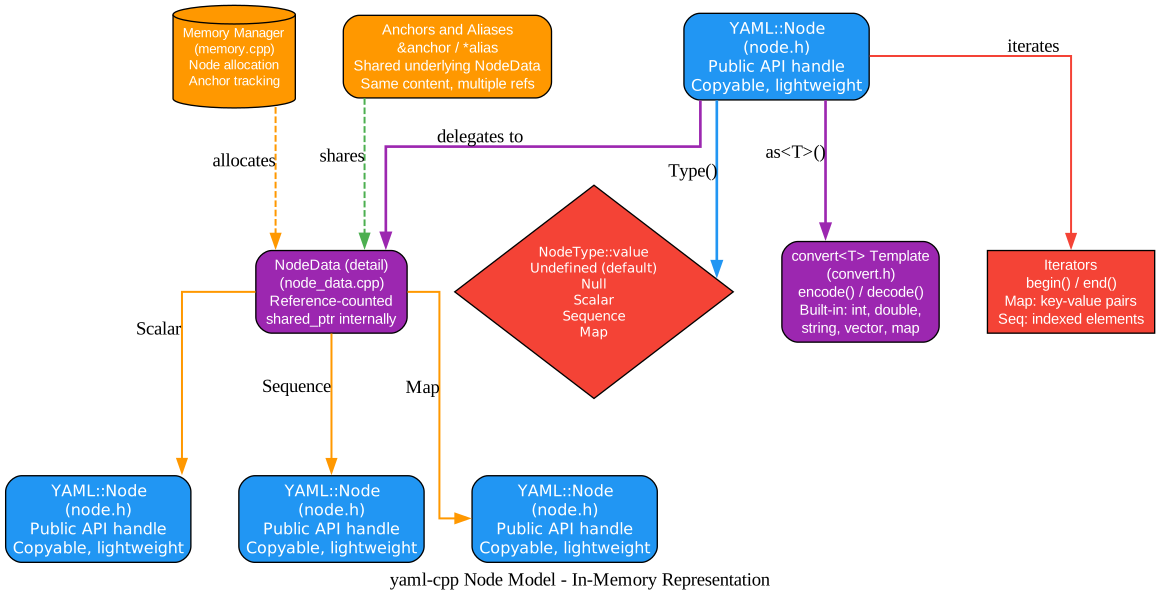
Understanding the Node Model
The node model diagram shows how yaml-cpp represents parsed YAML data in memory. The design centers on a lightweight handle (YAML::Node) that delegates to a reference-counted internal representation.
YAML::Node Handle The YAML::Node class is the public API that users interact with. It is a lightweight, copyable handle - copying a node does not copy the underlying data, it just increments a reference count. This makes it safe and efficient to pass nodes by value, store them in containers, and return them from functions. The handle provides methods like Type(), IsSequence(), IsMap(), IsScalar(), operator[], push_back(), begin(), end(), and as<T>().
NodeType Enumeration Every node has a type from the NodeType::value enumeration: Undefined (the default for freshly constructed nodes that have not been assigned a value), Null (explicit null, represented as ~ or null in YAML), Scalar (a leaf value holding a string), Sequence (an ordered list indexed by integers), and Map (an unordered collection of key-value pairs). The type can change as nodes are modified: assigning a string to a node makes it a scalar, calling push_back() makes it a sequence, and indexing with a string key makes it a map.
NodeData (Internal Representation) The actual data lives in NodeData (node_data.cpp), which is managed by shared_ptr. This is what enables YAML anchors and aliases: multiple YAML::Node handles can point to the same NodeData, so modifying one modifies all. The NodeData holds the scalar string value (for scalar nodes), a vector of node pointers (for sequence nodes), or a vector of key-value node pairs (for map nodes). The memory manager (memory.cpp) handles allocation and tracks anchor-to-node mappings.
Scalar Storage Scalar nodes store their value as a std::string in UTF-8 encoding. This is the canonical form for all string data in yaml-cpp. When you call as<int>() or as<double>(), the convert<T> template parses the string. When you assign node = 42, the integer is converted to its string representation and stored. This string-centric design simplifies the implementation but means that type information is not preserved across serialization round-trips - a YAML 42 could have been an int or a string in the original source.
Sequence and Map Storage Sequences use a vector of node shared pointers, providing O(1) indexed access and amortized O(1) append. Maps use a vector of key-value pairs rather than a std::map, which preserves insertion order (important for YAML’s human-readable output) and allows any node type as a key (not just strings). Map lookup is O(n) linear scan, which is acceptable for the typical configuration-file sizes that YAML handles. The node_iterator implementation handles the difference between sequence iteration (yielding values) and map iteration (yielding key-value pairs).
**convert
Anchors and Aliases YAML anchors (&anchor) and aliases (*alias) are handled at the NodeData level. When the parser encounters an anchor, it registers the current NodeData with the memory manager. When it encounters an alias, it looks up the previously registered NodeData and creates a new YAML::Node handle pointing to the same data. This means aliases are true references - modifying an aliased node modifies the original. The tutorial even shows that self-aliases (node["self"] = node) and strange loops are possible, demonstrating the flexibility of the reference-counting design.
Iterators The iterator interface mirrors STL conventions. For sequences, iterators yield value nodes (like iterating a vector). For maps, iterators yield key-value pairs (like iterating a map). The const_iterator provides read-only access. Iterators are stable across modifications to other parts of the node tree, though modifying the node being iterated is undefined behavior, consistent with STL container rules.
The Emitter: State Machine Output
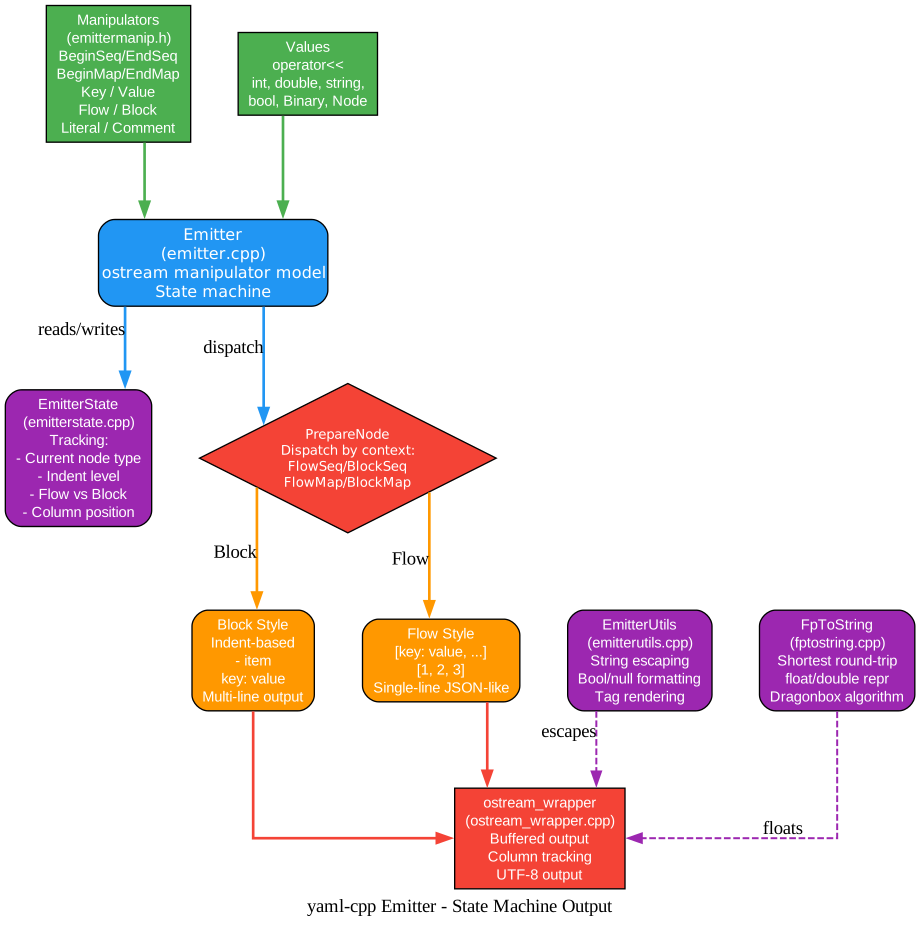
Understanding the Emitter
The emitter diagram shows how yaml-cpp produces YAML output through a state machine driven by stream manipulators. The emitter design is modeled after std::ostream manipulators, making it familiar to C++ developers.
Manipulators and Values The emitter accepts two kinds of input. Manipulators (BeginSeq, EndSeq, BeginMap, EndMap, Key, Value, Flow, Block, Literal, Comment, Anchor, Alias, Tag) control the structure and formatting of the output. Values (integers, floating-point numbers, strings, booleans, Binary, YAML::Node) are the actual data to be serialized. Both are fed through operator<<, which is overloaded for each type. The manipulator model means that YAML structure is expressed through the sequence of operations, not through a separate API.
Emitter State Machine The Emitter class (emitter.cpp) is a state machine. Each operator<< call transitions the state and produces output. The state includes the current node type being emitted (none, scalar, sequence start, map start, etc.), the nesting depth, whether the next value is a key or a value in a map context, and whether the current collection is in flow or block style. If the caller makes an error (such as emitting Key outside a map, or forgetting EndSeq), the emitter sets an error flag and stops producing output. The caller can check good() and retrieve the error message via GetLastError().
EmitterState The EmitterState class (emitterstate.cpp) tracks all formatting context. It maintains a stack of node types (to handle nesting), the current indentation level, the current column position (for line wrapping), the active flow/block style at each level, and formatting settings (indent width, float precision, boolean format, null format, string escaping mode). Global setters (SetIndent, SetFloatPrecision, SetMapStyle) change the default, while local manipulators (_Indent, _Precision, Flow, Block) override for the next item only, with a manipulator stack handling nesting.
PrepareNode Dispatch PrepareNode is the central dispatch function. When a value or manipulator arrives, PrepareNode examines the current state (are we in a sequence? a map? flow or block style? is this a key or a value?) and routes to the appropriate preparation function: FlowSeqPrepareNode, BlockSeqPrepareNode, FlowMapPrepareNode (with variants for simple keys, long keys, and key-value pairs), or BlockMapPrepareNode (with the same variants). Each preparation function handles indentation, spacing, and line breaks according to the YAML formatting rules.
Block Style Output Block style is the default and the most human-readable. Sequences use - item notation with indentation. Maps use key: value with indentation for nesting. The emitter handles complex cases like long keys (where the key and value must be on separate lines), multi-line scalars (using literal | or folded > style), and comments (aligned to the right of the value or on their own line). The block style output is what most people think of when they think of YAML.
Flow Style Output Flow style produces compact, JSON-like output: [1, 2, 3] for sequences and {key: value} for maps. Flow style can be set globally via SetSeqFormat(YAML::Flow) or locally via the YAML::Flow manipulator. The emitter correctly handles mixed flow and block styles, allowing a block sequence to contain flow-style sub-sequences. Flow style is useful for compact data representation and for parts of the document that do not benefit from the readability of block style.
EmitterUtils and FpToString EmitterUtils (emitterutils.cpp) handles string escaping (determining when quotes are needed and which quote style to use), boolean formatting (true/false, yes/no, on/off), null representation (~, null, Null, NULL), and tag rendering. FpToString (fptostring.cpp) uses the Dragonbox algorithm (from contrib/dragonbox.h) to produce the shortest floating-point representation that round-trips correctly. This means that 3.14 is emitted as 3.14 rather than 3.1400000000000001, which is important for both readability and data integrity.
ostream_wrapper The final output goes through ostream_wrapper (ostream_wrapper.cpp), which provides buffered output and column position tracking. The column position is essential for the emitter to make decisions about line wrapping, indentation, and spacing. The wrapper ensures that the emitter always knows the current output position without having to query the underlying stream.
Emitting YAML
#include <yaml-cpp/yaml.h>
#include <iostream>

int main() {
    YAML::Emitter out;

    // Block-style map (default)
    out << YAML::BeginMap;

    out << YAML::Key << "name" << YAML::Value << "production";
    out << YAML::Key << "port" << YAML::Value << 5432;

    // Nested sequence with flow style
    out << YAML::Key << "features";
    out << YAML::Value << YAML::Flow;
    out << YAML::BeginSeq << "ssl" << "replication" << "backup" << YAML::EndSeq;

    // Comment
    out << YAML::Key << "timeout";
    out << YAML::Value << 30;
    out << YAML::Comment("seconds");

    out << YAML::EndMap;

    std::cout << "Output:\n" << out.c_str() << "\n";
    return 0;
}
Output:
name: production
port: 5432
features: [ssl, replication, backup]
timeout: 30  # seconds
Error Handling in the Emitter
YAML::Emitter out;
out << YAML::Key;  // error: Key outside of map

if (!out.good()) {
    std::cerr << "Emitter error: " << out.GetLastError() << "\n";
}
Key Features
| Feature | Description |
|---|---|
| YAML 1.2 Spec Compliance | Full support for the YAML 1.2 specification including block/flow styles, anchors/aliases, tags, and multi-document streams |
| Scanner-Parser-Event Architecture | Decoupled design with token queue, event-driven parser, and pluggable EventHandler consumers |
| Reference-Counted Nodes | YAML::Node handles are lightweight and copyable, sharing underlying data via shared_ptr |
| Type Conversion | Built-in convert |
| Block and Flow Emitter | State-machine emitter supporting both human-readable block style and compact flow style |
| Multi-Document Support | Parse and emit YAML streams containing multiple documents separated by --- |
| UTF-8/16/32 Input | Automatic encoding detection and normalization to UTF-8 internally |
| Dragonbox Float Formatting | Shortest round-trip floating-point representation using the Dragonbox algorithm |
| CMake Integration | FetchContent, find_package, and pkg-config support for easy integration |
| Static and Shared Builds | Configurable static or shared library builds with MSVC CRT options |
Troubleshooting
Compilation error: “dot” not found This is a Graphviz issue, not a yaml-cpp issue. If you are generating diagrams, ensure Graphviz is on your PATH. yaml-cpp itself has no such dependency.
Linker error: unresolved external symbol Ensure you link against yaml-cpp::yaml-cpp (the CMake imported target) rather than just the library name. The imported target sets the correct defines, including YAML_CPP_STATIC_DEFINE for static builds.
Node assignment does not create a copy This is by design. YAML anchors and aliases share underlying data. If you need a deep copy, use YAML::Clone(node):
YAML::Node original = YAML::Load("key: value");
YAML::Node copy = YAML::Clone(original);
copy["key"] = "changed";  // does not affect original
Emitter produces no output after an error The emitter enters a bad state on structural errors (missing EndSeq, Key outside map, etc.). Check out.good() and use out.GetLastError() to diagnose. You must recreate the emitter to recover from an error.
Old API vs New API yaml-cpp 0.5+ uses the new API (YAML::Node, YAML::Load, node.as<T>()). The old API (0.3.x, using >> operators) is deprecated and will stop receiving bugfixes. Use the new API for all new code.
Conclusion
yaml-cpp’s architecture is a textbook example of layered parsing design: a scanner that handles lexical analysis and context tracking, a parser that applies production rules through an event interface, a node model that provides a convenient in-memory representation with reference counting, and an emitter that mirrors the parsing pipeline in reverse through a state machine. The event-driven EventHandler abstraction is the key insight that enables both the node builder and the emitter to share the same parsing infrastructure, and that allows third-party code to build custom representations without going through the intermediate node graph.
The library’s commitment to the full YAML 1.2 specification, including features like multi-document streams, anchors/aliases, tags, and all scalar styles, makes it suitable for any YAML processing need. The Dragonbox-based float formatting ensures that numeric data round-trips correctly, and the reference-counted node model provides an intuitive API that matches YAML’s alias semantics. For C++ projects that need to read or write YAML, yaml-cpp is the standard choice.
Links
- yaml-cpp GitHub Repository
- yaml-cpp Tutorial
- How to Emit YAML
- YAML 1.2 Specification
- yaml-cpp 0.9.0 Release
Related Posts
- meshoptimizer: Mesh Optimization for GPU Rendering
- PyShine Screen Recorder: Native C++ Engine
- Needle 2: 14MB Foundation Model for Tiny Devices

Enjoyed this post? Never miss out on future posts by following us


