Introduction
BiliTickerBuy is an open-source Python automation tool designed to purchase event tickets on Bilibili, one of China’s largest video and entertainment platforms. The project, hosted at https://github.com/mikumifa/biliTickerBuy, has accumulated over 3,708 GitHub stars, reflecting the significant demand for automated ticket purchasing in the Chinese live-event ecosystem. Bilibili frequently hosts ticketed events for concerts, anime conventions, gaming tournaments, and creator meetups, and these high-demand sales routinely sell out within seconds of opening. Manual purchasing through a browser is often futile because the window of availability is shorter than human reaction time.
The tool is distributed as the bilitickerbuy Python package (version 2.15.15 at the time of writing) and installs a btb console entry point. It is licensed under PolyForm Noncommercial 1.0.0, which permits free use, modification, and distribution for noncommercial purposes while prohibiting commercial deployment. This license choice reflects the maintainer’s intent to keep the tool available to individual users while preventing resale or commercial wrapping.
What sets biliTickerBuy apart from simpler ticket-grabbing scripts is its engineering maturity. It offers a dual interface: a command-line tool built on the tyro argument parser and a Gradio-based web UI with seven tabs covering login, configuration, buying, settings, guidance, updates, and logs. Under the hood it implements a proxy pool with intelligent rotation and exponential backoff, a six-channel notification system, browser-fingerprint-based cToken generation to pass Bilibili’s anti-bot verification, and NTP-synchronized timing so that purchase requests fire at the exact moment a sale opens. The architecture is modular and generator-based, which allows real-time status streaming to both the CLI and the web UI.
This post is an independent technical analysis of the project’s architecture and internals. It is not an official publication and does not endorse automated purchasing as a practice. Users should review Bilibili’s terms of service and use the tool responsibly. The repository is the authoritative source for current behavior: https://github.com/mikumifa/biliTickerBuy.
How It Works
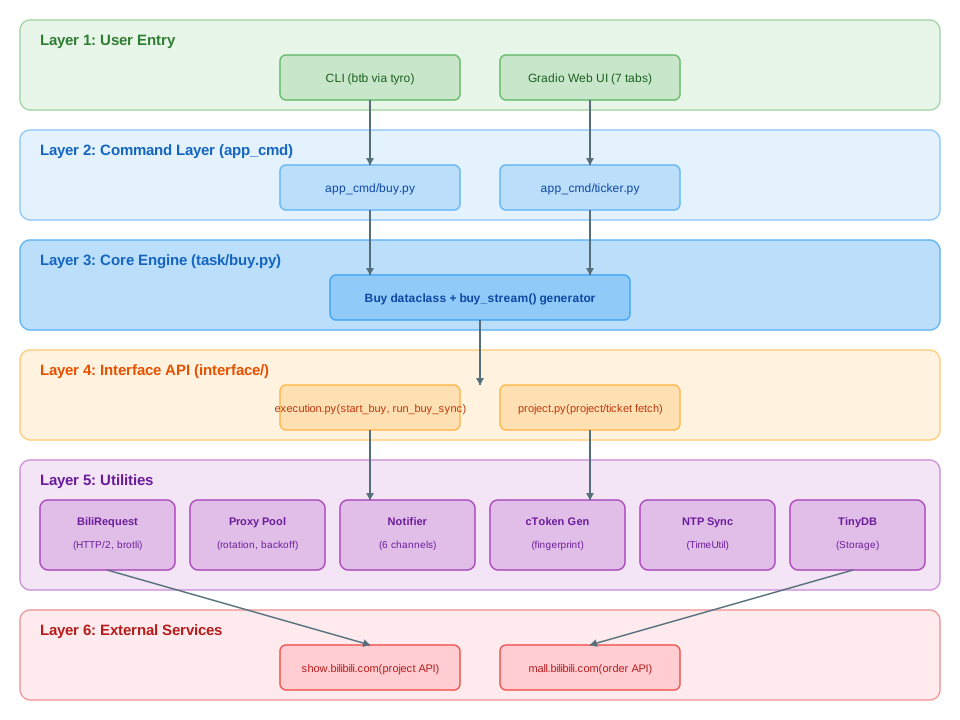
The architecture of biliTickerBuy is organized into six clearly separated layers, each with a distinct responsibility. At the top is the user entry layer, which exposes two ways to interact with the system: the btb command-line tool and the Gradio web UI. The CLI is built on tyro, a typed argument parser that derives subcommands and flags directly from Python type annotations, while the web UI is launched by the btb ui subcommand and presents seven tabs for configuration, execution, and monitoring.
The command layer sits directly beneath user entry and is implemented in the app_cmd/ package. app_cmd/buy.py handles the CLI buy subcommand, translating command-line flags into a configuration object and invoking the core engine. app_cmd/ticker.py is responsible for launching the Gradio interface, wiring up the tab components, and bridging UI events to the underlying execution functions. This separation keeps the presentation logic distinct from the business logic, which is important because the same purchase flow must work identically whether triggered from a terminal or a browser.
The core engine lives in task/buy.py and is built around a Buy dataclass that exposes a buy_stream() generator. This generator is the heart of the system: it yields status updates as it progresses through the purchase loop, allowing both the CLI and the Gradio UI to consume the same stream of events and render progress in real time. The generator pattern is a deliberate design choice because it decouples the execution of the purchase loop from its presentation, and it allows the caller to cancel or react to intermediate states without polling.
Beneath the core engine is the interface API layer in the interface/ package. interface/execution.py provides a programmatic API with functions like start_buy(), run_buy_sync(), and start_managed_buy(), which wrap the generator-based engine for synchronous or managed execution. interface/project.py is responsible for fetching project and ticket details from Bilibili’s public API at show.bilibili.com/api/ticket/project/getV2, returning structured information about available ticket tiers, sale times, and venue metadata.
The utility layer is the broadest part of the codebase. util/request/BiliRequest.py implements the HTTP client using httpx with HTTP/2, brotli compression, zstd, and SOCKS proxy support, giving it modern performance characteristics and the ability to route traffic through proxy servers. util/proxy/ contains the proxy pool manager, API provider, backoff calculator, and tester. util/notifer/ houses the six notification channels. cptoken/ generates the anti-bot cToken by simulating browser fingerprints. util/TimeUtil.py synchronizes the local clock against NTP servers so that scheduled purchases fire at the correct instant. util/Storage/ uses TinyDB for persistent key-value storage of configuration and runtime state.
At the bottom of the stack are the external Bilibili API endpoints. The project endpoint at show.bilibili.com returns ticket metadata, while the order endpoints at mall.bilibili.com handle the prepare-order and create-order calls that actually reserve and purchase tickets. All HTTP traffic flows through the BiliRequest client, which transparently selects proxies from the pool and applies retry logic, so the upper layers never need to reason about network-level concerns directly.
Ticket Buying Workflow
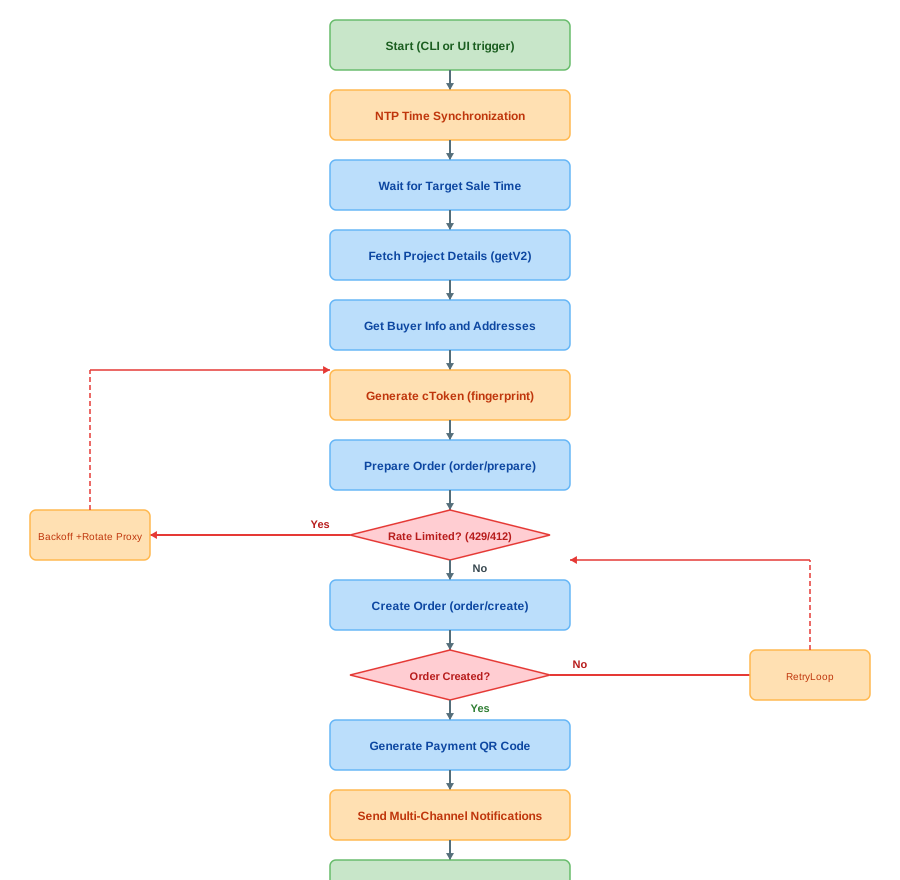
The ticket buying workflow is implemented as a linear pipeline with two decision points and retry loops, all driven by the buy_stream() generator in task/buy.py. The flow begins when the user triggers a buy command, either by running btb buy with a configuration file or by clicking the start button in the Gradio UI. The first action the engine takes is NTP time synchronization, which corrects any drift between the local system clock and a reference NTP server. This step is critical because Bilibili opens ticket sales at a precise server-side timestamp, and a local clock that is even a few hundred milliseconds off can cause the tool to fire requests too early (which are rejected) or too late (by which point inventory is gone).
Once the clock is synchronized, the engine enters a wait state until the configured target sale time. During this wait it sleeps efficiently and wakes just before the sale opens to begin the request phase. The first request fetches project details via interface/project.py, which calls show.bilibili.com/api/ticket/project/getV2 to retrieve the full ticket metadata, including the available ticket tiers, their prices, and the exact sale window. This information is used to select the correct ticket SKU for the order.
Next, the engine retrieves buyer information and saved addresses from the Bilibili account associated with the user’s cookies. Bilibili requires a valid buyer profile and delivery address to create an order, so these must be fetched and validated before the purchase attempt. After the buyer profile is assembled, the engine generates a cToken by simulating a browser fingerprint through the cptoken/ module. The cToken is Bilibili’s anti-bot verification token, and generating it correctly is what allows the automated client to pass the same checks that a real browser would face. The fingerprint simulation includes headers, cookies, and computed values that mimic a legitimate browser session.
With the cToken in hand, the engine calls the prepare-order endpoint at mall.bilibili.com/.../api/ticket/order/prepare. This endpoint validates the order parameters, checks inventory availability, and returns a token that is required for the subsequent create-order call. At this point the engine checks whether the response indicates rate limiting, specifically HTTP 429 (too many requests) or HTTP 412 (risk control triggered). If either is detected, the engine applies exponential backoff, rotates to a different proxy from the pool, and retries the prepare call. This retry loop is what allows the tool to survive Bilibili’s aggressive rate limiting during high-traffic sales.
When the prepare call succeeds, the engine immediately calls the create-order endpoint at mall.bilibili.com/.../api/ticket/order/create using the token from the prepare step. This is the call that actually reserves the ticket. The engine then checks whether the order was created successfully; if not, it enters a retry loop that re-attempts the create call, often with a fresh cToken and proxy. On success, the engine generates a payment QR code from the order response, dispatches notifications across all configured channels, and yields a final status update to the UI. The user then scans the QR code to complete payment within Bilibili’s payment window.
The generator-based design is what makes this workflow practical for both interfaces. Each step yields a status object that the CLI prints and the Gradio UI renders, so the user sees live progress through NTP sync, waiting, fetching, preparing, creating, and notifying. The same generator can be paused, resumed, or cancelled, which is essential for a long-running purchase attempt that may span minutes of waiting followed by sub-second bursts of requests.
Proxy Pool and Rate Limit Handling
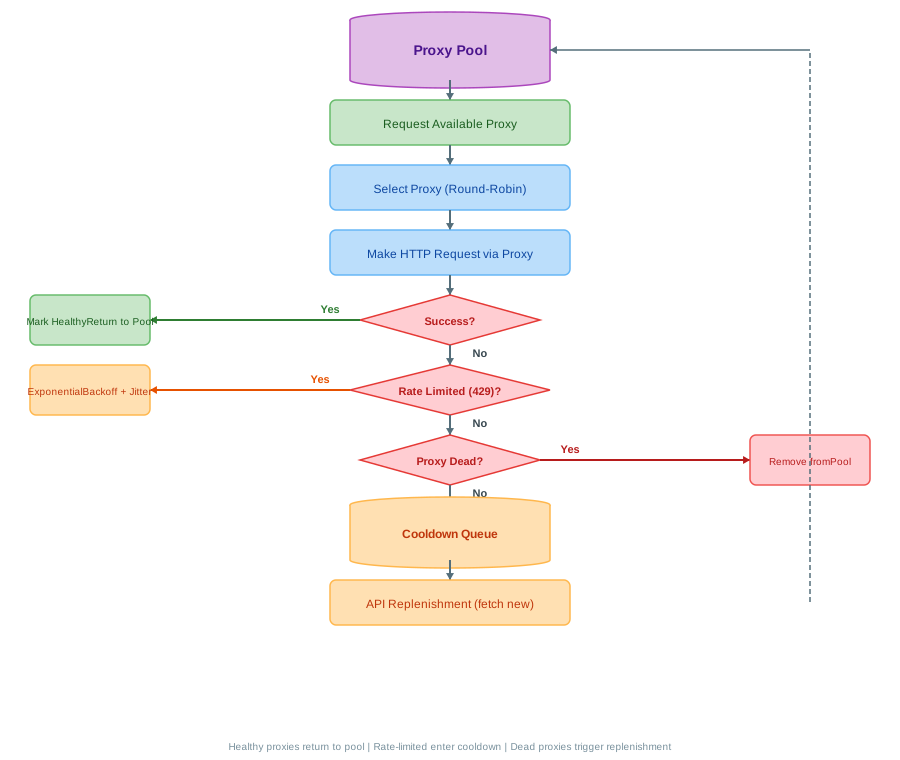
Proxies are essential to biliTickerBuy because Bilibili rate-limits ticket purchase requests by IP address. During a popular sale, a single IP can only issue a small number of order requests before being throttled with HTTP 429 responses or blocked entirely with HTTP 412 risk-control errors. To work around this, the tool maintains a pool of proxy servers in util/proxy/ and rotates through them so that no single IP bears the full request load. The proxy pool is the component that makes sustained purchase attempts viable during high-traffic events.
The pool lifecycle begins when a component requests an available proxy. The pool manager selects a proxy using a rotation strategy, defaulting to round-robin selection that distributes requests evenly across all healthy proxies. The selected proxy is handed to the BiliRequest HTTP client, which routes the outgoing request through it using SOCKS support provided by httpx[socks]. After the request completes, the outcome determines what happens to the proxy. If the request succeeded, the proxy is marked healthy and returned to the active pool for future selection. If the request failed, the engine inspects the error to decide on a recovery action.
When the failure is a rate-limit response (HTTP 429), the proxy is placed into a cooldown queue and an exponential backoff with jitter is applied before the next attempt. Exponential backoff increases the wait time between retries geometrically, while jitter randomizes the delay slightly to prevent many concurrent clients from retrying in lockstep, a pattern known as the thundering herd problem. The cooldown queue holds proxies for a timed period, after which they are eligible for selection again. This mechanism prevents a single rate-limited proxy from being hammered repeatedly while still allowing it to recover and rejoin the pool.
If the failure indicates the proxy is dead, unreachable, or otherwise unusable, it is removed from the pool entirely and the API replenishment path is triggered. Replenishment fetches new proxies from a configured proxy API endpoint, which can be a commercial proxy provider or a self-hosted proxy source. The new proxies are validated by the proxy tester, added to the pool, and made available for selection. This automatic replenishment ensures the pool does not deplete during a long purchase session, which is important because a sale window may last several minutes and require hundreds of request attempts.
The integration between the proxy pool and the BiliRequest client is transparent to the upper layers. The core engine and interface API never select proxies directly; they simply make HTTP calls through BiliRequest, which internally pulls a proxy from the pool, applies it to the request, and reports the outcome back to the pool manager. This separation keeps the purchase logic clean and allows the proxy strategy to evolve independently, for example by adding least-recently-used selection or weighted scoring based on historical success rates.
Notification System
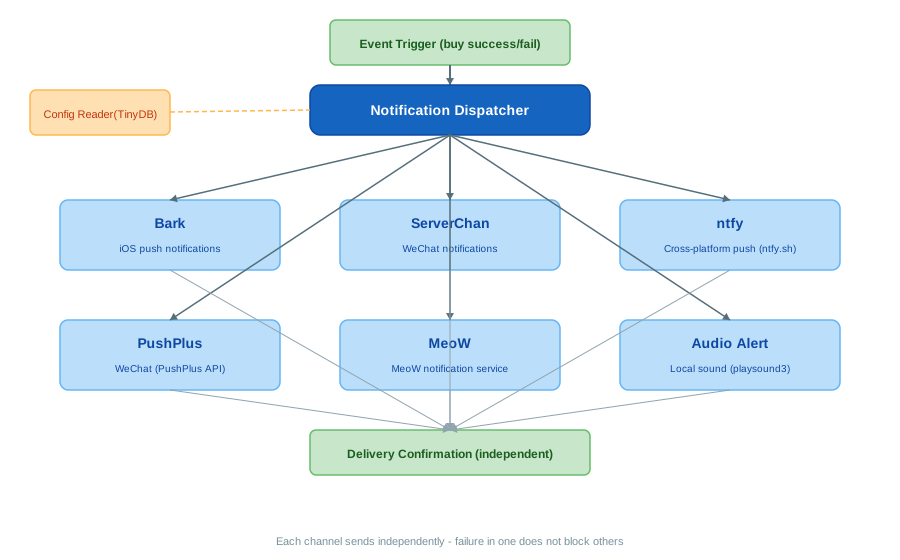
The notification system in util/notifer/ is built around a central dispatcher that fans a single event out to all configured channels simultaneously. When the buy engine yields a success or failure event, the dispatcher reads the channel configuration from TinyDB storage and sends the payload to every enabled channel. The six supported channels cover the most common notification ecosystems used by the tool’s audience: Bark, ServerChan, ntfy, PushPlus, MeoW, and a local audio alert.
Bark is an iOS push notification service that delivers messages directly to an iPhone through the Bark app’s API. It is the primary channel for users who want instant alerts on their phone while away from the computer. ServerChan is a WeChat-based notification service popular in the Chinese messaging ecosystem; it sends messages through the ServerChan API to a configured WeChat account, which is valuable because WeChat is the dominant messaging platform in China. ntfy is a cross-platform push notification protocol hosted at ntfy.sh that supports iOS, Android, and desktop clients, making it the most portable option for users outside the WeChat ecosystem.
PushPlus is an alternative WeChat notification channel that provides similar functionality to ServerChan through a different API provider, giving users a fallback if one service is down or rate-limited. MeoW is an additional notification service integrated for users who prefer its delivery characteristics. The audio alert channel is different from the others: it uses the playsound3 library to play a local sound file on the user’s computer, which is useful for users who are sitting at their machine waiting for a purchase result and want an immediate audible signal without relying on any external service.
The dispatcher pattern is important for fault tolerance. Each channel sends its payload independently, and a failure in one channel does not block or affect the others. If the Bark API is down, the ServerChan and ntfy messages still go through. This independence is achieved by wrapping each channel send in its own error handling, so an exception in one channel is logged but does not propagate to the dispatcher loop. Configuration is also independent per channel: each channel reads its own API keys, endpoints, and enable flag from TinyDB, so users can enable only the channels they use and leave the rest disabled.
The notification system integrates with the buy_stream generator through status events. As the generator progresses through the purchase loop, it emits status objects that the dispatcher consumes. A successful order creation triggers a success notification with the payment QR code and order details, while a failure or rate-limit event triggers a status notification so the user knows the tool is still retrying. This tight integration means the user is never left wondering whether the purchase succeeded; the notification arrives within seconds of the outcome, regardless of which interface they used to start the attempt.
Installation
BiliTickerBuy requires Python 3.11 or newer. The recommended installation method depends on how you intend to use it.
# Clone the repository
git clone https://github.com/mikumifa/biliTickerBuy.git
cd biliTickerBuy

# Install dependencies
pip install -e .

# Or using install.sh
bash install.sh

# Docker
docker-compose up
For an isolated environment, pipx install bilitickerbuy is preferred because it avoids polluting the global Python environment. After installation, verify the entry point with btb --help, which should print the available subcommands. The Docker deployment option is useful for running the tool on a server; it mounts a configuration directory as a volume so settings persist across container restarts. For standalone distribution, the repository includes PyInstaller build configuration to produce a single executable that bundles the Python runtime and all dependencies.
Usage
BiliTickerBuy exposes two interfaces: a CLI and a Gradio web UI.
# Launch Gradio web UI
btb ui

# Run ticket buying from CLI
btb buy --config-file config.json

# With options
btb buy --time-start "2026-06-18T20:00:00" --interval 1000
The CLI is built on tyro, which means every configuration option is exposed as a typed command-line flag. The buy subcommand accepts a config file path, a target start time, a request interval, proxy settings, and notification configuration. The ui subcommand launches the Gradio web server and opens the interface in a browser.
The Gradio web UI organizes functionality into seven tabs. The Login tab handles Bilibili cookie authentication, allowing the user to paste cookies or scan a QR code to log in. The Config tab is where the user sets the ticket project URL, selects the target ticket tier, configures buyer information, and sets the sale start time. The Buy tab provides start and stop buttons for the purchase attempt and displays real-time status updates streamed from the buy generator. The Settings tab manages proxy pool configuration and notification channel setup. The Guide tab offers in-app documentation for common workflows. The Update tab checks for and applies new releases of the package. The Logs tab shows a real-time log viewer powered by loguru, which is useful for diagnosing failures during a live purchase attempt.
Both interfaces drive the same underlying engine, so the purchase behavior is identical regardless of which one is used. The web UI is generally more approachable for users who prefer a visual workflow, while the CLI is better suited for scripting, automation, or headless server deployment.
Features
| Feature | Description |
|---|---|
| Scheduled Ticket Grabbing | NTP-synchronized precise timing for ticket purchase at sale opening |
| Automated Order Flow | Prepare order, create order, generate payment QR code - fully automated |
| Proxy Pool Management | Rotation, cooldown, exponential backoff, API-based replenishment |
| Multi-Channel Notifications | Bark, ServerChan, ntfy, PushPlus, MeoW, and audio alerts |
| cToken Generation | Browser fingerprint simulation to pass anti-bot verification |
| Rate Limit Handling | HTTP 429 and 412 risk control detection with automatic retry |
| Dual Interface | CLI via tyro plus Gradio web UI with 7 tabs |
| Docker Support | Containerized deployment with volume-mounted config |
| PyInstaller Building | Standalone executable distribution |
| TinyDB Storage | Persistent key-value configuration and state |
| HTTP/2 + Brotli | Modern HTTP client with compression and SOCKS proxy support |
| NTP Time Sync | Clock synchronization against NTP servers for precise scheduling |
Troubleshooting
cToken generation fails: The cToken is generated by simulating a browser fingerprint, so failures usually indicate that the cookie has expired or the fingerprint configuration does not match what Bilibili expects. Re-log in through the Login tab to refresh cookies, and verify that the browser fingerprint parameters in the configuration are current.
Rate limited (HTTP 429): Bilibili is throttling requests from your IP. Add more proxies to the pool, increase the backoff delay, and reduce the request interval. The proxy pool cooldown mechanism will automatically rotate proxies, but a larger pool gives more headroom during high-traffic sales.
Risk control (HTTP 412): Bilibili’s risk control system has detected automation. Rotate cookies and proxies, add delay between attempts, and ensure the cToken is being regenerated for each attempt rather than reused. Persistent 412 errors may require pausing the attempt and resuming later.
NTP sync failure: Check network connectivity to NTP servers. If NTP is unreachable, the tool falls back to system time, which may be less precise. Running on a server with a well-synchronized clock via chrony or systemd-timesyncd reduces reliance on the in-tool NTP client.
Notification not received: Verify the API keys for each configured channel in the Settings tab. Test individual channel connectivity by triggering a test event. Remember that each channel is independent, so a failure in one does not imply the others are broken.
Order creation fails: Verify that buyer information is complete and that the selected ticket tier is still available. Ensure cookies are valid and that the cToken was generated successfully in the same session. Check the Logs tab for the specific error returned by the create-order endpoint.
Gradio UI not accessible: Check that the configured port is available and not blocked by a firewall. Use btb ui --share to generate a public Gradio link for remote access, which is useful when running the tool on a headless server.
Conclusion
BiliTickerBuy is a well-engineered automation tool that addresses a real problem in the Bilibili event ticketing ecosystem. Its generator-based architecture, modular utility layer, and dual CLI and web UI interfaces make it accessible to both developers and non-technical users. The proxy pool with intelligent rotation and backoff, the six-channel notification system, and the NTP-synchronized timing demonstrate attention to the practical realities of high-traffic ticket sales, where network-level concerns dominate the user experience.
The PolyForm Noncommercial license keeps the tool available to individual users while preventing commercial exploitation. As with any automation tool that interacts with a third-party platform, users should review Bilibili’s terms of service and use the tool responsibly. The repository is the authoritative source for current behavior and updates: https://github.com/mikumifa/biliTickerBuy. Enjoyed this post? Never miss out on future posts by following us 


