What is HyperFrames
HyperFrames is an open-source framework from HeyGen that turns HTML, CSS, media, and seekable animations into deterministic MP4 videos. The core idea: write a standard HTML file with data-* timing attributes to declare timelines and tracks, and the engine captures each exact frame via Puppeteer headless Chrome and muxes via FFmpeg. Same input produces byte-identical output across machines.
The project is on GitHub at heygen-com/hyperframes, Apache 2.0 licensed, v0.8.22, with 4,107 commits and 45.8k stars. It is actively trending on GitHub. The docs are at hyperframes.heygen.com. The tagline says it all: Write HTML. Render video. Built for agents.
Three things to know:
- Agent-built: You describe the video; the agent writes the HTML, CSS, and JavaScript. You do not need to write code.
- Editable: The result is a project folder, not a flattened black box. An agent, Studio, and your own tools can work on the same files.
- Reliable render: HyperFrames asks the project for each exact frame instead of depending on live playback, so a slow machine does not drop moments from the finished video.
Five-Package Architecture
HyperFrames is structured as five npm packages, each with a clear responsibility.
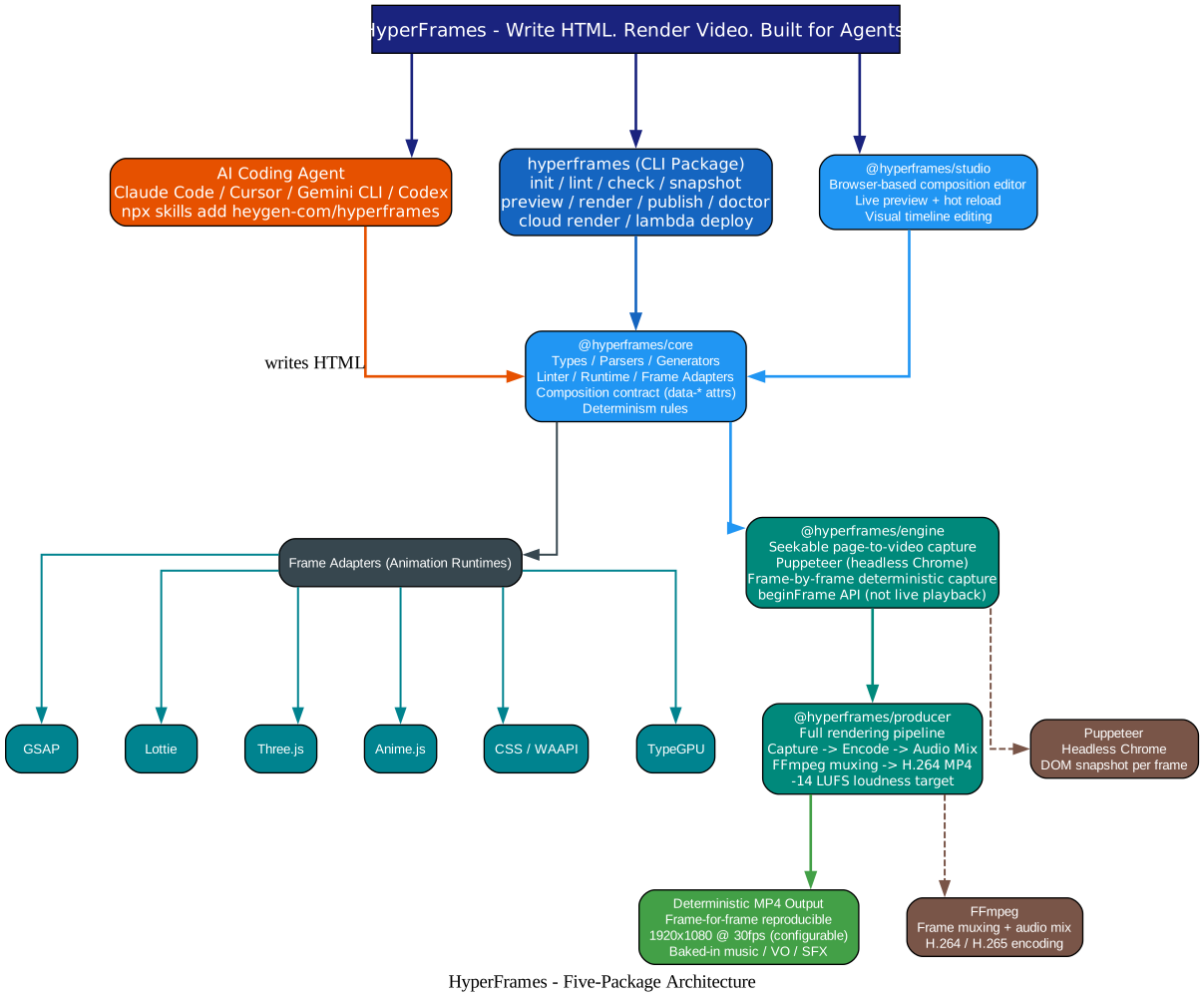
Understanding the Architecture
hyperframes (CLI Package)
The main CLI package handles project scaffolding, linting, checking, snapshotting, previewing, rendering, publishing, and diagnostics. Key commands include init (scaffold a new project), lint (report composition issues), check (validate), snapshot (generate frame previews), preview (browser with live reload), render (render to MP4), publish (share composition), and doctor (diagnose issues). It also supports HeyGen-hosted cloud rendering (cloud render) and AWS Lambda rendering (lambda deploy / render / progress).
@hyperframes/core
The core package contains types, parsers, generators, linter, runtime, and frame adapters. It defines the composition contract: data-* timing attributes, class="clip", tracks, sub-compositions, variables, framework-owned media playback, and determinism rules. This is the package that defines the HTML dialect HyperFrames speaks.
@hyperframes/engine
The engine is the seekable page-to-video capture system. It uses Puppeteer (headless Chrome) to open the HTML composition, seek to each exact frame timestamp, wait for a seek-safe state, and capture a PNG screenshot. The key design decision is that it does not depend on live playback. Instead, it uses a beginFrame API that asks the page for each exact frame, ensuring no dropped frames on slow machines.
@hyperframes/producer
The producer package is the full rendering pipeline: capture, encode, and audio mix. FFmpeg combines the PNG frame sequence with the mixed audio track, encoding to H.264 MP4 at a configurable resolution, fps, and quality level (draft or final). The audio mix targets -14 LUFS loudness.
@hyperframes/studio
The studio package is the browser-based composition editor UI. It provides live preview with hot reload and visual timeline editing. Studio is where humans can directly edit compositions alongside AI agents.
Frame Adapters (Animation Runtimes)
The core package defines a Frame Adapter pattern that supports multiple animation runtimes: GSAP, Lottie, Three.js, Anime.js, CSS, WAAPI (Web Animations API), and TypeGPU. Each runtime has its own adapter that translates seek-safe keyframe authoring into the deterministic frame capture protocol. This means agents can write animations in whatever runtime fits the task, and the engine handles the rest.
Deterministic Render Pipeline
The rendering pipeline is the heart of HyperFrames. It transforms HTML compositions into deterministic MP4 videos through five steps.
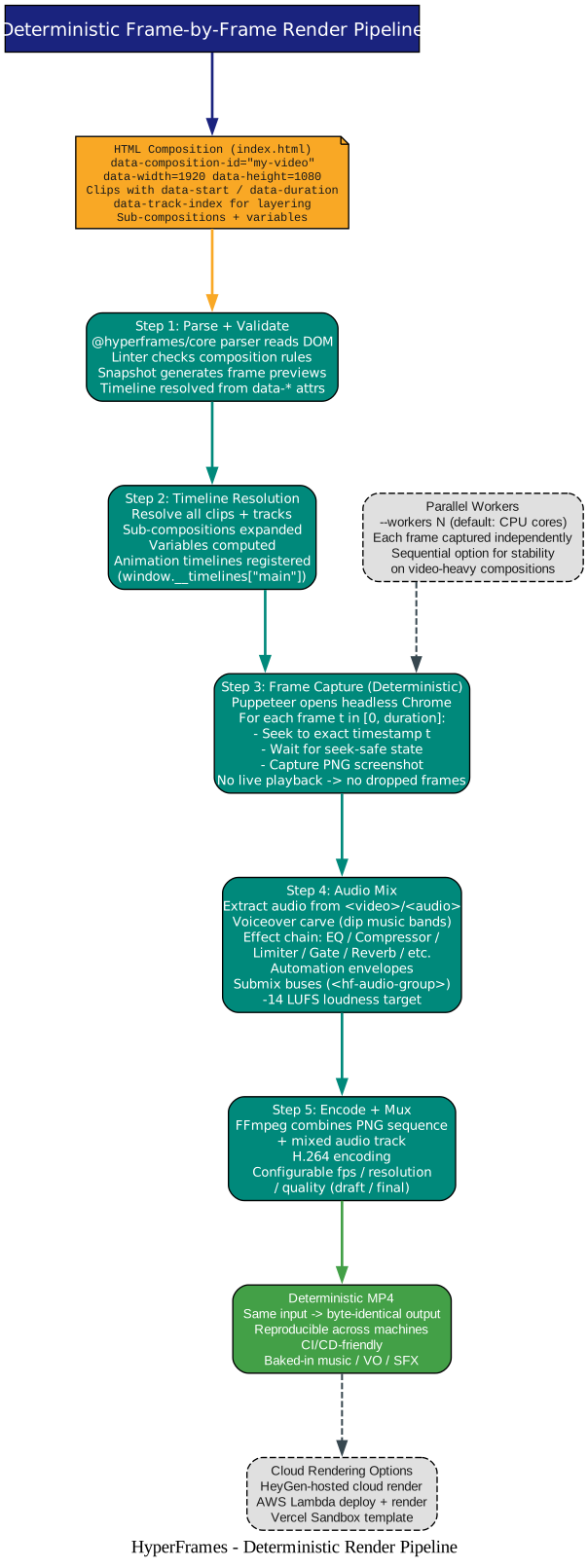
Understanding the Render Pipeline
Step 1: Parse and Validate
The @hyperframes/core parser reads the DOM, the linter checks composition rules, and snapshots generate frame previews. The timeline is resolved from data-* attributes on each element.
Step 2: Timeline Resolution
All clips and tracks are resolved. Sub-compositions are expanded into their parent tracks. Variables are computed. Animation timelines are registered via window.__timelines["main"] (for GSAP, this is a paused timeline that the engine seeks frame by frame).
Step 3: Frame Capture (Deterministic)
Puppeteer opens headless Chrome with the composition. For each frame t in the range [0, duration]:
- Seek to the exact timestamp
t - Wait for the seek-safe state (all animations paused at this position)
- Capture a PNG screenshot
Because the engine seeks to each frame rather than playing in real time, a slow machine never drops frames from the finished video. The same composition produces byte-identical output on every run.
Parallel workers speed up capture. The --workers N flag (default: CPU cores) captures frames independently across worker processes. For video-heavy compositions, --workers 1 provides sequential capture for stability.
Step 4: Audio Mix
Audio is extracted from <video> and <audio> elements. The audio mix includes:
- Voiceover carve: Dip the music bed only in the frequency bands the voice occupies (static or dynamic, level match included)
- Effect chain: EQ, compressor, limiter, gate, saturation, delay, reverb, chorus, phaser, bitcrush
- Automation envelopes: On volume or any effect parameter
- Submix buses:
<hf-audio-group>carries one chain, fader, and automation clock for several tracks at once
The final mix targets -14 LUFS loudness. Sourcing audio is handled by the /media-use domain skill.
Step 5: Encode and Mux
FFmpeg combines the PNG frame sequence with the mixed audio track. H.264 encoding is configurable: resolution, fps, and quality (draft for fast iteration, final for production). The output is a deterministic MP4 with baked-in music, voiceover, and SFX.
Cloud Rendering Options
Beyond local rendering, HyperFrames supports:
- HeyGen-hosted cloud render:
hyperframes cloud render - AWS Lambda:
hyperframes lambda deploy / render / progress - Vercel Sandbox: The hyperframes-vercel-template deploys preview and server-side render to Vercel using Vercel Sandbox for rendering and Vercel Blob for output storage
Twenty Skills System
HyperFrames ships 20 skills that teach AI agents the full video production loop. Install them with one command:
npx skills add heygen-com/hyperframes
This works with Claude Code, Cursor, Gemini CLI, and Codex. The skills register as slash commands (e.g., /hyperframes, /product-launch-video, /gsap).

Understanding the Skills System
Router (1 skill)
/hyperframes is the entry point. Read it first for any make/create/edit/animate/render request. It is the capability map for domain skills, the intent layer that confirms every creation brief up front, and the intent router for creation workflows. It picks a workflow for any “make me a…” request.
Creation Workflows (10 skills, loaded on demand)
| Skill | Use when |
|---|---|
/product-launch-video | A website to promote (URL, brief, or script) -> 30-90s product intro |
/faceless-explainer | Explaining a topic/concept from text, no product or URL |
/pr-to-video | A GitHub pull request (PR URL, owner/repo#N) -> changelog/feature explainer |
/embedded-captions | Adding captions/subtitles to existing talking-head video |
/talking-head-recut | Packaging talking-head video with designed graphic overlays |
/motion-graphics | Short unnarrated design-led motion graphic under 10s |
/music-to-video | A music track -> beat-synced video (lyric, slideshow, promo) |
/slideshow | Presentation/pitch deck -> navigable deck (not rendered video) |
/general-video | Anything else: multi-scene, brand reel, title card, fallback |
/remotion-to-hyperframes | Porting existing Remotion (React) composition to HyperFrames HTML |
Domain Skills (9 skills, loaded on demand)
| Skill | Covers |
|---|---|
/hyperframes-core | Composition contract: data-* timing, class="clip", tracks, determinism rules |
/hyperframes-animation | All animation: atomic motion, scene blueprints, transitions, runtime adapters |
/hyperframes-keyframes | Seek-safe keyframe authoring: GSAP timelines, CSS keyframes, Anime.js, WAAPI, FLIP, SVG morph |
/hyperframes-creative | Non-animation creative: frame.md/design.md, palettes, typography, narration, beat planning |
/media-use | Media OS: resolve any media need (BGM, SFX, image, voice, LUT), generate via TTS/music/image models |
/hyperframes-cli | CLI dev loop: init, lint, check, snapshot, preview, render, publish, doctor, cloud, lambda |
/hyperframes-audio | Audio mix: voiceover carve, effect chain, automation envelopes, submix buses |
/hyperframes-registry | Install registry blocks via hyperframes add, author new blocks upstream |
/figma | Import Figma assets, tokens, components, storyboard sections into compositions |
Skills Install Mechanics
skills add resolves the skills.sh registry blob, which can lag main by hours. npx hyperframes skills update installs from current main directly. The interactive picker lists the “Core Skills” group with nothing pre-selected. Non-interactive or agent runs without --skill install all 20. Use npx hyperframes skills update <workflow> to install a specific creation workflow on demand.
Composition Format and frame.md
The composition format is standard HTML with data-* timing attributes. Every brand has a design.md; none were written for a camera. frame.md is the missing translation layer.
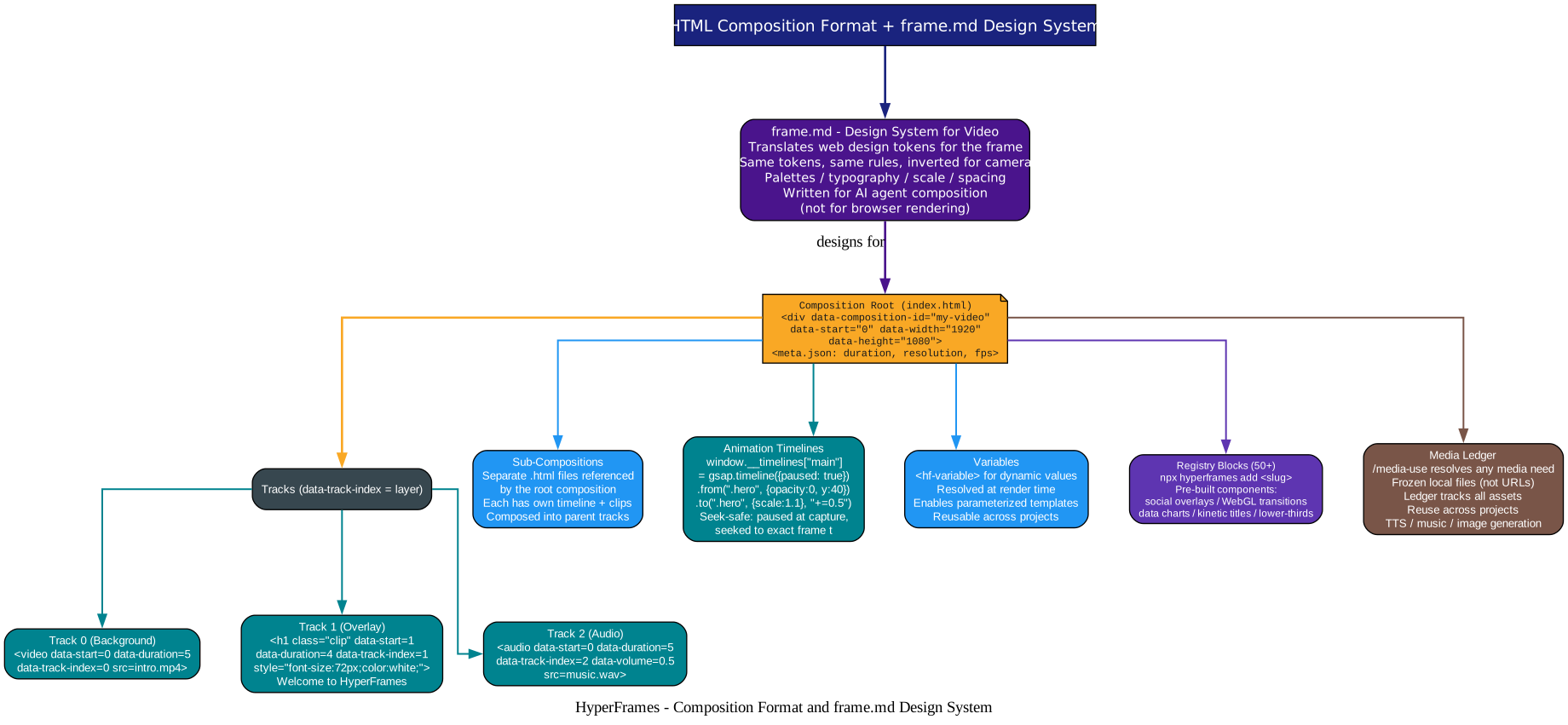
Understanding the Composition Format
Composition Root
The root HTML file declares the composition:
<div id="stage"
     data-composition-id="my-video"
     data-start="0"
     data-width="1920"
     data-height="1080">
  <!-- clips go here -->
</div>
A meta.json file specifies duration, resolution, and fps.
Tracks and Clips
Each element with class="clip" is a clip. The data-track-index attribute controls vertical layering (higher = on top):
<!-- Background video: 0-5s, track 0 -->
<video id="clip-1" class="clip"
       data-start="0" data-duration="5"
       data-track-index="0"
       src="intro.mp4" muted playsinline></video>

<!-- Title overlay: 1-5s, track 1 -->
<h1 id="title" class="clip"
    data-start="1" data-duration="4"
    data-track-index="1"
    style="font-size: 72px; color: white;">
  Welcome to HyperFrames
</h1>

<!-- Background music: 0-5s, track 2 -->
<audio id="bg-music" class="clip"
       data-start="0" data-duration="5"
       data-track-index="2"
       data-volume="0.5"
       src="music.wav"></audio>
Sub-Compositions
Separate .html files can be referenced by the root composition. Each sub-composition has its own timeline and clips, composed into the parent’s tracks. This enables modular video construction: an act-1 cold open, act-2 feature reel, and act-3 end card can each be separate files.
Animation Timelines
Animations use seek-safe keyframe authoring. For GSAP, the timeline is paused and the engine seeks to each frame:
window.__timelines["main"] = gsap.timeline({paused: true})
  .from(".hero-title", {opacity: 0, y: 40, duration: 0.8})
  .to(".hero-title", {scale: 1.1, duration: 0.4}, "+=0.5");
Variables
<hf-variable> elements enable dynamic values resolved at render time. This supports parameterized templates reusable across projects.
Registry Blocks (50+)
npx hyperframes add <slug> installs pre-built components: social overlays, WebGL shader transitions, data charts, kinetic titles, lower-thirds, and more. The registry is in the registry/ directory with a write-on wave for community contributions.
Media Ledger
The /media-use skill resolves any media need into a frozen local file (not a URL) with a ledger record. This ensures deterministic rendering (no network dependency at render time). Assets can be reused across projects. When the catalog misses, it generates via TTS, music, or image models.
frame.md
frame.md is the design system translation layer. It takes web-context design specs and inverts them for the frame: the same tokens, the same rules, but rewritten so an AI agent can compose a promo video without guessing at scale or reaching for web chrome. Every brand has a design.md; frame.md is the version written for a camera.
Installation
Prerequisites
- Node.js 22+
- FFmpeg
With an AI Coding Agent
Install the HyperFrames skills:
npx skills add heygen-com/hyperframes
Then describe the video in your agent:
Using /hyperframes, create a 10-second product intro with a fade-in title,
a background video, and subtle background music.
The skills teach agents the production loop: plan the video, write valid HTML, wire seekable animations, add media, lint, preview, and render.
Manually with the CLI
npx hyperframes init my-video
cd my-video
npx hyperframes preview    # preview in browser with live reload
npx hyperframes render     # render to MP4
Useful Render Variants
npx hyperframes render --quality draft      # fast, for iteration
npx hyperframes render --workers 1          # sequential (stable on video-heavy comps)
npx hyperframes lint                        # report issues in compositions
npx hyperframes snapshot                     # generate frame previews
Key Features
| Feature | Description |
|---|---|
| HTML as timeline | Standard HTML with data-* attributes for timing, tracks, and metadata |
| Deterministic render | Puppeteer seeks each frame, no live playback, byte-identical output |
| Five-package architecture | CLI, core, engine, producer, studio with clear separation |
| 20 agent skills | Router + 10 creation workflows + 9 domain skills |
| 6 animation runtimes | GSAP, Lottie, Three.js, Anime.js, CSS/WAAPI, TypeGPU |
| frame.md | Design system translation layer from web to video |
| 50+ registry blocks | Pre-built components via hyperframes add |
| Full audio mix | Voiceover carve, effect chain, automation, submix buses, -14 LUFS |
| Cloud rendering | HeyGen-hosted, AWS Lambda, Vercel Sandbox |
| Sub-compositions | Modular HTML files composed into parent tracks |
| Variables | <hf-variable> for parameterized templates |
| Studio editor | Browser-based visual composition editor |
| Multi-agent support | Claude Code, Cursor, Gemini CLI, Codex |
Troubleshooting
| Issue | Cause | Solution |
|---|---|---|
| Render drops frames | Live playback mode | HyperFrames uses seek-safe capture; check Puppeteer/Chrome version |
| Non-deterministic output | Math.random() in composition | Use seeded RNG (mulberry32) for deterministic output |
| Skills not loading | Registry blob lagging main | Use npx hyperframes skills update for latest from main |
| Puppeteer sandbox hang (macOS) | sandbox-exec issue | Run npx hyperframes render from daemon process, not agent shell |
| FFmpeg not found | Not installed or not on PATH | Install FFmpeg: brew install ffmpeg / choco install ffmpeg |
| Node version too old | Requires Node 22+ | Check with node --version; use nvm or Docker |
| Cloud render fails | Auth or quota issue | Check hyperframes doctor for cloud auth status |
| Audio not baking | Audio mix step skipped | Ensure <audio> elements have data-start and data-duration |
| Large file guard fires | Text file exceeding threshold | Fixed in v0.8.x; update to latest |
Conclusion
HyperFrames represents a paradigm shift in programmatic video generation. Instead of learning React, a proprietary DSL, or a timeline editor, you write standard HTML with data-* timing attributes. The deterministic render pipeline via Puppeteer frame-by-frame capture and FFmpeg muxing guarantees that the same input produces byte-identical output across machines, making it suitable for CI/CD automation.
The 20-skill system makes HyperFrames uniquely agent-native. An AI coding agent can plan a video, write valid HTML compositions, wire seekable GSAP animations, add media, lint, preview, and render, all from natural language prompts. The 10 creation workflows cover the most common video types (product launches, explainers, PR walkthroughs, captions, motion graphics, music videos, slideshows), while the 9 domain skills provide atomic capabilities that workflows compose against.
The project is actively developed by HeyGen, with v0.8.22 currently on GitHub, 4,107 commits, 41 open issues, 203 pull requests, and active discussions. The Apache 2.0 license ensures broad adoption. The ADOPTERS.md file lists organizations including THU-MAIC using HyperFrames in production.
Related Posts
- CowAgent: Open Source Super AI Assistant
- TeamAI: Make Every Team AI Native
- ACE Step UI: Open Source AI Music Generation

Enjoyed this post? Never miss out on future posts by following us


