What is LLM Wiki
LLM Wiki is an open source cross-platform desktop application that turns your documents into an organized, interlinked knowledge base automatically. Instead of traditional RAG (retrieve-and-answer from scratch every time), the LLM incrementally builds and maintains a persistent wiki from your sources. Knowledge is compiled once and kept current, not re-derived on every query.
The project is based on Andrej Karpathy’s LLM Wiki pattern, a methodology for building personal knowledge bases using LLMs. The original is an abstract design pattern designed to be copy-pasted to an LLM agent. LLM Wiki, created and maintained by nash_su, implements the core ideas as a full desktop application with substantial extensions.
The code is on GitHub at nashsu/llm_wiki, GPL v3 licensed, v0.6.11, with 856 commits and trending on GitHub. The tech stack includes Tauri v2 (Rust backend), React 19, TypeScript, Vite, shadcn/ui, Tailwind CSS v4, Milkdown editor, sigma.js + graphology + ForceAtlas2 for graph visualization, and LanceDB for optional vector search.
The Core Idea
Most people’s experience with LLMs and documents looks like RAG: you upload a collection of files, the LLM retrieves relevant chunks at query time, and generates an answer. This works, but the LLM is rediscovering knowledge from scratch on every question. There is no accumulation. Ask a subtle question that requires synthesizing five documents, and the LLM has to find and piece together the relevant fragments every time. Nothing is built up.
The LLM Wiki idea is different. Instead of just retrieving from raw documents at query time, the LLM incrementally builds and maintains a persistent wiki: a structured, interlinked collection of markdown files that sits between you and the raw sources. When you add a new source, the LLM does not just index it for later retrieval. It reads it, extracts the key information, and integrates it into the wiki, creating new pages, updating existing ones, and adding cross-references.
Three-Layer Architecture and Two-Step Ingest
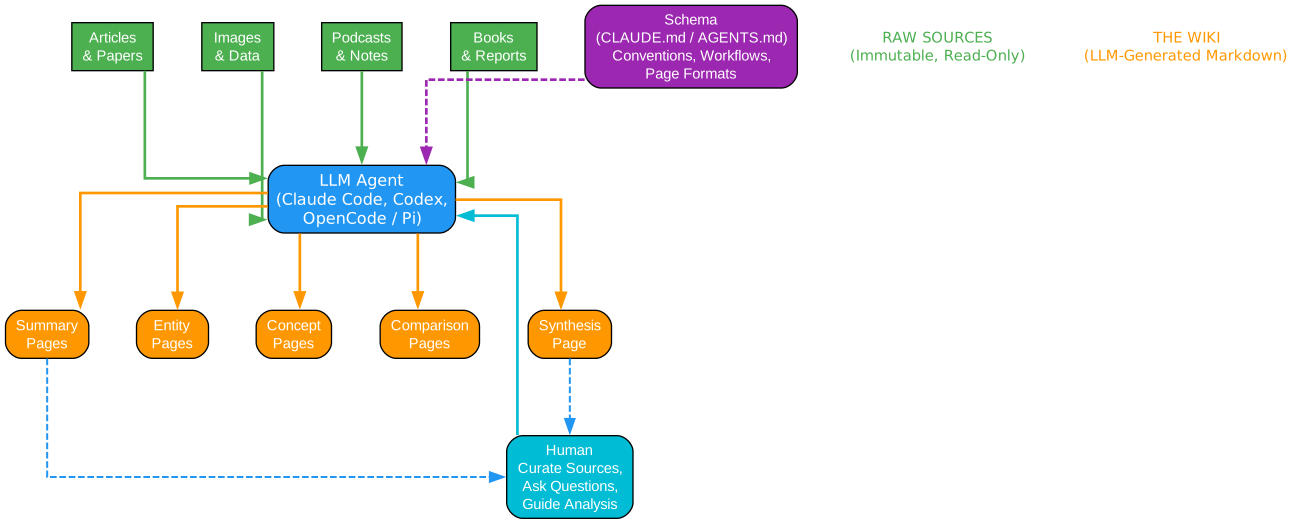
The core architecture follows Karpathy’s design faithfully: a three-layer structure with three core operations.
Understanding the Architecture
Layer 1: Raw Sources (Immutable)
The raw sources layer stores your original documents unchanged. Supported formats include PDF (via built-in pdf-extract in Rust or optional MinerU Cloud/Local for complex layouts), DOCX (via docx-rs with headings, bold/italic, lists, tables), PPTX (ZIP + XML slide-by-slide extraction), XLSX/XLS/ODS (via calamine with proper cell types and multi-sheet support), EPUB/MOBI, Org mode, images, media, web clips, and batches of URLs.
Each source file is SHA256-hashed before ingest. Unchanged files are skipped automatically, saving LLM tokens and time. The raw sources directory is also auto-watched: files added, edited, or deleted outside the app are picked up automatically and reuse the same ingest/delete lifecycle.
Layer 2: Wiki (LLM-Generated)
The wiki layer is the LLM-generated, interlinked collection of markdown files. Key files include index.md (the content catalog and LLM navigation entry point), log.md (chronological operation record with parseable format), and overview.md (global summary regenerated on every ingest). Entity pages, concept pages, and source summaries fill out the wiki, all with YAML frontmatter and [[wikilink]] cross-references.
Every generated wiki page includes a sources: [] field in YAML frontmatter, linking back to the raw source files that contributed to it. This source traceability is critical for the knowledge graph and retrieval pipeline. The wiki directory is also Obsidian-compatible: it works as an Obsidian vault with auto-generated .obsidian/ configuration.
Layer 3: Schema (Rules & Config)
The schema layer defines how and why the wiki works. schema.md contains structural rules. purpose.md is the wiki’s soul: it defines goals, key questions, research scope, and an evolving thesis. The LLM reads purpose.md during every ingest and query for context. The LLM can also suggest updates to purpose.md based on usage patterns. This is different from schema.md: schema is structural rules, purpose is directional intent.
Scenario templates (Research, Reading, Personal Growth, Business, General) pre-configure purpose.md and schema.md for different use cases.
Two-Step Chain-of-Thought Ingest
The original pattern describes a single-step ingest where the LLM reads and writes simultaneously. LLM Wiki splits it into two sequential LLM calls for significantly better quality:
Step 1: Analysis — The LLM reads the source and produces a structured analysis. This includes key entities, concepts, arguments, connections to existing wiki content, contradictions and tensions with existing knowledge, and recommendations for wiki structure.
Step 2: Generation — The LLM takes the analysis and generates wiki files. This includes source summary with frontmatter (type, title, sources[]), entity pages, concept pages with cross-references, updated index.md, log.md, overview.md, review items for human judgment, and search queries for Deep Research.
A persistent ingest queue ensures serial processing, preventing concurrent LLM calls. The queue is persisted to disk, survives app restarts, and failed tasks auto-retry up to 3 times. The Activity Panel shows progress bar, pending/processing/failed tasks with cancel and retry buttons.
Multi-Phase Retrieval Pipeline
The original pattern describes a simple query where the LLM reads relevant pages. LLM Wiki builds a multi-phase retrieval pipeline with optional vector search and budget control.

Understanding the Retrieval Pipeline
The pipeline has four phases plus an optional vector search step:
Phase 1: Tokenized Search
The tokenized search handles both English and Chinese. For English, it uses word splitting and stop word removal. For Chinese, it uses CJK bigram tokenization (e.g., “每个” becomes [“每个”, “个…”]). Title matches get a +10 score bonus. The search covers both the wiki/ directory and raw/sources/.
Phase 1.5: Vector Semantic Search (Optional)
Vector search is fully optional and disabled by default. When enabled, it uses any OpenAI-compatible /v1/embeddings endpoint to generate embeddings. These are stored in LanceDB, a Rust-embedded vector database, for fast approximate nearest neighbor (ANN) retrieval. Cosine similarity finds semantically related pages even without keyword overlap. Results are merged into the search: they boost existing matches and add new discoveries. When disabled, the pipeline falls back to tokenized search plus graph expansion.
Phase 2: Graph Expansion
Top search results serve as seed nodes for graph expansion. The 4-signal relevance model finds related pages through 2-hop traversal with decay for deeper connections. This means that even if a page does not match the search keywords, it can still be retrieved if it is structurally connected to matching pages.
Phase 3: Budget Control
The context window is configurable from 4K to 1M tokens. The proportional allocation is 60% for wiki pages, 20% for chat history, 5% for index, and 15% for system. Pages are prioritized by their combined search and graph relevance score, ensuring the most relevant content fits within the budget.
Phase 4: Context Assembly
Pages are assembled with full content (not just summaries), numbered for citation. The system prompt includes purpose.md, language rules, citation format, and index.md. The LLM is instructed to cite pages by number (e.g., [1], [2]) in its responses.
Benchmark: Overall recall improved from 58.2% (without vector search) to 71.4% (with vector search enabled).
4-Signal Knowledge Graph and Community Detection
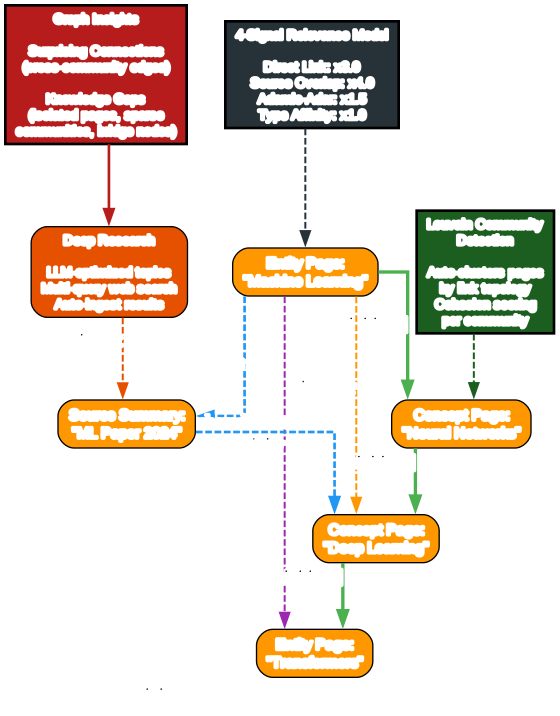
The original pattern mentions [[wikilinks]] for cross-references but has no graph analysis. LLM Wiki builds a full knowledge graph visualization and relevance engine.
Understanding the Knowledge Graph
4-Signal Relevance Model
Every pair of wiki pages gets a combined relevance score based on four signals:
| Signal | Weight | Description |
|---|---|---|
| Direct link | x3.0 | Pages linked via [[wikilinks]] |
| Source overlap | x4.0 | Pages sharing the same raw source (via frontmatter sources[]) |
| Adamic-Adar | x1.5 | Pages sharing common neighbors (weighted by neighbor degree) |
| Type affinity | x1.0 | Bonus for same page type (entity to entity, concept to concept) |
Source overlap has the highest weight because pages derived from the same source document are likely to be semantically related, even if they do not directly link to each other.
Graph Visualization
The graph is rendered with sigma.js and graphology, using the ForceAtlas2 layout algorithm. Node colors indicate page type or community, with sizes scaled by link count using square root scaling. Edge thickness and color reflect relevance weight (green for strong, gray for weak). Hover interactions keep neighbors visible while dimming non-neighbors, and edge labels show relevance scores. Position caching prevents layout jumps when data updates.
Louvain Community Detection
Using the graphology-communities-louvain algorithm, the system automatically discovers knowledge clusters based on link topology, independent of predefined page types. Each community is scored by intra-edge density (actual edges divided by possible edges). Low-cohesion clusters (less than 0.15) are flagged with a warning. A 12-color palette provides distinct visual separation between clusters. The community legend shows the top node label, member count, and cohesion per cluster.
Graph Insights
The system automatically analyzes graph structure to surface actionable insights:
- Surprising Connections: Detects unexpected relationships including cross-community edges, cross-type links, and peripheral-to-hub couplings. A composite surprise score ranks the most noteworthy connections. These are dismissable.
- Knowledge Gaps: Identifies isolated pages (degree less than or equal to 1), sparse communities (cohesion less than 0.15 with at least 3 pages), and bridge nodes (connecting 3 or more clusters).
- Deep Research: Knowledge gaps and bridge nodes have a Deep Research button that triggers LLM-optimized research with domain-aware topics. The system reads
overview.mdandpurpose.mdfor context, then generates search queries. Research is done via Tavily, SerpApi, or SearXNG, and results are auto-ingested into the wiki.
Rust Backend Chat Agent and MCP Server
Chat runs through a Rust backend Agent runtime rather than a browser-only TypeScript loop. The agent can use tools, manage skills, generate workspace files, and stream tool events.

Understanding the Agent and MCP Server
Rust Backend Chat Agent
The agent is a tool-using runtime built in Rust. It can choose from seven tool categories:
- Wiki Search: Tokenized search plus graph expansion retrieval
- Source Search: Search
raw/sources/for original document content - Graph Search: 4-signal relevance traversal across the knowledge graph
- Web Search: Tavily, SerpApi, or SearXNG JSON API
- Workspace Files: Generate Markdown, HTML, images, and other files under
agent-workspace/ - Shell Approval: Run approved shell commands with user consent
- Skill File Reads: Read local
SKILL.mdfolders, select skills with/skillcompletion
Generated workspace outputs (Markdown, HTML, images, other files) appear as preview cards in the chat with quick folder access. The agent supports streaming tool events and cancellation.
Skill Management
The agent can scan project and user skill folders, enable or disable skills, and pick a skill per conversation with /skill completion. Skills are local SKILL.md folders that the agent reads on demand for instructions.
MCP Server
A built-in MCP (Model Context Protocol) server runs at 127.0.0.1:19828 and provides:
- Hybrid search (tokenized plus vector)
- File read
- Graph traversal
- Source rescan
The MCP server is bundled as a Tauri resource and built from the mcp-server/ directory. This allows external AI agents to query the knowledge base programmatically.
Agent Skill Installation
A ready-made agent skill (llm_wiki_skill) installs into Claude Code or Codex with one command (npx skills add ...). This lets external coding agents use the wiki as a knowledge source.
Chrome Web Clipper
A Chrome extension provides one-click web page capture with auto-ingest into the knowledge base. A keyboard shortcut for web clipping was added in v0.6.x.
Multi-Provider LLM Support
The system supports OpenAI, Anthropic, Google, Ollama, and Custom providers, each with provider-specific streaming and headers. Models can be configured per project, with Chat and Ingest routed independently. Custom providers, headers, and streaming output are all configurable.
Key Features
| Feature | Description |
|---|---|
| Two-step CoT ingest | LLM analyzes first, then generates wiki pages with source traceability |
| SHA256 incremental cache | Unchanged sources skipped automatically, saving tokens |
| Persistent ingest queue | Serial processing, crash recovery, auto-retry (3x), cancel/retry |
| 4-signal knowledge graph | Direct links, source overlap, Adamic-Adar, type affinity |
| Louvain communities | Auto-clustering with cohesion scoring, 12-color palette |
| Graph insights | Surprising connections, knowledge gaps, bridge nodes |
| Multi-phase retrieval | Tokenized + optional vector (LanceDB) + graph expansion + budget control |
| Rust backend agent | Tool-using chat runtime with 7 tool types, streaming events |
| MCP server | 127.0.0.1:19828 API for hybrid search, file read, graph traversal |
| Chrome web clipper | One-click page capture with auto-ingest |
| Agent skill | npx skills add for Claude Code / Codex integration |
| Multi-format parsing | PDF, DOCX, PPTX, XLSX, EPUB, MOBI, images, web clips, URLs |
| Obsidian compatible | Wiki directory works as Obsidian vault |
| Multi-conversation chat | Independent sessions with persistence, cited references, save to wiki |
| Mermaid rendering | Mermaid code blocks rendered in chat and preview |
| i18n | English + Chinese interface (react-i18next) |
Installation
Prerequisites
- Node.js 20+
- Rust 1.88+
- protoc (Protocol Buffers compiler)
- macOS:
brew install protobuf - Linux:
sudo apt install protobuf-compiler - Windows:
choco install protoc
- macOS:
Build from Source
git clone https://github.com/nashsu/llm_wiki.git
cd llm_wiki
npm install
npm --prefix mcp-server ci && npm run mcp:build   # mcp-server/dist bundled as Tauri resource
npm run tauri dev      # Development
npm run tauri build    # Production build
Download Prebuilt
Prebuilt binaries are available via GitHub Releases for macOS (ARM + Intel), Windows (.msi), and Linux (.deb / .AppImage). GitHub Actions CI/CD automates the builds.
Chrome Extension
The Chrome extension is in the extension/ directory. Load it as an unpacked extension in Chrome developer mode.
Plug Your AI Agent In
Install the agent skill into Claude Code or Codex with one command:
npx skills add nashsu/llm_wiki_skill
This gives your coding agent access to the wiki’s hybrid search, file read, graph traversal, and source rescan capabilities via the MCP server.
Troubleshooting
| Issue | Cause | Solution |
|---|---|---|
| Ingest fails on complex PDF | Built-in pdf-extract cannot handle layout | Enable MinerU Cloud or Local API in Settings |
| Vector search not working | LanceDB not initialized | Enable vector search in Settings, configure embedding endpoint |
| Recall is low without vector | Tokenized search misses semantic matches | Enable optional vector search (Phase 1.5) for 71.4% recall |
| Chinese search returns few results | CJK tokenization is bigram-based | Ensure Chinese is configured in language settings |
| Agent cannot use tools | MCP server not running | Check 127.0.0.1:19828 is accessible; rebuild mcp-server |
| Wiki not Obsidian-compatible | Missing .obsidian/ config | Re-export project or regenerate Obsidian config |
| Ollama models fail on ingest | Reasoning models produce thinking output | Fixed in v0.6.x: thinking disabled on Ollama path |
| Large source folders slow | Progressive rendering needed | Sources view renders progressively on scroll |
Conclusion
LLM Wiki represents a fundamental shift from retrieve-and-answer to compile-and-maintain. Instead of the LLM rediscovering knowledge from scratch on every question, the wiki is built once and kept current. The two-step chain-of-thought ingest produces higher quality pages than single-step generation. The 4-signal knowledge graph with Louvain community detection surfaces surprising connections and knowledge gaps that traditional search cannot find. The multi-phase retrieval pipeline with optional vector search achieves 71.4% recall, a significant improvement over the 58.2% baseline.
The Rust backend chat agent with 7 tool types and the MCP server at 127.0.0.1:19828 make the wiki accessible to external AI agents. The Chrome web clipper and agent skill installation provide multiple entry points for content. The Obsidian compatibility ensures the wiki remains portable and works with existing knowledge management workflows.
The project is actively developed by nash_su, with v0.6.11 currently on GitHub, 856 commits, 171 open issues, and multilingual documentation (English, Chinese, Japanese, Korean). The GPL v3 license ensures the software remains free and open.
Related Posts
- CowAgent: Open Source Super AI Assistant
- WeKnora: Tencent Open Source Knowledge Framework
- Open-Notebook: Open Source NotebookLM Alternative

Enjoyed this post? Never miss out on future posts by following us


