Introduction
Plane has emerged as a powerful open-source project management platform, rapidly gaining traction in the developer community. With over 52,000 stars on GitHub and 1,514 stars added in just one week, Plane demonstrates the growing demand for self-hosted project management solutions. The platform offers a modern alternative to established tools like Jira, Linear, Monday, and ClickUp, providing teams with complete control over their project management workflows while maintaining the features and functionality that modern teams require.
The project, maintained by Makeplane, represents a significant shift in the project management landscape. By combining the flexibility of open-source software with the feature-rich experience of commercial platforms, Plane addresses the pain points that many teams face with proprietary solutions. The platform supports multiple deployment options including Docker and Kubernetes, making it accessible to teams of all sizes and technical backgrounds.
What is Plane?
Plane is a comprehensive project management platform designed to help teams organize, track, and execute their work efficiently. The platform provides a unified interface for managing tasks, sprints, documentation, and project roadmaps without the complexity of maintaining the tool itself. Unlike traditional project management software that often requires significant infrastructure investment, Plane offers both cloud-based and self-hosted options to suit different organizational needs.
The platform distinguishes itself through its modular architecture and focus on developer experience. Teams can choose between using Plane Cloud for rapid deployment or self-hosting the platform to maintain complete control over their data and infrastructure. This flexibility makes Plane suitable for startups looking to avoid vendor lock-in, established companies requiring on-premise solutions, and open-source enthusiasts who want to contribute to the project.
Installation options include Docker Compose for quick setup and Kubernetes for production environments, ensuring that teams can deploy Plane according to their specific infrastructure requirements. The platform’s documentation provides comprehensive guides for both installation methods, making it accessible to teams with varying levels of DevOps expertise.
Key Features
Work Items
Work Items form the core of Plane’s task management system. The platform provides a robust rich text editor that supports file uploads, enabling teams to create detailed task descriptions with attachments. Work Items can be organized using sub-properties and linked to related issues, creating a comprehensive network of dependencies and relationships. This hierarchical organization helps teams maintain clarity about task relationships and progress tracking.
The editor supports various formatting options including headings, lists, code blocks, and media attachments, making it easy to create detailed task specifications. Teams can add custom fields, assign priorities, set due dates, and track status changes through an intuitive interface. The ability to reference related issues directly within task descriptions creates a connected workflow that reduces context switching and improves team communication.
Cycles
Cycles provide teams with a sprint management system that maintains momentum through structured work periods. The platform includes burn-down charts and other visualization tools that help teams track progress against their sprint goals. These charts provide real-time insights into team velocity and help identify potential blockers before they impact delivery timelines.
The cycle management system integrates seamlessly with Work Items, allowing teams to create, assign, and track tasks within specific timeframes. Teams can visualize their progress through multiple views including burndown charts, velocity charts, and task lists. The system automatically calculates completion percentages and highlights tasks that are at risk of missing deadlines, enabling proactive management of sprint commitments.
Modules
Modules help teams break down complex projects into smaller, manageable components. This modular approach simplifies project organization by allowing teams to group related work items into logical units. Each module can have its own set of tasks, dependencies, and milestones, making it easier to track progress on large-scale initiatives.
The module system supports nested structures, enabling teams to create hierarchical project breakdowns that reflect their organizational structure. This organization helps teams maintain clarity about project scope and deliverables while providing stakeholders with a high-level view of progress. Modules can be assigned to specific teams or individuals, ensuring accountability and clear ownership of deliverables.
Views
Views provide teams with customizable dashboards that display only the most relevant information for their current work. The platform supports multiple view types including list views, board views, and calendar views, allowing teams to choose the visualization that best suits their workflow. Saved filters and custom layouts enable teams to create personalized workspaces that reduce information overload.
Teams can share views with colleagues, creating collaborative workspaces where everyone has access to the same information. The view system supports advanced filtering options including custom fields, status filters, priority levels, and assignee assignments. This flexibility ensures that teams can create views tailored to their specific needs without requiring custom development work.
Pages
Pages offer a powerful documentation and knowledge management system integrated directly into the project management workflow. The platform provides a rich text editor with AI capabilities, enabling teams to capture ideas, document processes, and create knowledge bases. Pages support formatting options including headings, lists, code blocks, images, and hyperlinks, making it easy to create comprehensive documentation.
The AI-powered features help teams convert notes into actionable items and suggest improvements to existing content. Pages can be linked to Work Items and Modules, creating a connected ecosystem where documentation and task management work together seamlessly. This integration ensures that documentation remains up-to-date and directly tied to project work.
Analytics
Analytics provides teams with real-time insights across all Plane data. The platform visualizes trends, identifies blockers, and helps teams keep projects moving forward. The analytics dashboard includes metrics such as task completion rates, velocity trends, and resource allocation, providing a comprehensive view of project health.
The analytics system supports custom reporting and data export, enabling teams to generate detailed reports for stakeholders. Teams can track key performance indicators specific to their workflows and create visualizations that highlight areas for improvement. The real-time nature of the analytics ensures that teams always have access to current data for decision-making.
Architecture
Plane’s architecture follows a modern, microservices-based approach that separates concerns while maintaining a cohesive user experience. The platform consists of multiple interconnected services including a Django-based API, a React-based frontend, a WebSocket service for real-time collaboration, and supporting infrastructure for authentication, file storage, and background tasks.
The backend API is built with Django, providing robust RESTful endpoints for all platform functionality. Django’s built-in authentication system, ORM, and admin interface form the foundation of the API, while Celery handles asynchronous tasks such as email notifications, file processing, and background jobs. The API follows RESTful conventions and includes comprehensive error handling and validation.
The frontend is built with React and TypeScript, leveraging modern JavaScript frameworks to create a responsive and performant user interface. The frontend communicates with the API through REST endpoints and WebSocket connections for real-time updates. The use of TypeScript ensures type safety and improves developer experience during development and maintenance.
The collaboration service uses WebSocket technology to enable real-time document editing and updates. This service handles concurrent editing, conflict resolution, and synchronization across multiple users. The architecture supports high concurrency and ensures that all users see the same data in real-time, creating a seamless collaborative experience.
The platform uses Redis for caching and message brokering, improving performance and enabling real-time features. PostgreSQL serves as the primary database, storing all project data, user information, and configuration. The architecture supports horizontal scaling through load balancing and database replication, ensuring high availability and performance under heavy loads.
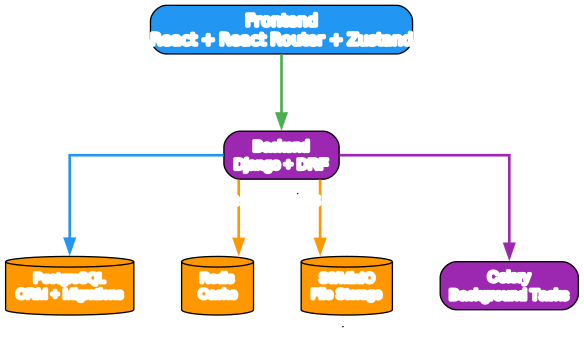
The architecture diagram illustrates the core components of Plane’s system design. The frontend React application communicates with the Django API through REST endpoints, while the WebSocket service enables real-time collaboration features. Redis handles caching and message brokering, improving performance and enabling features like live updates and notifications. PostgreSQL stores all application data, including projects, tasks, and user information. Celery manages background tasks such as email notifications and file processing, ensuring that these operations don’t block the main application threads. This modular architecture allows teams to scale individual components as needed while maintaining overall system stability.
User Workflow
Getting started with Plane follows a straightforward workflow that enables teams to quickly adopt the platform and begin managing their projects. The initial setup involves creating a workspace, which serves as the top-level container for all projects and teams. Workspaces can be customized with branding, settings, and permissions to match organizational requirements.
Once a workspace is created, teams can create projects within it. Each project represents a specific initiative or work stream and can have its own set of Work Items, Cycles, Modules, and Views. Projects can be organized hierarchically, allowing teams to manage multiple related initiatives within a single workspace. The project creation process includes templates for common project types, helping teams get started quickly.
Teams create Work Items to represent individual tasks or deliverables. Each Work Item includes a title, description, status, priority, assignee, and due date. The rich text editor supports attachments, formatting, and related issue references, enabling teams to create comprehensive task specifications. Work Items can be organized into Modules for larger initiatives and assigned to Cycles for sprint management.
Cycles represent time-boxed work periods, typically one week or two weeks, during which teams focus on completing specific Work Items. Teams can visualize progress through burn-down charts and other metrics. The cycle management system helps teams maintain momentum and track progress against sprint goals. At the end of each cycle, teams review completed work, plan the next cycle, and adjust priorities as needed.
Views provide customized perspectives on project data. Teams can create different views for different purposes, such as a board view for daily standups, a list view for detailed task management, or a calendar view for scheduling. Views can be shared with team members, creating collaborative workspaces where everyone has access to the same information in the format that works best for them.
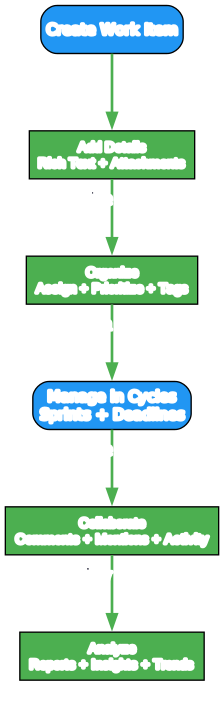
The workflow diagram demonstrates the typical user journey through Plane’s platform. Users begin by creating a workspace, which serves as the organizational container for all projects. Within each workspace, teams create projects that represent specific initiatives or work streams. Work Items represent individual tasks or deliverables and can include detailed specifications, attachments, and related issue references. Teams organize Work Items into Modules for larger initiatives and assign them to Cycles for sprint management. Views provide customized perspectives on project data, allowing teams to access information in the format that best suits their workflow. The cycle management system helps teams maintain momentum through structured work periods, with burn-down charts providing visibility into progress. This workflow ensures that teams can manage projects efficiently while maintaining clarity and accountability throughout the development process.
Tech Stack
Plane’s technology stack reflects modern web development best practices, combining mature, well-supported frameworks with cutting-edge tools for performance and developer experience. The backend is built with Django, a high-level Python web framework that provides robust features for rapid development and clean, pragmatic design. Django’s built-in ORM, authentication system, and admin interface significantly reduce development time while providing enterprise-grade functionality.
The frontend utilizes React with TypeScript, leveraging the React ecosystem for component-based architecture and TypeScript for type safety. React’s virtual DOM and efficient rendering ensure a responsive user experience, while TypeScript catches errors during development and improves code maintainability. The frontend uses modern JavaScript features and follows React best practices for performance and scalability.
The collaboration service uses WebSocket technology through the Hocuspocus library, enabling real-time document editing and updates. This service handles concurrent editing, conflict resolution, and synchronization across multiple users. The use of WebSocket technology ensures that all users see the same data in real-time, creating a seamless collaborative experience.
The platform uses PostgreSQL as its primary database, chosen for its reliability, performance, and feature set. PostgreSQL’s advanced data types, indexing capabilities, and ACID compliance make it ideal for storing complex project data. Redis serves as a caching layer and message broker, improving performance and enabling real-time features like live updates and notifications.
Celery handles asynchronous tasks such as email notifications, file processing, and background jobs. This decoupling ensures that these operations don’t block the main application threads and can be scaled independently. The task queue system provides reliability and fault tolerance, ensuring that critical operations complete successfully even under heavy load.
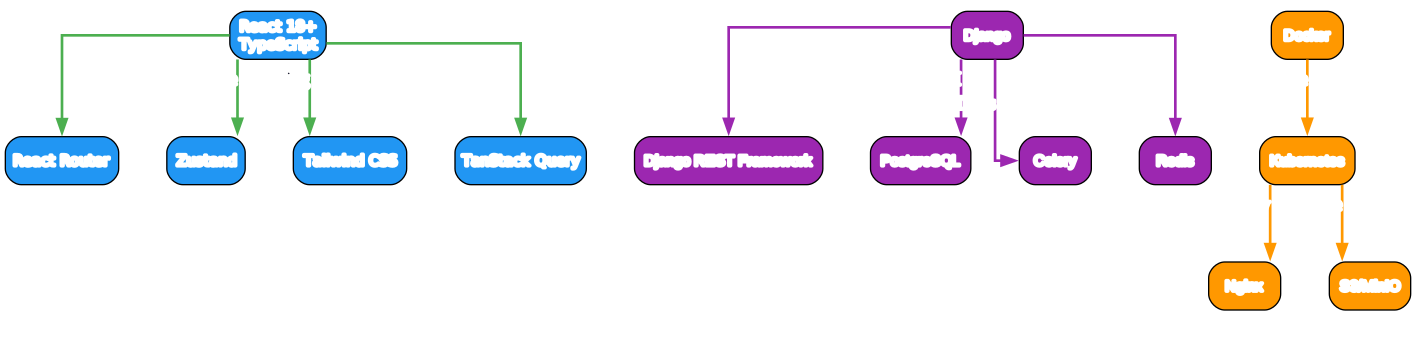
The tech stack diagram illustrates the technology choices that power Plane’s platform. The Django backend provides RESTful API endpoints with built-in authentication, ORM, and admin interface. The React frontend with TypeScript delivers a responsive user interface with type safety. WebSocket technology through Hocuspocus enables real-time collaboration features. PostgreSQL stores all application data with ACID compliance and advanced indexing. Redis handles caching and message brokering for performance and real-time features. Celery manages asynchronous tasks for background operations. This combination of mature, well-supported technologies ensures long-term maintainability and provides a solid foundation for future development.
Comparison
Plane competes directly with established project management platforms including Jira, Linear, Monday, and ClickUp. Each platform offers unique strengths, but Plane distinguishes itself through its open-source nature and self-hosting capabilities. Unlike proprietary solutions, Plane allows teams to maintain complete control over their data and infrastructure, which is particularly important for organizations with strict data governance requirements.
Jira offers extensive customization and integration options but comes with a steep learning curve and high licensing costs. Linear provides an elegant, streamlined interface but lacks the self-hosting option and open-source community support. Monday.com offers visual project management with a user-friendly interface but similar licensing restrictions as other commercial platforms. ClickUp provides all-in-one functionality but can become complex and expensive at scale.
Plane bridges the gap between these platforms by offering the self-hosting option of open-source software with the feature set of commercial platforms. The platform’s modular architecture allows teams to choose which features to use, avoiding the complexity of all-in-one solutions. The open-source nature means that teams can contribute to the project, customize it to their needs, and avoid vendor lock-in.
The licensing model also differs significantly. Jira and Linear require paid subscriptions that scale with team size and feature requirements. Monday.com and ClickUp offer free tiers but charge premium prices for advanced features. Plane is available under the AGPL-3.0 license, which allows free use and modification but requires sharing of modifications under the same license. This model aligns with the open-source philosophy while ensuring that improvements benefit the entire community.
Use Cases
Plane is suitable for a wide range of teams and organizations, from small startups to large enterprises. Software development teams can use Plane to manage sprints, track bugs, and coordinate feature development. The platform’s Work Items and Cycles provide the structure needed for agile development workflows, while the documentation features support technical writing and knowledge management.
Product management teams benefit from Plane’s Modules and Views, which help organize product roadmaps and track progress on multiple initiatives simultaneously. The analytics dashboard provides visibility into team velocity and project health, enabling data-driven decision-making. The ability to link documentation directly to tasks ensures that product requirements remain up-to-date and accessible to all stakeholders.
Marketing teams can use Plane to manage campaigns, track deliverables, and coordinate cross-functional projects. The platform’s customizable views allow teams to create dashboards that focus on the metrics that matter most for marketing initiatives. The collaboration features enable real-time communication and document sharing, improving team coordination.
Research and development teams can leverage Plane’s structured approach to manage experiments, track findings, and document results. The rich text editor supports complex documentation with attachments and formatting options. The ability to link related issues and create hierarchical structures helps teams maintain clarity in complex research projects.
Educational institutions can use Plane to manage course projects, track student assignments, and coordinate faculty work. The platform’s modular structure allows for different project types and workflows. The self-hosting option ensures that institutions maintain control over student data and can customize the platform to meet their specific requirements.
Getting Started
Getting started with Plane is straightforward, with multiple deployment options available to suit different needs. For teams that want to get started quickly, Plane Cloud provides a free account with no infrastructure management required. Simply sign up at app.plane.so and begin creating workspaces and projects immediately.
For teams that prefer self-hosting, Plane offers comprehensive deployment guides for both Docker and Kubernetes. The Docker Compose setup is ideal for development and small production environments, requiring minimal configuration and infrastructure. The Kubernetes deployment provides enterprise-grade scalability and reliability for larger organizations.
The installation process for Docker involves cloning the repository and running the setup script, which automatically configures all necessary services. The platform uses environment variables for configuration, making it easy to customize settings such as database credentials, Redis connections, and email configuration. The documentation provides detailed examples for common configurations.
Once installed, teams can begin creating workspaces and projects. The platform includes templates for common project types, helping teams get started quickly. The onboarding process guides users through creating their first workspace, project, and Work Items. The intuitive interface makes it easy for teams to adopt the platform without extensive training.
For teams that need help getting started, Plane provides comprehensive documentation at docs.plane.so and developers.plane.so. The documentation includes guides for installation, configuration, usage, and customization. The community forum at forum.plane.so provides a space for users to ask questions, share ideas, and contribute to the project.
Conclusion
Plane represents a significant advancement in open-source project management, offering teams a powerful alternative to commercial platforms. With its comprehensive feature set, modern architecture, and flexible deployment options, Plane addresses the needs of teams across various industries and use cases. The platform’s open-source nature ensures that teams maintain control over their data and can customize the software to meet their specific requirements.
The rapid growth of Plane, evidenced by its impressive GitHub metrics, demonstrates the demand for self-hosted project management solutions. The active community and comprehensive documentation make it accessible to teams of all sizes and technical backgrounds. Whether teams choose Plane Cloud for rapid deployment or self-hosting for complete control, the platform provides the tools needed to manage projects efficiently and effectively.
As the project continues to evolve, the open-source community ensures that Plane remains relevant and responsive to changing needs. The platform’s modular architecture and modern technology stack provide a solid foundation for future development. For teams seeking a project management solution that combines the power of commercial platforms with the freedom of open-source software, Plane offers an compelling choice.
Resources:

Enjoyed this post? Never miss out on future posts by following us


