Learn Apache Kafka in a Single Post: Complete Tutorial From Topics and Partitions to Consumer Groups and Kafka Streams
Apache Kafka is a distributed event streaming platform — a durable, partitioned, replicated commit log that can handle millions of events per second. It’s the backbone of real-time data pipelines at LinkedIn (where it was born), Uber, Netflix, and every company that needs to move events between systems at scale. This single post teaches the whole platform in five stages, with hand-drawn diagrams and runnable code.
Learning Roadmap
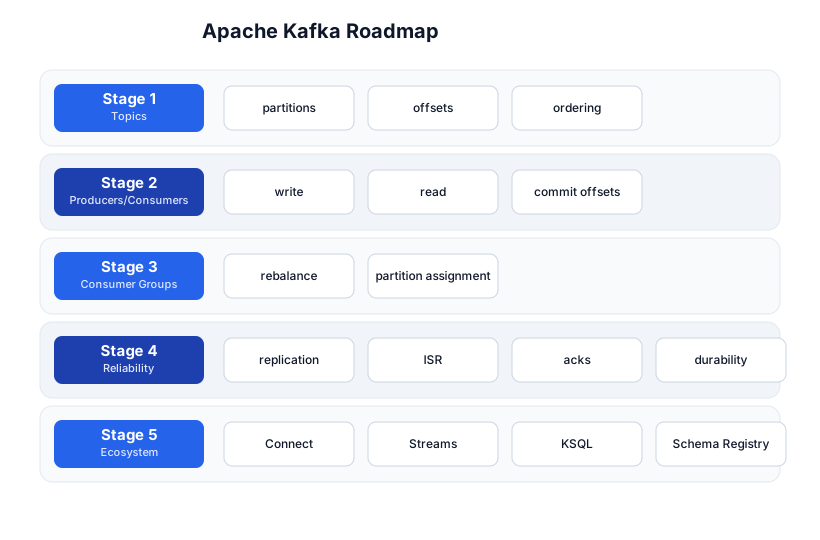
The roadmap moves from the data model (Stage 1), through the write/read API (Stage 2), the consumer-group coordination (Stage 3), the reliability guarantees (Stage 4), and the stream-processing ecosystem (Stage 5).
Stage 1 — Topics, Partitions, Offsets
The core abstraction: an append-only, partitioned log
Kafka stores events in topics. A topic is split into partitions, and each partition is an append-only, ordered log of records (key + value + timestamp). Every record in a partition gets a sequential offset — its position in the log.
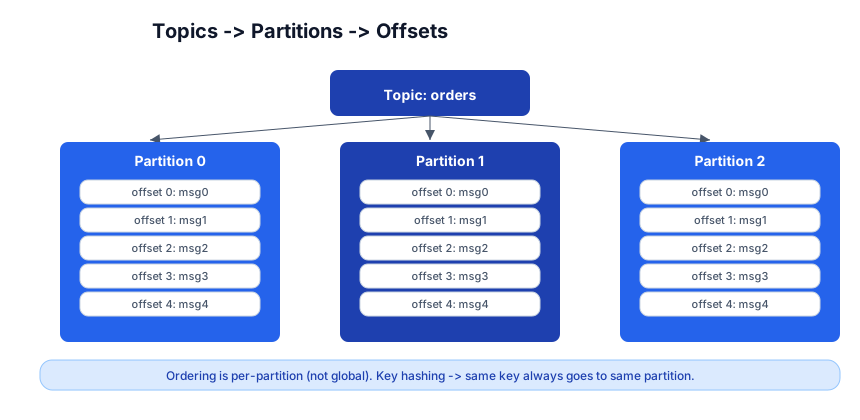
Topic: orders
├── Partition 0: [msg0] [msg1] [msg2] [msg3] [msg4]
├── Partition 1: [msg0] [msg1] [msg2]
└── Partition 2: [msg0] [msg1] [msg2] [msg3]
Key ordering guarantees
- Ordering is per-partition, not per-topic. Records within one partition arrive in the order they were written; records across partitions have no guaranteed order.
- Key-based routing: if a producer sends a record with a key (e.g.
order_id=42), Kafka hashes the key to pick a partition — so all records with the same key go to the same partition, preserving their order. - No key → round-robin (or sticky partitioner in newer Kafka).
Pitfall: If you need all events for a user to be ordered, use the user ID as the key. But this creates hot partitions if one user generates disproportionate traffic. The tradeoff between ordering and even distribution is the fundamental Kafka design decision.
Partitions = parallelism
The number of partitions is the maximum parallelism for consumers: a consumer group can have at most N consumers for an N-partition topic (extra consumers sit idle). Choose your partition count carefully — you can add partitions later, but existing key-to-partition mappings change (breaking ordering for existing keys).
Stage 2 — Producers and Consumers
Producer — write to Kafka
from kafka import KafkaProducer
import json

producer = KafkaProducer(
    bootstrap_servers=['localhost:9092'],
    value_serializer=lambda v: json.dumps(v).encode('utf-8'),
    key_serializer=lambda k: k.encode('utf-8'),
)

producer.send('orders', key='user_42', value={'item': 'book', 'price': 29.99})
producer.flush()       # ensure all sent before exiting
The producer connects to any broker (bootstrap_servers), gets the cluster metadata, and sends records to the partition leader for the target topic.
Consumer — read from Kafka
from kafka import KafkaConsumer
import json

consumer = KafkaConsumer(
    'orders',
    bootstrap_servers=['localhost:9092'],
    group_id='order-processor',
    auto_offset_reset='earliest',
    enable_auto_commit=True,
    value_deserializer=lambda m: json.loads(m.decode('utf-8')),
)

for message in consumer:
    print(f"partition={message.partition} offset={message.offset} key={message.key} value={message.value}")
The consumer reads records, tracks its position (offset) in each partition, and periodically commits the offset (so it doesn’t re-read on restart).
Offsets and commit
auto_offset_reset=earliest— if no committed offset exists (new consumer group), start from the beginning.latest(default) = only new records.enable_auto_commit=True— Kafka auto-commits offsets periodically (default 5s). Simple, but can cause at-most-once (if you crash after auto-commit but before processing) or at-least-once with duplicates (if you process, then crash before the next auto-commit).- Manual commit —
consumer.commit()after processing gives you control over the delivery semantics (Stage 4).
Stage 3 — Consumer Groups
The consumer group model
A consumer group is a set of consumers that jointly read a topic. Kafka assigns each partition to exactly one consumer in the group — so every record is processed by exactly one consumer in the group, but the group as a whole reads all partitions in parallel.
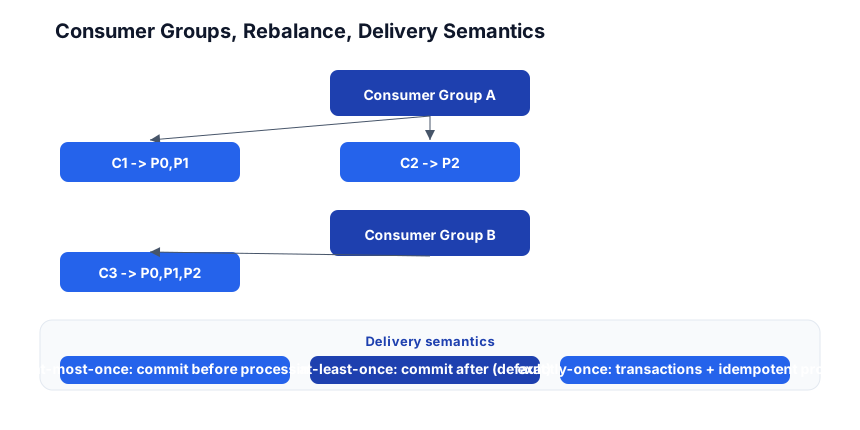
Topic: orders (3 partitions)
Consumer Group A:
  C1 -> P0, P1
  C2 -> P2

Consumer Group B (separate):
  C3 -> P0, P1, P2
- Within a group: each partition → one consumer (no duplicates, parallel processing).
- Across groups: every group independently reads the full topic (pub/sub — multiple downstream systems each get all events).
Rebalance
When a consumer joins or leaves the group (scale up, crash, deploy), Kafka rebances — reassigns partitions across the remaining consumers. During a rebalance, no consumer in the group can read (brief pause). Modern Kafka uses cooperative rebalancing (incremental, only moves the partitions that need to move) to minimize the pause.
Pitfall: A long-running consumer that doesn’t send heartbeats gets kicked out of the group (thought dead), triggering a rebalance. Use
max.poll.interval.msto tell Kafka how long your processing takes; if you exceed it, Kafka rebalances and you get duplicate processing.
Partition assignment strategies
- Range (default) — partitions by range; can be uneven.
- Round-robin — evenly distributes; good for uniform workloads.
- Sticky — minimizes partition movement on rebalance (fewer duplicates).
- Cooperative-sticky — the modern default; no “stop-the-world” rebalance.
Stage 4 — Reliability: Replication, ISR, Acks
Replication
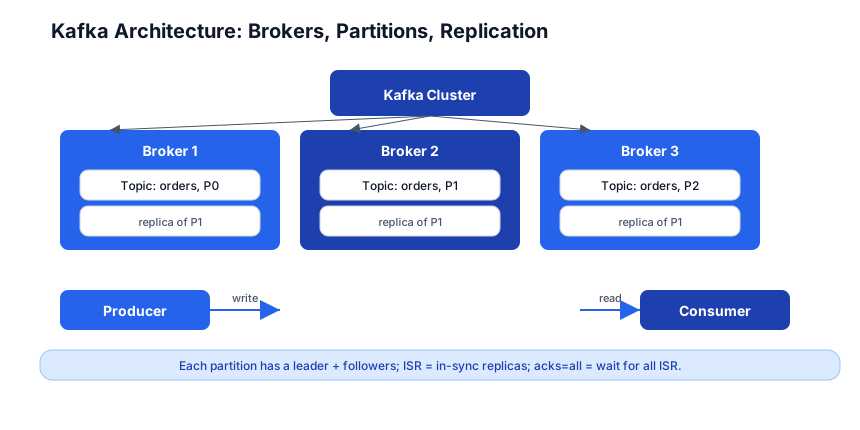
Every partition has a leader (handles all reads + writes) and N-1 followers (replicate the leader’s log). The replication factor (typically 3) determines how many broker failures you can tolerate without data loss.
ISR (In-Sync Replicas)
The ISR is the set of replicas that are fully caught up with the leader. If a follower falls behind, it’s removed from the ISR. The leader only acknowledges writes that are replicated to all ISR members (with acks=all).
acks — the producer’s durability knob
acks | What it means | Tradeoff |
|---|---|---|
acks=0 | fire and forget (don’t wait) | fastest, can lose data |
acks=1 | wait for leader only | fast, can lose data if leader crashes before replicating |
acks=all (or -1) | wait for all ISR replicas | safest, slightly slower |
Use acks=all for any data you can’t afford to lose. The latency cost is small; the durability gain is large.
Delivery semantics
| Semantic | How | Risk |
|---|---|---|
| At-most-once | commit offset before processing | may lose messages (crash after commit, before process) |
| At-least-once (default) | process, then commit offset | may duplicate (crash after process, before commit) |
| Exactly-once | transactions + idempotent producer | no loss, no dup; requires Kafka transactions + a transactional consumer |
Exactly-once is the hardest: it requires the producer to be idempotent (enable.idempotence=true, default in newer Kafka) and the consumer to read within a transaction (read-process-write pattern where the output is another Kafka topic or a database in the same transaction). Most real systems use at-least-once + make the consumer idempotent (dedup by key).
Pitfall: At-least-once means your consumer must handle duplicates. The classic pattern: use the record key or a dedup ID in a database unique constraint. “Kafka guarantees delivery; your app guarantees idempotency.”
min.insync.replicas
Set min.insync.replicas=2 with replication.factor=3 — this means at least 2 of 3 replicas must be in-sync for a write to succeed with acks=all. If only 1 is in sync, Kafka rejects the write (rather than accepting a write that could be lost). This is the durability vs availability tradeoff: you’d rather reject a write than lose it.
Stage 5 — The Ecosystem
Kafka Connect — no-code integration
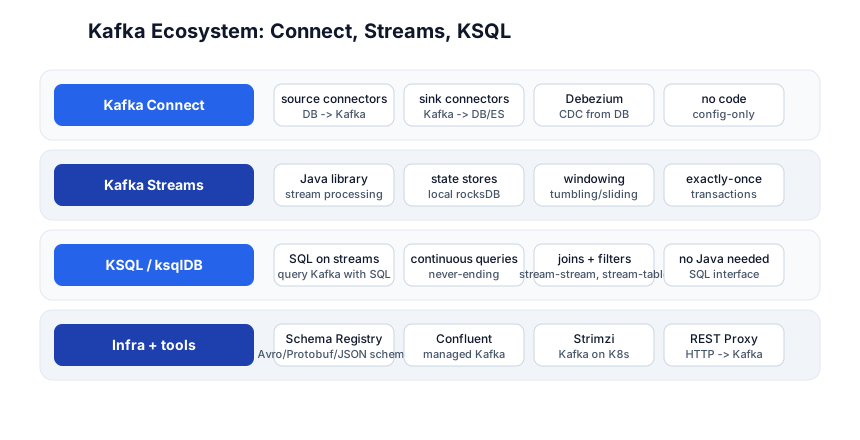
Kafka Connect is a framework for moving data in/out of Kafka without writing code:
- Source connectors — read from external systems into Kafka (Debezium for CDC from Postgres/MySQL, JDBC connector, file connector).
- Sink connectors — write from Kafka to external systems (Elasticsearch, S3, JDBC, Redis).
// Debezium source connector config (CDC from Postgres)
{
  "name": "pg-orders-connector",
  "config": {
    "connector.class": "io.debezium.connector.postgresql.PostgresConnector",
    "database.hostname": "postgres",
    "database.dbname": "myapp",
    "topic.prefix": "pg",
    "table.include.list": "public.orders"
  }
}
Connect runs as its own cluster (separate from the Kafka brokers); you configure connectors via a REST API, and they run continuously, fault-tolerantly.
Kafka Streams — stream processing in Java
Kafka Streams is a Java library for processing Kafka topics in real time:
KStream<String, Order> orders = builder.stream("orders");
KStream<String, Order> expensive = orders.filter((k, v) -> v.amount > 100);
expensive.to("expensive-orders");
Features: state stores (local RocksDB for aggregations/joins), windowing (tumbling, sliding, session windows), exactly-once via transactions, and interactive queries (query the state store directly). It runs as a library inside your app — no separate processing cluster.
ksqlDB — SQL on Kafka
ksqlDB lets you query Kafka with SQL:
CREATE STREAM orders (id INT, amount DOUBLE, user_id VARCHAR)
  WITH (KAFKA_TOPIC='orders', VALUE_FORMAT='JSON');

CREATE STREAM expensive AS
  SELECT * FROM orders WHERE amount > 100;
Continuous, never-ending queries — SELECT runs forever, emitting results as new events arrive. Supports joins (stream-stream, stream-table), filters, aggregations, and windowing. For teams that don’t want to write Java, ksqlDB is the path to stream processing.
Schema Registry
Kafka stores raw bytes; it doesn’t know the schema. Schema Registry (from Confluent) stores Avro/Protobuf/JSON schemas and enforces compatibility — producers register a schema, consumers fetch it, and the registry rejects incompatible schema changes (e.g. removing a required field). This is how you evolve a Kafka topic’s format without breaking consumers.
Strimzi — Kafka on Kubernetes
Strimzi is the operator that runs Kafka on Kubernetes: it manages brokers, ZooKeeper/KRaft, topics, users, and ACLs as Kubernetes custom resources. Deploy Kafka with kubectl apply -f kafka.yaml and Strimzi handles the lifecycle.
Confluent / managed Kafka
- Confluent Cloud — managed Kafka (the company founded by Kafka’s creators).
- Amazon MSK, Azure Event Hubs (Kafka protocol), Aiven Kafka — other managed options.
- For learning: run Kafka locally with Docker (
confluentinc/cp-kafka+ KRaft mode, no ZooKeeper needed).
Quick-Start Checklist
- Run Kafka locally —
docker runwith KRaft mode (no ZooKeeper needed); or use Confluent’sdocker-compose. - Create a topic —
kafka-topics --create --topic orders --partitions 3 --replication-factor 1. - Write a producer — send 10 messages with keys; see them distribute across partitions.
- Write a consumer — read them back; observe offsets and partition assignment.
- Run two consumers in one group — see partition split (P0,P1 → C1; P2 → C2).
- Run a second consumer group — see it independently read all messages (pub/sub).
- Set
acks=allon the producer; understand the durability guarantee. - Make your consumer idempotent — dedup by key; handle at-least-once duplicates.
- Try Kafka Connect with the file source/sink connector (no-code pipeline).
- Try ksqlDB —
SELECT * FROM orders EMIT CHANGESand watch the stream.
Common Pitfalls
- Too few partitions — limits consumer parallelism; you can’t have more consumers than partitions (extras sit idle). Choose partition count based on your target throughput / consumer count.
- Adding partitions later — changes key-to-partition mapping, breaking ordering for existing keys. Pick the count upfront.
- Hot partitions — one key generates disproportionate traffic; the partition for that key is overloaded. Use a more granular key or a custom partitioner.
- Auto-commit in production — can cause data loss (commit before processing) or duplicates. Use manual commit after processing for at-least-once.
- Not handling duplicates — at-least-once means your consumer WILL see duplicates. Make it idempotent.
acks=1for important data — if the leader crashes before replicating, data is lost. Useacks=all.- Long processing >
max.poll.interval.ms— Kafka thinks the consumer is dead, kicks it out, rebalances, and another consumer reprocesses. Increasemax.poll.interval.msor batch your processing. - No Schema Registry — without it, a schema change silently breaks consumers. Use Avro/Protobuf + Schema Registry for production topics.
Further Reading
- Kafka Docs — the official reference
- Kafka: The Definitive Guide by Neha Narkhede et al — the canonical book
- Confluent Docs — the company’s extended docs (Connect, Streams, ksqlDB, Schema Registry)
- Kafka Tutorials — free interactive courses
- Strimzi Docs — Kafka on Kubernetes
Related guides
Kafka is the event-streaming layer of the data + backend stack — these PyShine tutorials connect to it:
- Learn Redis in One Post — Redis Streams are the lighter alternative to Kafka; know when to use which.
- Learn PostgreSQL in One Post — Debezium streams CDC changes from Postgres to Kafka.
- Learn System Design in One Post — event-driven architecture, CQRS, and decoupling are system-design staples Kafka enables.
- Learn Kubernetes in One Post — Strimzi runs Kafka on K8s.
- Learn Python in One Post —
kafka-python/aiokafkafor Python producers + consumers.
Kafka’s power is that it’s a durable, partitioned, replicated log — not a smart queue, just a very fast, very reliable append-only data structure. The five stages here — topics, producers/consumers, consumer groups, reliability, ecosystem — cover everything from a one-partition topic to a multi-broker, replicated, Connect-sourced, Streams-processed, exactly-once pipeline. The two habits that pay off: choose your partition count carefully (it’s hard to change later), and make your consumers idempotent (at-least-once is the default, and duplicates are your problem, not Kafka’s). Run Kafka in Docker, produce 10 messages, consume them with two consumers in one group, and watch the partition split — once you’ve seen the consumer-group model in action, the rest follows. Enjoyed this post? Never miss out on future posts by following us