dotnet/skills: Microsoft’s 80+ AI Agent Skills for .NET, C#, and MSBuild, Explained
When Microsoft’s .NET team decided to teach AI coding agents how to work with C#, MSBuild, Blazor, MAUI, and the entire .NET ecosystem, they did not write a single tutorial. Instead, they published dotnet/skills — a curated marketplace of 15 plugins, 80+ skills, and 13 custom agents that follow the open agentskills.io standard and work with Claude Code, Copilot CLI, Cursor, Codex CLI, and VS Code. At 4,567 stars and +914 per week, it is the most comprehensive vendor-published agent skill repository on GitHub.
Every .NET developer who has tried to get an AI coding agent to correctly run dotnet test, generate binary logs, scaffold a Blazor project, or diagnose a build performance problem knows the frustration of the agent hallucinating APIs, inventing MSBuild targets, or choosing the wrong render mode. The dotnet/skills repository solves this by giving agents domain-specific instructions — written and maintained by the actual .NET team — that tell the agent exactly which commands to run, which patterns to follow, and which anti-patterns to avoid. This post breaks down four architectural views of the repository: the plugin taxonomy and multi-platform support, the SKILL.md anatomy and description routing system, the SkillValidator A/B evaluation pipeline that scientifically measures whether each skill actually helps, and the multi-agent test generation pipeline that coordinates seven specialized agents to write comprehensive unit tests.
1. Plugin Taxonomy and Multi-Platform Support (Diagram 1)
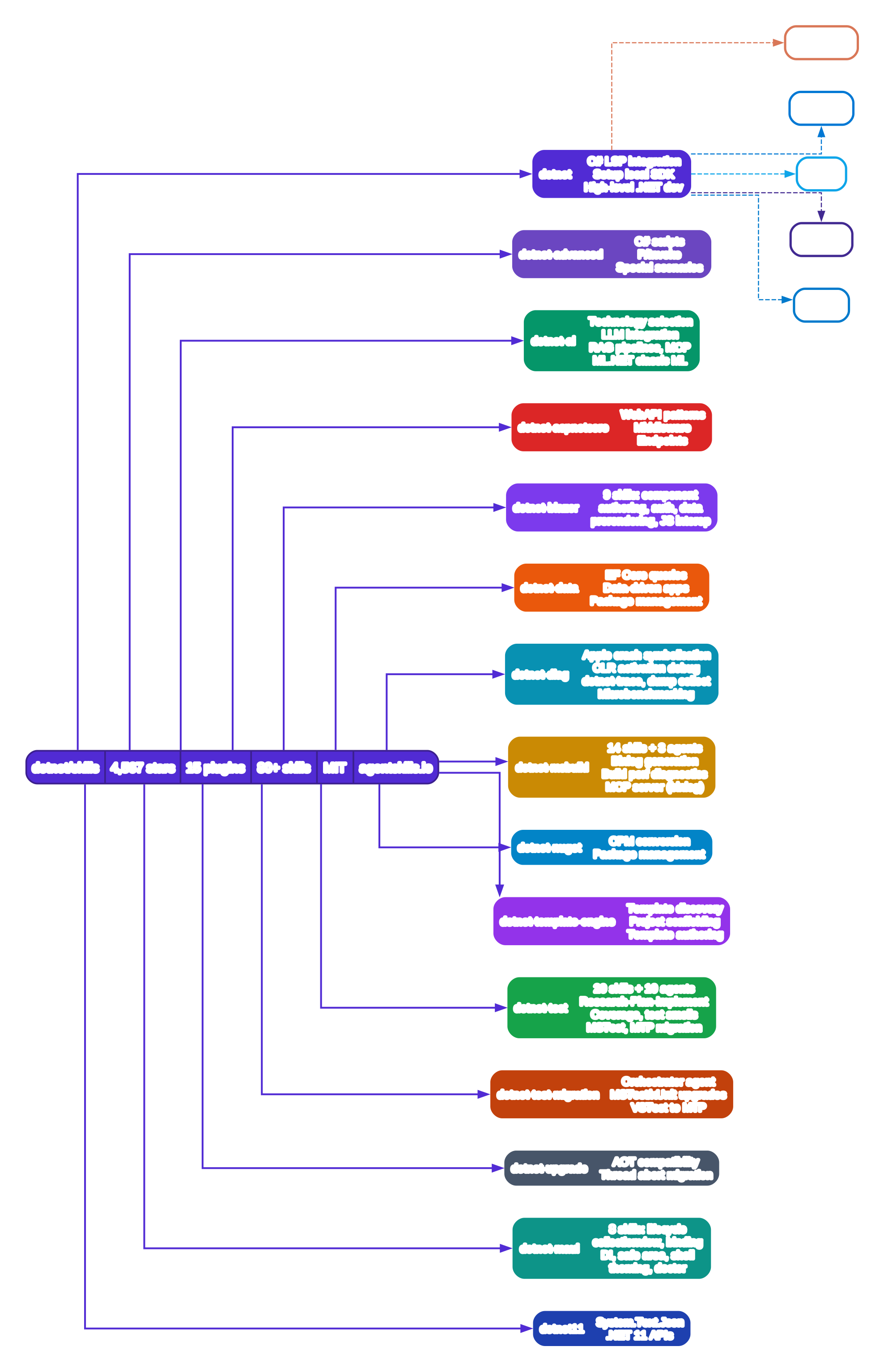
The opening diagram maps the full repository structure. At the root sits a single MIT-licensed repository that conforms to the agentskills.io open standard for agent skills. The root node records the headline statistics: 4,567 stars, 15 plugins, 80+ skills, MIT license. From the root, fifteen color-coded plugin nodes fan out, each representing a distinct .NET technology domain.
The dotnet base plugin (purple, v0.2.3) provides the foundation: a C# language server (LSP) integration that gives coding agents real-time type information, completions, and diagnostics as they edit C# files. The lsp.json configuration tells the agent runtime how to start the OmniSharp or C# Dev Kit LSP server and route its responses back into the agent’s context. The setup-local-sdk skill within this plugin handles the common “I need to install .NET SDK X.Y on this machine” request.
The dotnet-advanced plugin handles specialized scenarios: C# scripting with dotnet-script, P/Invoke signatures for native interop, and other edge cases that standard .NET development rarely touches but that AI agents consistently get wrong without guidance. The dotnet-ai plugin (green) is particularly interesting — it covers technology selection (choosing between ML.NET, Semantic Kernel, and Azure AI), LLM integration patterns, RAG pipeline construction, MCP server usage, and classic ML with ML.NET. This is the plugin that teaches agents how to build AI features within .NET applications themselves.
The dotnet-aspnetcore and dotnet-blazor plugins cover web development. The Blazor plugin alone ships 9 skills: create-blazor-project (which guides the agent through render mode selection — Static SSR, Interactive Server, Interactive WebAssembly, or Auto — based on a structured decision table), author-component, collect-user-input, configure-auth, coordinate-components, fetch-and-send-data, plan-ui-change, support-prerendering, and use-js-interop. Each skill contains a detailed SKILL.md file with frontmatter, decision rules, code examples, and anti-pattern warnings.
The dotnet-msbuild plugin (gold, v0.1.8) is the deepest plugin with 14 skills and 3 custom agents. It includes binlog-generation (teaching agents to always add the /bl:{} flag for binary logging), build-perf-diagnostics, msbuild-antipatterns, target-authoring, property-patterns, and incremental-build. The plugin also ships an MCP server — the binlog MCP server — that gives the agent programmatic access to binary log analysis tools via dotnet dnx Microsoft.AITools.BinlogMcp. The three custom agents (msbuild.agent.md, msbuild-code-review.agent.md, build-perf.agent.md) are specialized sub-agents that can be invoked for specific MSBuild tasks.
The dotnet-test plugin (green, 20 skills + 10 agents) is the largest by skill count. It includes test execution skills (run-tests, filter-syntax), test quality skills (test-anti-patterns, crap-score, test-smell-detection, assertion-quality), test generation skills (code-testing-agent, code-testing-extensions), and testability analysis skills (find-untested-sources, test-gap-analysis, testability-obstacle). The 10 custom agents form a coordinated pipeline — Researcher, Planner, Implementer, Tester, Linter, Fixer, Quality Auditor, and others — that work together to generate comprehensive test suites. Diagram 4 explores this pipeline in detail.
The remaining plugins cover dotnet-maui (8 skills for cross-platform mobile/desktop), dotnet-diag (5 skills for crash symbolication, trace collection, dump analysis, microbenchmarking), dotnet-upgrade (AOT compatibility, thread abort migration), dotnet-nuget (Central Package Management conversion), dotnet-template-engine, dotnet-test-migration (framework migration orchestrator), and dotnet11 (.NET 11-specific APIs like System.Text.Json changes).
The five platform nodes at the right of Diagram 1 — Claude Code, Copilot CLI, Cursor, Codex CLI, and VS Code — illustrate the cross-platform deployment story. Each platform has its own plugin discovery mechanism: Claude Code uses .claude-plugin/marketplace.json, Codex CLI uses .codex-plugin/plugin.json, Cursor uses .cursor-plugin/marketplace.json, VS Code uses settings.json configuration, and GitHub Copilot uses .github/plugin/marketplace.json. The repository ships all five manifests, so the same skills work everywhere.
2. SKILL.md Anatomy and Description Routing (Diagram 2)
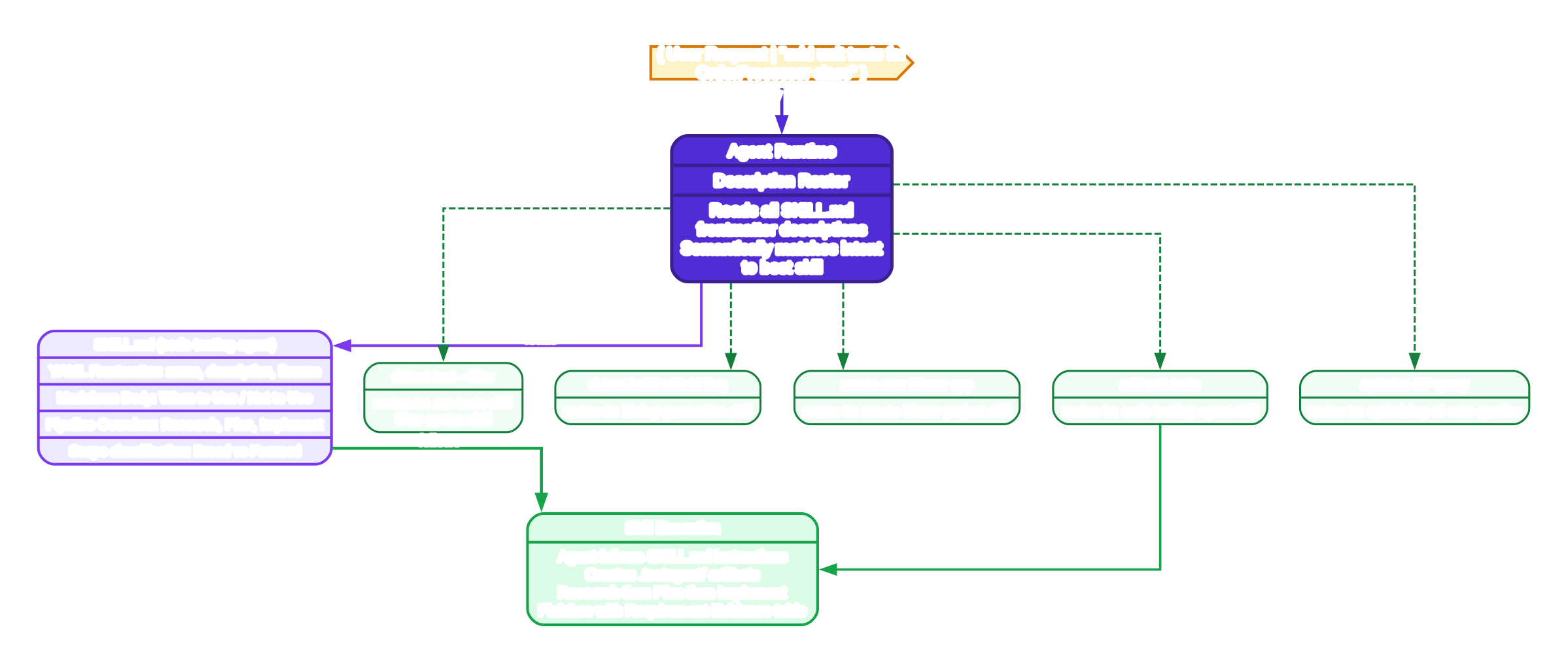
Diagram 2 reveals the internal anatomy of a single skill file and the runtime routing mechanism that decides which skill to activate for a given user request. The flow starts at the top with a user message — for example, “add unit tests for OrderProcessor class” — which enters the Agent Runtime node (purple). The runtime’s Description Router reads all available SKILL.md frontmatter description fields and semantically matches the user’s intent to the best skill.
The SKILL.md node (violet) shows the file structure. Every skill file has two parts: a YAML frontmatter block delimited by --- containing name, description, and license fields, followed by a Markdown body with structured sections. The description field is the most critical — it is what the description router reads to decide whether to activate this skill. Writing a good description is so important that the repository ships its own create-skill authoring skill (under .agents/skills/) with guidance on writing descriptions that the runtime will route to correctly.
Consider the code-testing-agent skill’s description as captured in the repository:
Generate or add unit tests for existing code, from one function to a complete project-wide suite. ALWAYS USE when asked to “write unit tests”, “add tests”, “generate tests”, “cover this untested method”… Polyglot: C#/.NET, Python/pytest, TS/JS, Go, Rust, Java, Ruby. DO NOT USE for only running/diagnosing tests, analyzing a coverage report, auditing test quality, or answering an MSTest API question without writing tests.
This description is a masterclass in skill authoring. It includes positive triggers (“ALWAYS USE when…”), negative exclusions (“DO NOT USE for…”), polyglot capability declaration, and edge case handling. The Description Router uses this text to route requests like “add unit tests” to code-testing-agent rather than to run-tests or writing-mstest-tests.
The five green routing example nodes show how different user intents map to different skills: “dotnet test –filter” routes to run-tests and filter-syntax; “dotnet build with bl flag” routes to binlog-generation; “create new Blazor app” routes to create-blazor-project; “add unit tests” routes to code-testing-agent; and “optimize EF query” routes to the EF Core optimization skill. Each routing decision happens automatically based on the semantic similarity between the user’s request and the skill descriptions.
The Skill Execution node (green, bottom) shows what happens after routing. The agent loads the full SKILL.md body and follows its instructions — creating .testagent/ directory artifacts, executing the Research-Plan-Implement pipeline, and finishing with a compact Requirement-Evidence table where each requested behavior cites an exact test name and validation rows cite the successful command.

3. SkillValidator: Scientific A/B Evaluation Pipeline (Diagram 3)
Diagram 3 reveals what makes dotnet/skills genuinely exceptional among agent skill repositories: the SkillValidator tool. Most skill repositories on GitHub are just folders of markdown files. dotnet/skills ships a complete .NET application — written in C#, AOT-compiled, distributed as both a NuGet package and self-contained .tar.gz archives — that scientifically measures whether each skill actually improves agent performance.
The pipeline starts at the left with the Input node: a SKILL.md file plus its companion tests/eval.yaml file. The eval.yaml follows the Vally schema with stimuli: (the test prompts), graders: (the evaluation criteria), and defaults: (configuration). The SkillValidator discovers these files by scanning directories for SKILL.md markers and parsing their frontmatter.
The evaluation runs as a controlled experiment. Step 2a — Baseline Run (red) runs the agent without the skill loaded on every eval scenario, collecting metrics: token usage, tool call count, execution time, errors, and task completion status. Step 2b — Treatment Run (green) runs the same agent with the skill loaded on the same scenarios, collecting identical metrics. This A/B design isolates the skill’s causal effect — any performance difference between baseline and treatment is attributable to the skill itself.
Step 3 — Pairwise LLM Judge (blue) is where the evaluation gets sophisticated. Rather than using a simple score-based metric, SkillValidator uses an LLM as a pairwise comparative judge. The judge sees both the baseline output and the treatment output side-by-side and decides which is better. To mitigate position bias (the tendency for LLMs to prefer whichever output appears first), the judge runs each comparison twice with the outputs swapped, and the final verdict only counts if both runs agree. This technique, called position-swap bias mitigation, is borrowed from the LMSYS Chatbot Arena methodology.
Step 4 — Bootstrap Confidence Intervals (amber) adds statistical rigor. SkillValidator runs the full evaluation multiple times and uses bootstrapping to compute 95% confidence intervals on the improvement percentage. This prevents false positives where a skill appears to help but the improvement is within noise. The --runs flag controls how many repetitions to use; the repository’s own CI uses 5 runs by default.
Step 5 — Verdict (dark, right) produces the final report: whether the skill is worth keeping (yes/no), the improvement percentage, token efficiency delta, and full results saved to .skill-validator-results/ as both JSON and markdown. The verdict feeds directly into the CI pipeline: the evaluation.yml GitHub Actions workflow runs SkillValidator on every PR that modifies a skill, and blocks PRs that regress the skill quality score below the configured threshold. The live dashboard at dotnet.github.io/skills/ publishes accuracy and efficiency scoring trends for every contained plugin, so contributors can track whether their skills are improving or degrading over time.
The SkillValidator also includes an overfitting detection mode that checks whether a skill is gaming the eval rather than genuinely helping — for example, by hardcoding answers to specific eval scenarios. The OverfittingJudge compares skill performance on eval scenarios versus held-out scenarios, and flags skills where the gap is suspiciously large. The check subcommand provides static analysis (no LLM required) that scans skills for external dependencies, reference issues, and structural problems before any evaluation runs.
4. Multi-Agent Test Generation Pipeline (Diagram 4)
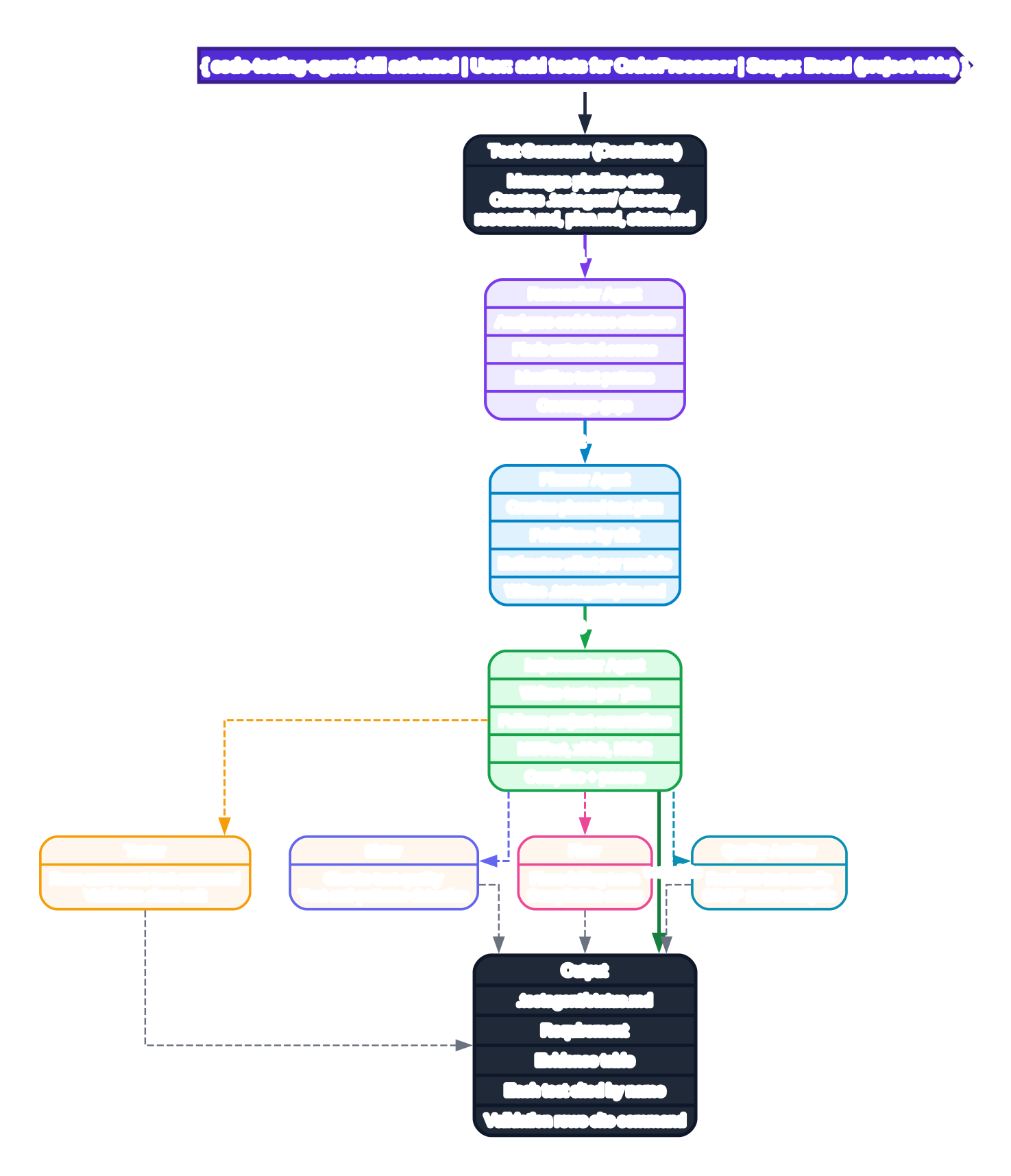
Diagram 4 zooms into the code-testing-agent skill — the most complex skill in the repository — to show how it coordinates multiple specialized agents in a Research-Plan-Implement pipeline. This is not a single prompt; it is a full multi-agent system with state management, phase gates, and quality review.
The pipeline starts when the code-testing-agent skill is activated by a user request like “add tests for OrderProcessor.” The skill first classifies scope: if the request is Broad (project-wide suite, multiple files/modules), the full multi-agent pipeline runs with .testagent/ directory artifacts. If Focused (one function/class/file), the pipeline is skipped in favor of direct test writing.
The Test Generator coordinator (dark node) manages pipeline state and creates the .testagent/ working directory with three artifact files: research.md, plan.md, and status.md. These files persist across agent invocations, so if the conversation is interrupted and resumed, the coordinator can read status.md to determine which phase to continue from.
Phase 1 — Researcher Agent (violet) analyzes the codebase structure, finds untested sources, identifies existing test patterns and conventions, and maps coverage gaps. It writes its findings to .testagent/research.md. This phase is critical because the alternative — having a single agent try to understand the codebase and write tests simultaneously — consistently produces tests that don’t match project conventions or miss important code paths.
Phase 2 — Planner Agent (blue) reads the research findings and creates a phased test plan, prioritizing by risk (which untested code is most likely to break), estimating effort per module, and writing the plan to .testagent/plan.md. The plan is not just a list of files; it includes which test patterns to use for each module, which MSTest or xUnit features to leverage, and which test anti-patterns to avoid.
Phase 3 — Implementer Agent (green) writes tests per the plan, following project conventions (SDK-style vs packages.config, explicit Compile registration, sparse workspaces). The Implementer handles the full polyglot range: C#/.NET, Python/pytest, TypeScript/JavaScript, Go, Rust, Java, and Ruby. It compiles and runs tests before declaring a phase complete.
Four supporting agents (amber, indigo, pink, cyan) orbit the Implementer. The Tester runs the narrowest relevant test command and validates a clean exit. The Linter checks test quality and detects test anti-patterns using the test-anti-patterns and test-smell-detection skills. The Fixer fixes failing tests and compilation errors. The Quality Auditor reviews test smells, runs CRAP score analysis, and performs testability migration assessment using the testability-migration.agent.md agent.
The pipeline terminates with the Output node (dark, bottom): a .testagent/status.md file containing a Requirement-Evidence table where each requested behavior cites an exact test name (e.g., OrderProcessor_CalculateTotal_ValidItems_ReturnsCorrectAmount) and validation rows cite the successful command (e.g., dotnet test --filter Category=OrderProcessor --exit-code 0). This table is the skill’s proof of work — the user can verify that every requested behavior has a corresponding passing test.
5. What This Means for .NET Developers and AI Agent Builders
Three takeaways emerge from studying the dotnet/skills repository:
First: Vendor-authored agent skills are the new API documentation. Traditional XML doc comments and MSDN pages tell developers what an API does. Agent skills tell the AI agent how to use the API in context — which render mode to choose, which MSBuild switch to add, which test pattern to follow. If you are a .NET developer using AI coding agents, installing these skills (via /plugin marketplace add dotnet/skills) is the single highest-ROI action you can take. Your agent will stop hallucinating APIs and start following .NET team best practices.
Second: The SkillValidator is a blueprint for any team building agent skills. The A/B evaluation methodology — baseline without skill, treatment with skill, pairwise LLM judge with position-swap mitigation, bootstrap confidence intervals, overfitting detection — is directly applicable to any agent skill repository, whether you are building skills for Python, Rust, or domain-specific tools. The skill-validator source code is open and well-documented, with separate Check, Evaluate, Consolidate, and Rejudge subcommands.
Third: Multi-agent coordination with persisted state is the pattern for complex coding tasks. The Research-Plan-Implement pipeline with .testagent/ state files is not specific to test generation. The same pattern — a coordinator managing specialized sub-agents with phase gates and artifact files — applies to any complex coding task: refactoring, migration, performance optimization, security review. The key insight is that breaking the task into phases with persisted state between them produces dramatically better results than a single monolithic agent invocation.
Whether you are a .NET developer looking to supercharge your AI coding agent, an ML engineer building agent skills for your own domain, or simply curious about how Microsoft’s .NET team approaches AI-assisted development, dotnet/skills is one of the most instructive open-source repositories of 2026. Browse the plugin directory, read a few Enjoyed this post? Never miss out on future posts by following us SKILL.md files, and try installing one in your coding agent of choice — you will immediately notice the difference.