Learn RabbitMQ in a Single Post: Complete Tutorial From Exchanges and Queues to Reliability, Streams, and Clustering
RabbitMQ is a message broker — a middleman that decouples producers from consumers using the AMQP protocol. Producers publish messages to exchanges, which route them to queues by bindings; consumers pull (or are pushed) messages from queues. It’s the classic “smart broker” messaging system, used for task queues, pub/sub, RPC, and event distribution. This single post covers the whole broker in five stages, with hand-drawn diagrams and runnable Python.
Learning Roadmap
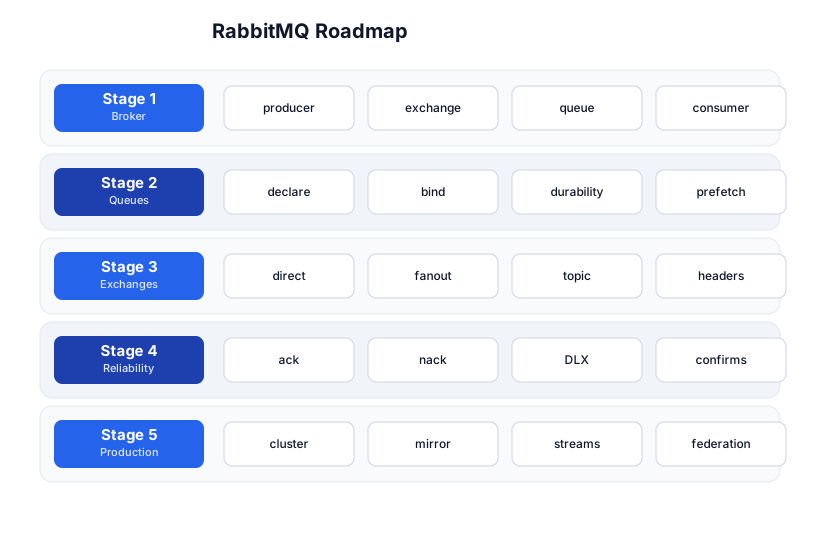
The roadmap moves from the broker flow (Stage 1), through queues (Stage 2), the four exchange types (Stage 3), reliability guarantees (Stage 4), and production architecture (Stage 5). The Apache Kafka tutorial is the comparison point — the two are different tools for different jobs.
Stage 1 — The Broker Flow
Producer → Exchange → Queue → Consumer
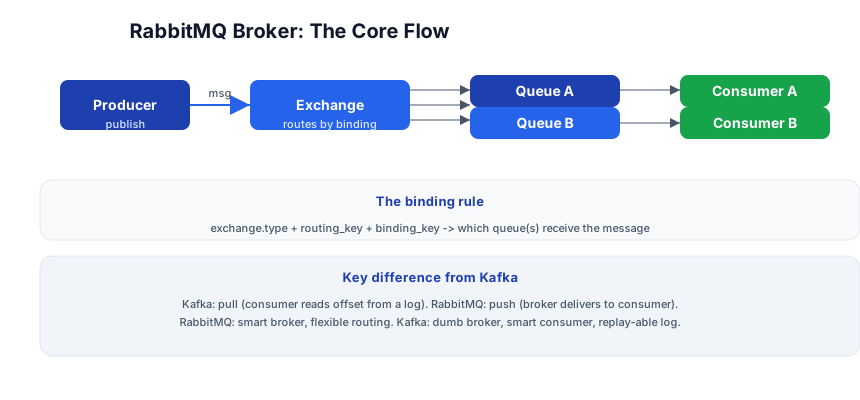
Producer ──publish(msg, exchange, routing_key)──> Exchange
Exchange ──binding rule routes msg──> Queue(s)
Queue ──push to consumer──> Consumer ──ack──> Queue (msg removed)
import pika

# producer
conn = pika.BlockingConnection(pika.ConnectionParameters("localhost"))
ch = conn.channel()
ch.basic_publish(
    exchange="logs",
    routing_key="error",
    body=b"server crashed",
    properties=pika.BasicProperties(delivery_mode=2),  # persistent
)
conn.close()
The binding rule
The exchange type + the routing_key + the binding_key decide which queue(s) receive a message. Each exchange type routes differently (Stage 3). The producer never publishes directly to a queue — it publishes to an exchange, which routes by binding.
RabbitMQ vs Kafka — the key difference
- RabbitMQ: push, smart broker. The broker delivers messages to consumers and removes them once acked. The broker knows which consumer got what. Good for task distribution, RPC, flexible routing.
- Kafka: pull, dumb broker, replayable log. Consumers read from a position (offset) in an append-only log; messages aren’t removed after read. Good for event streaming, replay, high-throughput data pipelines.
RabbitMQ is the right tool when you want a message delivered and processed exactly once; Kafka when you want every event retained for replay.
Stage 2 — Queues
Declare and bind
# consumer
ch.queue_declare(queue="errors", durable=True)   # survives broker restart
ch.queue_bind(exchange="logs", queue="errors", routing_key="error")

ch.basic_consume(queue="errors", on_message_callback=handle, auto_ack=False)
| Setting | What it does |
|---|---|
durable=True | the queue survives a broker restart (persist its metadata) |
persistent message | the message survives a restart (delivery_mode=2) |
auto_ack=False | consumer must explicitly ack (manual ack — reliability) |
prefetch_count | max unacked messages per consumer (fair dispatch + backpressure) |
Durability vs persistence
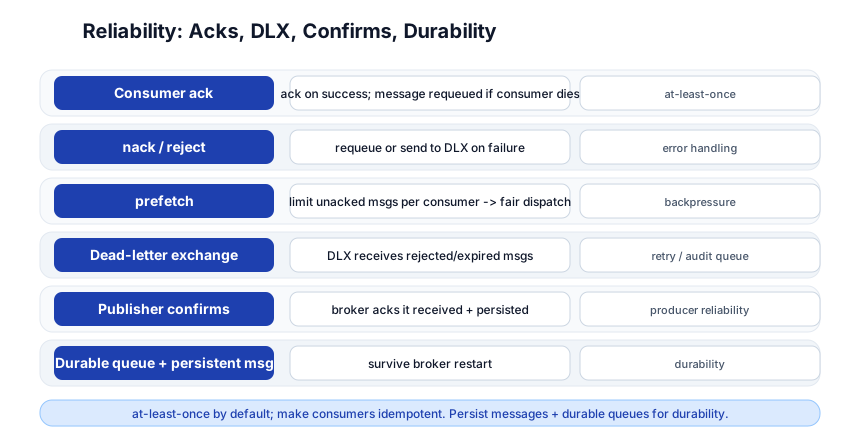
A durable queue survives a restart (the queue definition is persisted); a persistent message survives a restart (the message body is written to disk). Both are needed for durability — a durable queue holding non-persistent messages loses the messages on restart; a persistent message in a non-durable queue loses the queue itself.
prefetch — fair dispatch + backpressure
ch.basic_qos(prefetch_count=1)
prefetch_count=1 means a consumer gets at most 1 unacked message at a time — the broker doesn’t send the next message until the previous one is acked. This gives fair dispatch (a slow consumer doesn’t get a backlog while a fast one is idle) and backpressure (the queue doesn’t overflow the consumer’s memory).
Pitfall: With
auto_ack=True(the default in some examples), a message is removed from the queue the instant it’s delivered — if the consumer crashes before processing, the message is lost. Always useauto_ack=False+ manual ack for anything you can’t afford to lose.
Stage 3 — Exchange Types
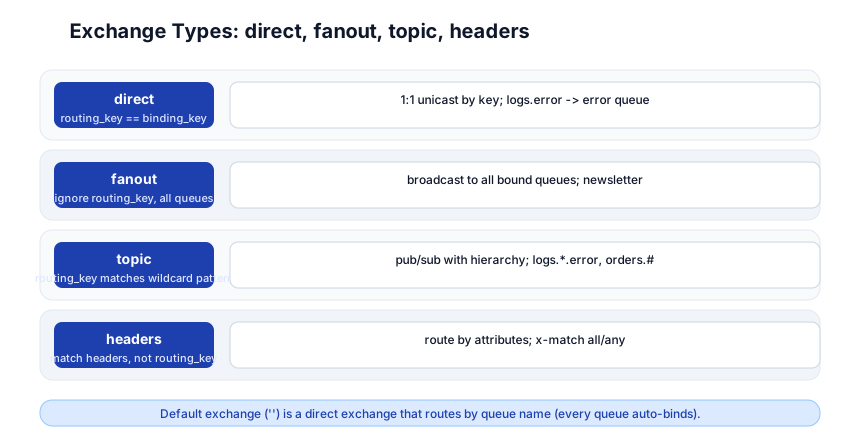
direct — 1:1 by exact routing_key
ch.exchange_declare(exchange="logs", exchange_type="direct")
ch.queue_bind(exchange="logs", queue="errors", routing_key="error")
ch.basic_publish(exchange="logs", routing_key="error", body=b"...")   # -> errors queue
The routing_key must exactly equal the binding_key. Used for unicast: logs.error → error queue, logs.info → info queue.
fanout — broadcast to all bound queues
ch.exchange_declare(exchange="broadcast", exchange_type="fanout")
ch.basic_publish(exchange="broadcast", routing_key="", body=b"...")   # -> ALL queues
The routing_key is ignored — every queue bound to the exchange gets the message. Used for pub/sub broadcast (newsletter, cache invalidation).
topic — wildcard routing_key
ch.exchange_declare(exchange="events", exchange_type="topic")
ch.queue_bind(exchange="events", queue="all_errors", routing_key="logs.*.error")
ch.queue_bind(exchange="events", queue="all_orders", routing_key="orders.#")
The binding_key uses wildcards: * (one word) and # (zero or more words). logs.*.error matches logs.app1.error, logs.app2.error. orders.# matches orders.created, orders.paid.billing. Used for hierarchical pub/sub (log routing, event filtering).
headers — route by headers, not routing_key
ch.exchange_declare(exchange="hdrs", exchange_type="headers")
ch.queue_bind(exchange="hdrs", queue="urgent", arguments={"x-match":"all", "priority":"high"})
Routes based on message headers (priority=high), not the routing_key. x-match: all requires all headers to match; any requires at least one. Used when the routing decision is attribute-based, not string-based.
The default exchange ""
Every queue is auto-bound to the default exchange ("") with a binding_key equal to its name. So basic_publish(exchange="", routing_key="my_queue", body=...) publishes directly to my_queue — a simple direct-exchange shortcut for point-to-point messaging.
Stage 4 — Reliability: Acks, DLX, Confirms
Consumer ack + nack
def handle(ch, method, properties, body):
    try:
        process(body)
        ch.basic_ack(delivery_tag=method.delivery_tag)        # success -> remove
    except Exception:
        ch.basic_nack(delivery_tag=method.delivery_tag, requeue=False)  # fail -> DLX
basic_ack— “I processed it successfully; remove it from the queue.”basic_nack/basic_reject— “I failed; requeue it (requeue=True) or dead-letter it (requeue=False).”
If a consumer dies without acking, the broker requeues the message (at-least-once delivery — another consumer gets it). This is why messages must be idempotent.
Dead-letter exchange (DLX)
ch.queue_declare(
    queue="work",
    arguments={
        "x-dead-letter-exchange": "dlx",
        "x-dead-letter-routing-key": "failed",
    },
)
ch.exchange_declare(exchange="dlx", exchange_type="direct")
ch.queue_declare(queue="failed")
ch.queue_bind(exchange="dlx", queue="failed", routing_key="failed")
Messages that are nacked (requeue=False), rejected, expired (TTL), or overflow a max-length go to the DLX — a separate exchange for failed messages. The failed queue collects them for retry, audit, or alerting. This is the standard retry/dead-letter pattern.
Publisher confirms
ch.confirm_delivery()   # enable publisher confirms on the channel
try:
    ch.basic_publish(exchange="logs", routing_key="error", body=b"...",
                     mandatory=True, properties=pika.BasicProperties(delivery_mode=2))
    # broker acks that it received + persisted the message
except pika.exceptions.UnroutableError:
    # no queue was bound (mandatory=True) -> handle
    pass
Publisher confirms are the broker’s ack that it received and persisted the message (the producer side of acks). Without them, a publish can be lost silently (network glitch, broker down). Use them for any message you can’t afford to lose.
Idempotent consumers — the rule
RabbitMQ delivers at-least-once — a consumer crash after processing but before ack means the message is redelivered. Consumers must be idempotent: a dedup key (message ID) in a database unique constraint, or track processed message IDs. “RabbitMQ guarantees delivery; your app guarantees idempotency.”
Pitfall: Without a DLX, a nack with
requeue=Trueloops forever (the message is redelivered, fails, requeued, redelivered, …). Always set a DLX + a max-retry count (via a retry queue with TTL) for messages that repeatedly fail.
Stage 5 — Production: Clustering, Streams, Federation
Clustering
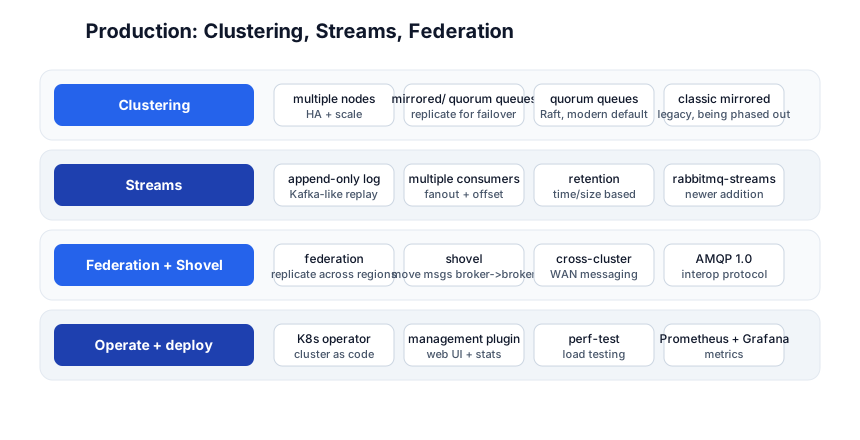
RabbitMQ clusters multiple nodes for high availability and scale. Within a cluster:
- Quorum queues (the modern default) — replicate across nodes using Raft consensus; survive node failures; strong consistency. Use these for new deployments.
- Classic mirrored queues (legacy) — replicate across nodes; being phased out in favor of quorum queues.
- Streams — a newer append-only log (Kafka-like replay), added to RabbitMQ for use cases that need retention + multiple consumers reading at their own pace.
Streams — the Kafka-like addition
# declare a stream (append-only, retained)
ch.exchange_declare("orders.stream", exchange_type="x-stream")
RabbitMQ Streams are an append-only log with retention (time or size based) and multiple independent consumers, each with its own offset — the Kafka model, added to RabbitMQ. Use a stream when you need replay; use a queue when you need delivery-and-done.
Federation + Shovel — cross-region
- Federation — replicate an exchange or queue across clusters (WAN, cross-region). One-way or bi-directional.
- Shovel — move messages from one broker/queue to another (reliable cross-broker transfer). Used for migration, aggregation, and bridging clusters.
Management + observability
- Management plugin — built-in web UI at
:15672showing queues, exchanges, rates, and message counts. - Prometheus + Grafana — the recommended metrics path; the
rabbitmq-prometheusplugin exports metrics. - K8s operator —
rabbitmq-cluster-operatormanages a cluster as a Kubernetes custom resource.
Quick-Start Checklist
- Run RabbitMQ —
docker run -p 5672:5672 -p 15672:15672 rabbitmq:3-management. - Open the UI at
http://localhost:15672(guest/guest) — see the queues/exchanges. - Install
pika—pip install pika(Python AMQP client). - Declare an exchange + queue + bind —
directexchange,routing_key="error". - Publish + consume — watch a message flow from producer to consumer in the UI.
- Turn off
auto_ack— use manualbasic_ackso a consumer crash requeues the message. - Set
prefetch_count=1— fair dispatch across consumers. - Add a DLX — dead-letter nacked messages to a
failedqueue. - Enable publisher confirms — the broker acks that it received the message.
- Make consumers idempotent — dedup by message ID; handle redelivery.
Common Pitfalls
auto_ack=True— message lost if consumer crashes before processing. Always manual ack.- Durable queue + non-persistent message — queue survives restart, messages don’t. Set
delivery_mode=2for persistent messages. - No DLX — nacked-with-requeue loops forever. Always configure a DLX + retry queue with TTL.
- No
prefetch— one consumer gets a backlog while others are idle; setprefetch_count=1for fair dispatch. - Non-idempotent consumer — redelivery causes duplicates; dedup by message ID.
- No publisher confirms — lost publishes are silent; enable confirms for important messages.
- Using classic mirrored queues — deprecated; use quorum queues for new deployments.
- One giant queue for everything — partition by routing_key into multiple queues for parallelism.
Further Reading
- RabbitMQ Docs — the official reference
- RabbitMQ Tutorials — official interactive tutorials
- pika Docs — the Python AMQP client
- Quorum Queues — the modern HA queue
- RabbitMQ Streams — the Kafka-like log feature
Related guides
RabbitMQ is the message broker in the messaging stack — these PyShine tutorials connect to it:
- Learn Apache Kafka in One Post — the comparison; push-broker vs pull-log, when to use which.
- Learn Redis in One Post — Redis Pub/Sub + Streams are the lightweight messaging alternatives.
- Learn System Design in One Post — async messaging, decoupling, and the queue-vs-log decision are system-design staples.
- Learn Python in One Post —
pikais the Python client; the async tutorial covers concurrency. - Learn Kubernetes in One Post — the RabbitMQ operator runs a cluster as a K8s resource.
RabbitMQ’s value is the smart broker — flexible routing (four exchange types), reliable delivery (acks + confirms + DLX), and a mature ecosystem (clustering, quorum queues, streams). The five stages here — broker flow, queues, exchange types, reliability, production — cover everything from a one-queue task distribution to a clustered, quorum-replicated, DLX-equipped, federation-bridged production deployment. The two habits that pay off: manual ack + idempotent consumers (at-least-once means duplicates are your problem), and always configure a DLX (a nack without a DLX loops forever). Run RabbitMQ in Docker, publish a message, consume it with manual ack, and watch it disappear from the queue in the management UI — once you’ve seen the ack remove the message, the model clicks. Enjoyed this post? Never miss out on future posts by following us